
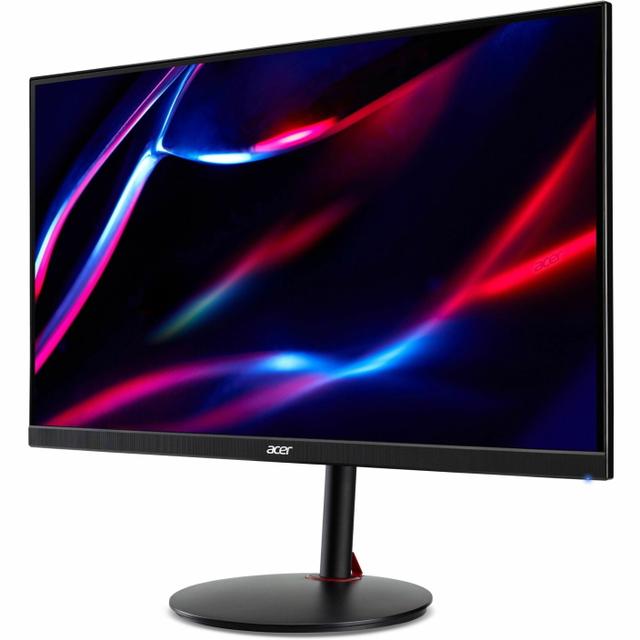
Acer Nitro XV271U M3
- Panel:
- 27" IPS (AU Optronics AHVA)
- Resolution:
- 2560 x 1440 (QHD)
- Refresh Rate:
- 180Hz
- Color:
- 95% DCI-P3
- Brightness:
- 250 nits
- Adaptive Sync:
- AMD FreeSync
- Connectivity:
- 2x HDMI
- Design:
- Ergonomic Stand
Consumercarts is reader-supported. Learn more
Disclaimer: The price and specification of the given product may differ from the actual product. Please confirm on the retailer's website before buying.
Manufacturer: Acer Last updated: September 8, 2026
Acer Nitro XV271U M3 (27-Inch QHD IPS/180Hz/0.5ms/95% DCI-P3/FreeSync/Budget 1440p Gaming Under $200) Review
The Acer Nitro XV271U M3 is a 27-inch QHD IPS gaming monitor that's earned recognition as one of the best 1440p monitors available under $200. It runs an AU Optronics AHVA (IPS-type) panel at 180Hz with a 1ms GTG response time, a genuinely strong combination for the price, paired with a fully ergonomic stand that many budget competitors skip.
It pairs a genuinely strong 180Hz, 1ms panel with a fully ergonomic stand that many budget competitors skip.
Panel Technology and Picture Quality
The AHVA panel delivers wide, consistent viewing angles and 95% DCI-P3 color coverage, wide enough to make this monitor suitable for basic color-critical work alongside gaming, not just a pure gaming display. As is typical of IPS-type panels, contrast sits at a static 1000:1, meaningfully lower than the roughly 3000:1 typical of VA panels, resulting in somewhat greyish blacks by comparison, and some IPS glow is visible around screen corners when viewing dark content at an angle in a dark room, though this is a known IPS-technology characteristic rather than a defect specific to this unit. Peak brightness of 250 nits is on the lower side, adequate for typical indoor use but not built for a bright room.
Refresh Rate and Motion Performance
180Hz with a 1ms GTG response time (listed as 0.5ms in some retailer marketing) delivers genuinely smooth motion for fast-paced gaming, matching the refresh rate tier of pricier competitors at a meaningfully lower cost. AMD FreeSync support eliminates screen tearing on compatible graphics cards.
Design and Ergonomics
The standout non-panel feature here is the fully ergonomic stand, a genuine rarity at this price point where most budget monitors ship with tilt-only adjustment. Built-in speakers, VESA mount compatibility, and a blue light filter round out a comprehensive feature set for the price.
Comparison to Sibling Products
Against the ASUS TUF Gaming VG27AQ3A, covered elsewhere on this site, both monitors share nearly identical core specifications; the ASUS adds ELMB Sync and Shadow Boost software features while this Acer counters with a fully ergonomic stand and typically a lower price, making the choice largely about which extra feature set matters more to a given buyer. Against the KTC H27T27, also covered elsewhere on this site, this monitor offers a meaningfully faster 180Hz refresh rate against that monitor's 100Hz, at a modest price premium.
Who This Monitor Is Actually For
Budget-conscious gamers who still want a fully ergonomic stand. This is a genuinely rare combination at this price tier.
Buyers who want wide color coverage for light creative work alongside gaming. 95% DCI-P3 supports basic color-critical tasks that a narrower-gamut panel wouldn't.
Not for anyone gaming or working in a bright room. 250 nits peak brightness is on the low side; a Mini-LED or higher-brightness panel is the better fit there.
Not for buyers who specifically want the deepest blacks and highest contrast. A VA panel like the AOC Q27G3XMN, covered elsewhere on this site, delivers meaningfully better native contrast at the cost of IPS's wider viewing angles.
Specifications
Identity
| Brand | Acer |
|---|---|
| Model Number | XV271U M3 |
Panel
| Panel Type | IPS |
|---|---|
| Screen Size | 27 in |
| Resolution | 2560 x 1440 (QHD) |
| Aspect Ratio | 16:9 |
Performance
| Refresh Rate | 180 Hz |
|---|---|
| Response Time | 1 ms |
| Adaptive Sync | AMD FreeSync |
Features
| Curved | No |
|---|
Panel technology
| Panel Technology | IPS |
|---|---|
| Panel Coating | Matte anti-glare |
Screen geometry
| Native Resolution | 2560x1440 |
|---|---|
| Screen Curvature | Flat |
Motion
| Max Refresh Rate | 180 Hz |
|---|---|
| Response Time GtG | 1 ms |
Adaptive sync
| VRR Standard | FreeSync |
|---|
HDR and brightness
| SDR Brightness | 250 nits |
|---|---|
| Native Contrast Ratio | 1000:1 |
Color
| DCI-P3 Coverage | 95 % |
|---|---|
| Color Depth | 8-bit |
Connectivity
| DisplayPort Version | 1.2 |
|---|---|
| HDMI Version | 2.0 |
Stand, mounting and form
| Height Adjustment Range | 120 mm |
|---|---|
| Pivot To Portrait | Yes |
| VESA Mount Pattern | 100x100 |
| Built-in Speakers | Yes |
| Series | Nitro XV271U M3 |
|---|---|
| Color Gamut | 95% DCI-P3 |
| Connectivity | 2x HDMI, DisplayPort |
| Design | Ergonomic Stand, Built-In Speakers, VESA Mountable, Blue Light Filter |
| Source URL | https://www.acer.com/us-en/monitors/gaming/nitro-xv1/pdp/UM.HX1AA.301 |
Expert Review
Reviewed by Burooj Alam. Rated by us, not by users.
Best for
- Budget-conscious gamers who still want a fully ergonomic stand
- Buyers who want wide color coverage for light creative work alongside gaming
Not for
- Anyone gaming or working in a bright room
- Buyers who specifically want the deepest blacks and highest contrast
FAQs
What are the key specifications of the Acer Nitro XV271U M3 (27-Inch QHD IPS/180Hz/0.5ms/95% DCI-P3/FreeSync/Budget 1440p Gaming Under $200)?
The Acer Nitro XV271U M3 (27-Inch QHD IPS/180Hz/0.5ms/95% DCI-P3/FreeSync/Budget 1440p Gaming Under $200) is a monitor from Acer. Key specs: Panel Type IPS (AU Optronics AHVA), Screen Size 27, Aspect Ratio 16:9, Resolution 2560 x 1440 (QHD), Refresh Rate 180Hz.
Will the Acer Nitro XV271U M3 (27-Inch QHD IPS/180Hz/0.5ms/95% DCI-P3/FreeSync/Budget 1440p Gaming Under $200) work with my current setup?
The Acer Nitro XV271U M3 (27-Inch QHD IPS/180Hz/0.5ms/95% DCI-P3/FreeSync/Budget 1440p Gaming Under $200) lists Panel Type is IPS (AU Optronics AHVA). Check that against the hardware you already own before buying, since this is the field that most often decides whether a part fits.
Who is the Acer Nitro XV271U M3 (27-Inch QHD IPS/180Hz/0.5ms/95% DCI-P3/FreeSync/Budget 1440p Gaming Under $200) best suited to?
It suits budget-conscious gamers who still want a fully ergonomic stand, buyers who want wide color coverage for light creative work alongside gaming.
What are the drawbacks of the Acer Nitro XV271U M3 (27-Inch QHD IPS/180Hz/0.5ms/95% DCI-P3/FreeSync/Budget 1440p Gaming Under $200)?
It is a poor fit for anyone gaming or working in a bright room, buyers who specifically want the deepest blacks and highest contrast.
Compare and read more
- Acer Nitro XV271U M3 (27-Inch QHD IPS/180Hz/0.5ms/95% DCI-P3/FreeSync/Budget 1440p Gaming Under $200) vs Arzopa S1 Table (15.6-Inch 1080p Portable IPS/60Hz/USB-C Single Cable/Budget Entry Monitor)
- Acer Nitro XV271U M3 (27-Inch QHD IPS/180Hz/0.5ms/95% DCI-P3/FreeSync/Budget 1440p Gaming Under $200) vs ASUS TUF Gaming VG27AQL3A (27-Inch QHD Fast IPS/180Hz/1ms/130% sRGB/HDR10/ELMB Sync)
- Acer Nitro XV271U M3 (27-Inch QHD IPS/180Hz/0.5ms/95% DCI-P3/FreeSync/Budget 1440p Gaming Under $200) vs BenQ MOBIUZ EX321UX (32-Inch 4K Mini-LED IPS/144Hz/1ms/95% DCI-P3/DisplayHDR 1000/treVolo Speakers)
- Acer Nitro XV271U M3 (27-Inch QHD IPS/180Hz/0.5ms/95% DCI-P3/FreeSync/Budget 1440p Gaming Under $200) vs GeChic On-Lap 1002 (10.1-Inch 1280x800 Portable Touchscreen IPS/USB Powered/Compact Field Monitor)
- Acer Nitro XV271U M3 (27-Inch QHD IPS/180Hz/0.5ms/95% DCI-P3/FreeSync/Budget 1440p Gaming Under $200) vs Gigabyte M28U (28-Inch 4K IPS/144Hz/1ms MPRT/94% DCI-P3/HDR400/USB-C 65W with KVM)