
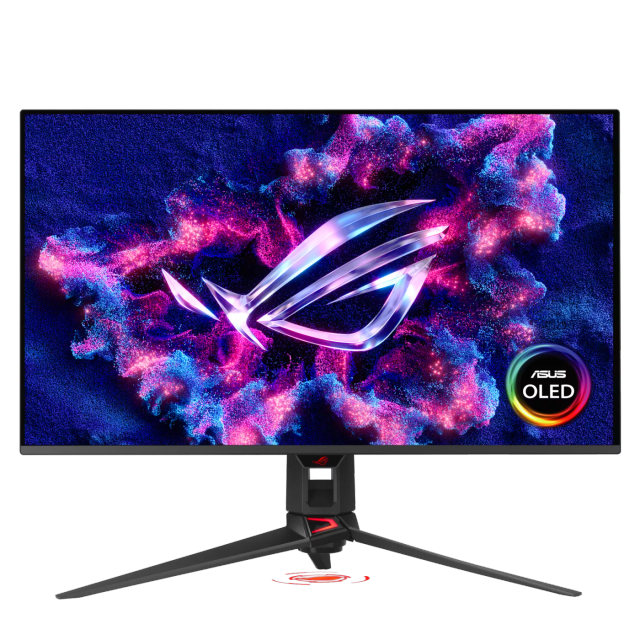
ASUS ROG Swift OLED PG32UCDM Gen 3
- Model:
- ASUS ROG Swift OLED PG32UCDM Gen 3
- Panel:
- 31.5" Tandem QD-OLED (4th Generation)
- Resolution:
- 3840 x 2160 (4K UHD)
- Refresh Rate:
- 240Hz
- HDR:
- VESA DisplayHDR True Black 500
- Color:
- 99% DCI-P3
- Adaptive Sync:
- FreeSync Premium Pro
- Connectivity:
- DisplayPort 2.1 UHBR20 (80Gbps)
- Special Features:
- BlackShield Film (2.5x Scratch Resistance
- Warranty:
- 3 Years
Consumercarts is reader-supported. Learn more
Disclaimer: The price and specification of the given product may differ from the actual product. Please confirm on the retailer's website before buying.
Manufacturer: ASUS Last updated: September 8, 2026
ASUS ROG Swift OLED PG32UCDM Gen 3 (31.5-Inch 4K QD-OLED/240Hz/0.03ms/DisplayPort 2.1 UHBR20/90W USB-C/Dolby Vision) Review
The ASUS ROG Swift OLED PG32UCDM Gen 3 is a 31.5-inch 4K gaming monitor built around Samsung Display's 4th-generation QD-OLED panel, running at 240Hz with a 0.03ms response time. It's the third version of this specific screen ASUS has released, following the original PG32UCDM and the PG32UCDMR revision shown at Computex the prior year, and the headline change this generation is a new BlackShield Film layer addressing QD-OLED's traditional weak point: blacks turning grey or purple under direct ambient light. ASUS states the film improves black levels in brightly lit rooms by up to 40% and adds 2.5x better scratch resistance, paired with an anti-reflective coating, while keeping the same semi-glossy panel appearance as before.
Multiple independent outlets have named this ASUS's best overall 4K gaming monitor for 2026, and the panel's improvements are specifically aimed at closing the one real gap QD-OLED technology has had against LG's competing WOLED panels in bright-room use.
Panel Technology and Picture Quality
The 4th-generation QD-OLED panel delivers 99% DCI-P3 coverage, true 10-bit color, and factory calibration to Delta E<2, a genuinely tight accuracy figure that means colors should look correct straight out of the box without needing a hardware calibrator, valuable for anyone doing photo or video work alongside gaming on the same screen. VESA DisplayHDR True Black 500 certification is a real step up from the DisplayHDR 400 True Black rating on earlier PG32UCDM variants, reflecting genuine brightness and contrast improvements in the new panel generation rather than just a badge change.
The BlackShield Film is the generation's defining addition: QD-OLED panels lack a traditional polarizer, which is part of what gives them their excellent contrast, but it also means the Quantum Dot layer can activate unintentionally under strong ambient light, washing blacks toward grey or purple. The new film addresses this directly without changing the panel's semi-glossy, moderately anti-reflective appearance.
Refresh Rate and Motion Performance
240Hz at native 4K resolution with a 0.03ms GTG response time delivers genuinely blur-free motion for fast-paced gaming, a combination that requires a powerful graphics card to actually drive at full resolution and frame rate. Both FreeSync Premium Pro and G-Sync Compatible certification mean the monitor works with variable refresh rate technology from either AMD or Nvidia graphics cards without needing to check compatibility lists first.
HDR and Color Accuracy
1,000 nits of peak brightness, a 1.5 million:1 contrast ratio, and support for both Dolby Vision and HDR10 give this monitor genuine HDR credibility rather than a checkbox certification. The Uniform Brightness setting in the OSD menu deliberately reduces peak brightness to keep luminance consistent when window sizes change, which helps during extended sessions by avoiding the eye strain that comes from brightness levels shifting unpredictably as bright white areas grow or shrink on screen.
Connectivity and Features
DisplayPort 2.1 with UHBR20 support delivers the full 80Gbps of bandwidth this standard allows, genuinely future-proof connectivity that most current graphics cards don't yet fully saturate. Dual HDMI 2.1 ports cover console and secondary PC connections, and USB-C with 90W Power Delivery and DisplayPort Alt Mode lets a compatible laptop connect over a single cable for video, data, and charging simultaneously. A built-in USB hub with three USB 3.2 Gen 1 Type-A ports and a KVM switch let peripherals and even a second connected system share the monitor's ports without a separate hub or switch box.
Design and Burn-In Protection
A tripod socket built into the stand is a genuinely practical inclusion for streamers mounting a webcam or ring light directly to the monitor rather than a separate arm. ASUS OLED Care Pro, paired with a Neo Proximity Sensor, detects when a user has stepped away and switches to a black screen automatically to reduce burn-in risk, addressing the one persistent concern OLED technology carries into any monitor purchase. The 3-year warranty specifically covering panel burn-in reflects genuine manufacturer confidence in the panel's longevity rather than treating burn-in as an excluded edge case.
Comparison to Sibling Products
Against its own predecessor, the PG32UCDMR, this Gen 3 model's real upgrade is the BlackShield Film and the HDR certification bump to DisplayHDR True Black 500 from 400; core specifications like resolution, refresh rate, and response time carry over unchanged. Against the smaller ASUS ROG Swift OLED PG27UCDM at 27 inches, this 32-inch model offers more screen real estate at the same 4K resolution, meaning a lower pixel density and correspondingly less need for OS-level display scaling on desktop work. Against the ultrawide MSI MPG 341CQR QD-OLED X36, that monitor trades this screen's 4K resolution and standard 16:9 aspect ratio for wraparound immersion and an even higher 360Hz refresh rate at a lower native resolution.
Who This Monitor Is Actually For
High-end PC gamers with a graphics card capable of driving 4K at high frame rates. The 240Hz ceiling and 0.03ms response time are wasted without the GPU horsepower to reach them.
Content creators who want accurate color without a separate calibrated monitor. Factory Delta E<2 calibration and 99% DCI-P3 coverage cover genuine professional color work alongside gaming.
Streamers wanting an integrated, cable-light setup. The tripod socket, KVM switch, and USB hub all reduce the extra hardware a streaming desk usually needs.
Not for anyone building a budget or mid-range setup. This is a genuine flagship price point; the value case only holds if the rest of the system can actually use what this panel offers.
Not for anyone specifically worried about static-image burn-in doing intensive productivity work with fixed UI elements for many hours daily. OLED Care Pro mitigates the risk significantly, but a traditional IPS or VA panel remains the structurally safer choice for that specific use case regardless of any single manufacturer's protection features.
Specifications
Identity
| Brand | ASUS |
|---|---|
| Model Number | PG32UCDM3 |
Panel
| Panel Type | QD-OLED |
|---|---|
| Screen Size | 31.5 in |
| Resolution | 3840 x 2160 (4K UHD) |
| Aspect Ratio | 16:9 |
Performance
| Refresh Rate | 240 Hz |
|---|---|
| Response Time | 0.03 ms |
| Adaptive Sync | FreeSync Premium Pro, G-Sync Compatible |
Features
| HDR Support | Yes |
|---|---|
| Curved | No |
Panel technology
| Panel Technology | QD-OLED |
|---|---|
| Backlight Type | Self-emissive |
Screen geometry
| Native Resolution | 3840x2160 |
|---|---|
| Screen Curvature | Flat |
Motion
| Max Refresh Rate | 240 Hz |
|---|---|
| Response Time GtG | 0.03 ms |
Adaptive sync
| VRR Range Minimum | 48 Hz |
|---|
HDR and brightness
| HDR Certification | DisplayHDR True Black 500 |
|---|---|
| Dolby Vision | Yes |
Color
| Color Depth | 10-bit |
|---|---|
| Factory Calibration DE | 2 dE |
Connectivity
| HDMI Version | 2.1 FRL |
|---|---|
| USB-C DP Alt Mode | Yes |
| USB-C Power Delivery | 90 W |
| USB Hub Ports | 3 |
Stand, mounting and form
| Height Adjustment Range | 80 mm |
|---|---|
| VESA Mount Pattern | 100x100 |
Panel care and support
| Burn-in Warranty | 3 years |
|---|
| Series | ROG Swift OLED PG32UCDM Gen 3 |
|---|---|
| Pixel Pitch | 0.182mm |
| HDR Formats | Dolby Vision, HDR10 |
| Peak Brightness | 1,000 nits |
| Contrast Ratio | 1.5 Million:1 |
| Color Gamut | 99% DCI-P3 |
| Colors | 1.07 Billion |
| DisplayPort | DisplayPort 2.1 UHBR20 (80Gbps) |
| USB-C | USB-C (90W Power Delivery, DisplayPort Alt Mode) |
| Audio | 3.5mm Audio Jack |
| Special Features | BlackShield Film, OLED Care Pro with Neo Proximity Sensor, Built-In KVM Switch, Tripod Socket |
| Warranty | 3 Years, Including Panel Burn-In |
| Source URL | https://rog.asus.com/us/monitors/27-to-31-5-inches/rog-swift-oled-pg32ucdm-gen3-pg32ucdm3/spec/ |
Expert Review
Reviewed by Burooj Alam. Rated by us, not by users.
Best for
- High-end PC gamers with a GPU capable of 4K at high frame rates
- Content creators wanting accurate color without a separate calibrated monitor
- Streamers wanting an integrated, cable-light setup
Not for
- Budget or mid-range builds
- Anyone worried about static-image burn-in during long productivity sessions with fixed UI elements
FAQs
What are the key specifications of the ASUS ROG Swift OLED PG32UCDM Gen 3 (31.5-Inch 4K QD-OLED/240Hz/0.03ms/DisplayPort 2.1 UHBR20/90W USB-C/Dolby Vision)?
The ASUS ROG Swift OLED PG32UCDM Gen 3 (31.5-Inch 4K QD-OLED/240Hz/0.03ms/DisplayPort 2.1 UHBR20/90W USB-C/Dolby Vision) is a monitor from ASUS. Key specs: Panel Type Tandem QD-OLED (4th Generation), Screen Size 31.5, Aspect Ratio 16:9, Pixel Pitch 0.182mm, Resolution 3840 x 2160 (4K UHD).
Will the ASUS ROG Swift OLED PG32UCDM Gen 3 (31.5-Inch 4K QD-OLED/240Hz/0.03ms/DisplayPort 2.1 UHBR20/90W USB-C/Dolby Vision) work with my current setup?
The ASUS ROG Swift OLED PG32UCDM Gen 3 (31.5-Inch 4K QD-OLED/240Hz/0.03ms/DisplayPort 2.1 UHBR20/90W USB-C/Dolby Vision) lists Panel Type is Tandem QD-OLED (4th Generation). Check that against the hardware you already own before buying, since this is the field that most often decides whether a part fits.
Who is the ASUS ROG Swift OLED PG32UCDM Gen 3 (31.5-Inch 4K QD-OLED/240Hz/0.03ms/DisplayPort 2.1 UHBR20/90W USB-C/Dolby Vision) best suited to?
It suits high-end pc gamers with a gpu capable of 4k at high frame rates, content creators wanting accurate color without a separate calibrated monitor, streamers wanting an integrated, cable-light setup.
What are the drawbacks of the ASUS ROG Swift OLED PG32UCDM Gen 3 (31.5-Inch 4K QD-OLED/240Hz/0.03ms/DisplayPort 2.1 UHBR20/90W USB-C/Dolby Vision)?
It is a poor fit for budget or mid-range builds, anyone worried about static-image burn-in during long productivity sessions with fixed ui elements.
Compare and read more
- Acer Nitro VG272U (27-Inch QHD IPS/180Hz/1ms VRB/90% DCI-P3/AMD FreeSync Premium Budget Pick) vs ASUS ROG Swift OLED PG32UCDM Gen 3 (31.5-Inch 4K QD-OLED/240Hz/0.03ms/DisplayPort 2.1 UHBR20/90W USB-C/Dolby Vision)
- AOC 16T3 (15.6-Inch 1080p Portable Touchscreen IPS/60Hz/5ms/USB-C Single Cable) vs ASUS ROG Swift OLED PG32UCDM Gen 3 (31.5-Inch 4K QD-OLED/240Hz/0.03ms/DisplayPort 2.1 UHBR20/90W USB-C/Dolby Vision)
- AOC 27G4X (27-Inch QHD IPS/180Hz/1ms MPRT/Standard Gamut/HDR10/Budget High-Refresh Value) vs ASUS ROG Swift OLED PG32UCDM Gen 3 (31.5-Inch 4K QD-OLED/240Hz/0.03ms/DisplayPort 2.1 UHBR20/90W USB-C/Dolby Vision)
- Acer Nitro XV320QU (32-Inch QHD IPS/170Hz/1ms VRB/95%+ DCI-P3/HDR10/KVM Switch) vs ASUS ROG Swift OLED PG32UCDM Gen 3 (31.5-Inch 4K QD-OLED/240Hz/0.03ms/DisplayPort 2.1 UHBR20/90W USB-C/Dolby Vision)
- Acer Predator XB273U GX (27-Inch QHD IPS/270Hz/0.5ms/95% DCI-P3/HDR10/NVIDIA Reflex Latency Analyzer) vs ASUS ROG Swift OLED PG32UCDM Gen 3 (31.5-Inch 4K QD-OLED/240Hz/0.03ms/DisplayPort 2.1 UHBR20/90W USB-C/Dolby Vision)