
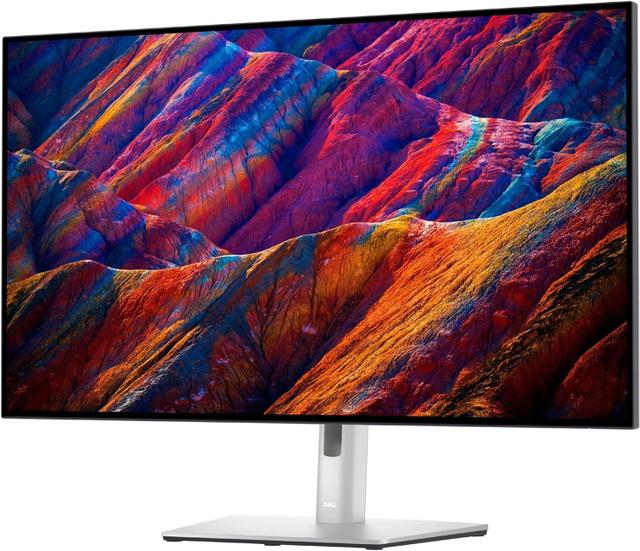
Dell UltraSharp U3223QE
Expert rating9 / 10
- Panel:
- 32-inch IPS Black 4K
- Refresh Rate:
- 60Hz
- Response Time:
- 5ms
Consumercarts is reader-supported. Learn more
Disclaimer: The price and specification of the given product may differ from the actual product. Please confirm on the retailer's website before buying.
Manufacturer: Dell Last updated: 2026-09-12
Dell UltraSharp U3223QE (32-Inch 4K IPS Black/60Hz/5ms/98% DCI-P3/HDR400/Thunderbolt 4 Daisy-Chain) Review
Dell UltraSharp U3223QE 32-inch 4K IPS Black professional monitor with 2000:1 contrast, 98% DCI-P3, Thunderbolt 4 daisy-chaining, built-in Ethernet and 90W USB-C power delivery.
The U3223QE uses Dell's IPS Black panel technology, which roughly doubles typical IPS contrast ratios to around 2000:1 — a real, visible improvement in shadow detail rather than a marketing footnote. Combined with Thunderbolt 4 daisy-chaining and a built-in Ethernet port, it's built for creative professionals and hybrid workers who want one dock-quality cable to run an entire desk setup.
Why It Still Holds Up
IPS Black meaningfully narrows the contrast gap with VA panels while keeping IPS color consistency and viewing angles, which is a rare combination. Thunderbolt 4 daisy-chaining lets two U3223QE units connect through a single laptop cable, and the built-in KVM and Ethernet port reduce cable clutter on multi-device desks.
Where It Falls Short
60Hz refresh and no adaptive sync make it unsuitable for gaming, and the premium build commands a price well above typical 4K office monitors. It's also a large, heavy display that needs a sturdy desk.
Comparison to Alternatives
Against the Samsung ViewFinity S8, the U3223QE offers a larger panel, better contrast via IPS Black, and Thunderbolt daisy-chaining, at a correspondingly higher price. Compared to the Dell G3223Q, the U3223QE trades gaming refresh rate entirely for superior color accuracy and connectivity aimed at professional workflows.
Specifications
Identity
| Brand | Dell |
|---|---|
| Model Number | U3223QE |
Panel
| Panel Type | IPS Black |
|---|---|
| Screen Size | 32 in |
| Resolution | 3840 x 2160 (4K UHD) |
| Aspect Ratio | 16:9 |
Performance
| Refresh Rate | 60 Hz |
|---|---|
| Response Time | 5ms (GTG) |
| Adaptive Sync | Not supported |
| Series | UltraSharp U3223QE |
|---|---|
| Color Gamut | 98% DCI-P3, 100% sRGB |
| HDR Formats | VESA DisplayHDR 400 |
| Connectivity | Thunderbolt 4 (Daisy-Chain, 90W PD), USB-C, RJ45 Ethernet |
Expert Review
Reviewed by Burooj Alam. Rated by us, not by users.
Expert rating9 / 10
A best-in-class professional 4K monitor with excellent contrast and connectivity for creative and hybrid work.
Best for
- Creative professionals needing accurate, high-contrast color
- Hybrid workers wanting Thunderbolt daisy-chaining
- Multi-monitor desks needing built-in KVM and Ethernet
Not for
- Gamers of any kind
- Budget-conscious buyers
- Anyone wanting a compact, lightweight display
FAQs
What are the key specifications of the Dell UltraSharp U3223QE (32-Inch 4K IPS Black/60Hz/5ms/98% DCI-P3/HDR400/Thunderbolt 4 Daisy-Chain)?
The Dell UltraSharp U3223QE (32-Inch 4K IPS Black/60Hz/5ms/98% DCI-P3/HDR400/Thunderbolt 4 Daisy-Chain) is a monitor from Dell. Key specs: Panel Type IPS Black, Screen Size 32, Aspect Ratio 16:9, Resolution 3840 x 2160 (4K UHD), Refresh Rate 60Hz.
Will the Dell UltraSharp U3223QE (32-Inch 4K IPS Black/60Hz/5ms/98% DCI-P3/HDR400/Thunderbolt 4 Daisy-Chain) work with my current setup?
The Dell UltraSharp U3223QE (32-Inch 4K IPS Black/60Hz/5ms/98% DCI-P3/HDR400/Thunderbolt 4 Daisy-Chain) lists Panel Type is IPS Black. Check that against the hardware you already own before buying, since this is the field that most often decides whether a part fits.
Who is the Dell UltraSharp U3223QE (32-Inch 4K IPS Black/60Hz/5ms/98% DCI-P3/HDR400/Thunderbolt 4 Daisy-Chain) best suited to?
It suits creative professionals needing accurate, high-contrast color, hybrid workers wanting thunderbolt daisy-chaining, multi-monitor desks needing built-in kvm and ethernet.
What are the drawbacks of the Dell UltraSharp U3223QE (32-Inch 4K IPS Black/60Hz/5ms/98% DCI-P3/HDR400/Thunderbolt 4 Daisy-Chain)?
It is a poor fit for gamers of any kind, budget-conscious buyers, anyone wanting a compact, lightweight display.
Compare and read more
- AOC AGON PRO AG276QSG2 (27-Inch QHD Mini-LED IPS/300Hz/1ms/98% DCI-P3/G-Sync Ultimate/1152-Zone Backlight) vs Dell UltraSharp U3223QE (32-Inch 4K IPS Black/60Hz/5ms/98% DCI-P3/HDR400/Thunderbolt 4 Daisy-Chain)
- Acer Predator XB273U GX (27-Inch QHD IPS/270Hz/0.5ms/95% DCI-P3/HDR10/NVIDIA Reflex Latency Analyzer) vs Dell UltraSharp U3223QE (32-Inch 4K IPS Black/60Hz/5ms/98% DCI-P3/HDR400/Thunderbolt 4 Daisy-Chain)
- Acer Predator XB273U (27-Inch QHD IPS/170Hz/1ms GTG/95% DCI-P3/G-Sync Compatible) vs Dell UltraSharp U3223QE (32-Inch 4K IPS Black/60Hz/5ms/98% DCI-P3/HDR400/Thunderbolt 4 Daisy-Chain)
- Acer Nitro XV320QU (32-Inch QHD IPS/170Hz/1ms VRB/95%+ DCI-P3/HDR10/KVM Switch) vs Dell UltraSharp U3223QE (32-Inch 4K IPS Black/60Hz/5ms/98% DCI-P3/HDR400/Thunderbolt 4 Daisy-Chain)
- Acer Nitro VG272U (27-Inch QHD IPS/180Hz/1ms VRB/90% DCI-P3/AMD FreeSync Premium Budget Pick) vs Dell UltraSharp U3223QE (32-Inch 4K IPS Black/60Hz/5ms/98% DCI-P3/HDR400/Thunderbolt 4 Daisy-Chain)