
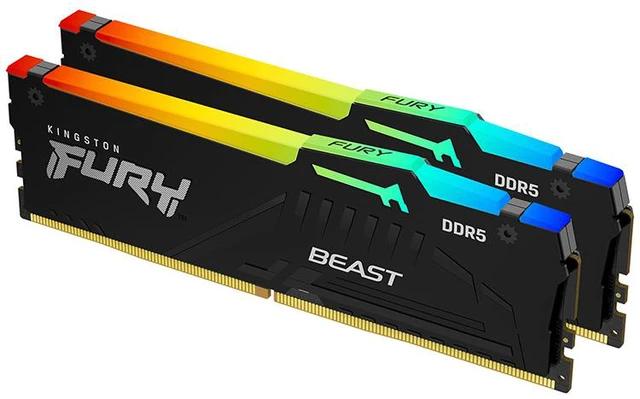
Kingston FURY Beast RGB KF556C40BBAK2-32
- Model:
- Kingston FURY Beast RGB
- Capacity:
- 32GB (2x16GB Kit)
- DDR Generation:
- DDR5
- Speed:
- 5600MT/s (PC5-44800)
- CAS Latency:
- CL40
- Overclocking:
- Intel XMP 3.0 Certified
- RGB Lighting:
- Dynamic RGB
- Warranty:
- Limited Lifetime
Consumercarts is reader-supported. Learn more
Disclaimer: The price and specification of the given product may differ from the actual product. Please confirm on the retailer's website before buying.
Manufacturer: Kingston Last updated: September 8, 2026
Kingston FURY Beast RGB KF556C40BBAK2-32 (32GB 2x16GB Kit/DDR5 5600MHz/CL40/RGB/Intel XMP 3.0) Review
The Kingston FURY Beast RGB KF556C40BBAK2-32 sits below Kingston’s mainstream 6000MHz FURY Beast tier at 5600MHz CL40, a genuinely accessible entry point into 32GB RGB DDR5 for buyers whose platform or budget doesn’t call for the higher-frequency variant.
Budget-conscious 32GB RGB DDR5 builds not specifically targeting AM5’s fabric-ratio sweet spot. A genuinely accessible entry point with real RGB. Not for AM5 builds wanting maximum platform-specific performance. The 6000MHz CL30 variant, covered elsewhere on this site, is the better fit for that.
Performance and Timings
CL40 at 5600MHz gives roughly 14.3ns true latency, looser than the 6000MHz CL30 tier but still a real, meaningful upgrade over any DDR4 or entry-tier DDR5 kit running below 5200MHz.
Compatibility
Intel XMP 3.0 certification reaches the rated 5600MHz with a single BIOS toggle. This is a lower, more universally supported DDR5 frequency than 6000MHz, so QVL concerns are minimal.
Module Count and Rank
Two 16GB modules. Buy the full capacity needed in one matched kit.
Design and Build
Dynamic RGB lighting via Kingston’s Infrared Sync technology and FURY CTRL software, matching the design language of Kingston’s higher-frequency FURY Beast RGB kits.
Overclocking and BIOS Setup
Boots at JEDEC baseline until XMP is enabled. Select the profile, choose 5600MHz CL40, save, reboot, verify in CPU-Z.
Comparison to Sibling Products
Against Kingston’s own FURY Beast RGB at 6000MHz CL30, that kit delivers meaningfully better latency and bandwidth for a real price premium, the better choice for AM5 builds specifically. This 5600MHz kit suits budget builds or platforms without a specific need for the 6000MHz fabric-ratio sweet spot.
Specifications
Identity
| Brand | Kingston |
|---|---|
| Series | FURY Beast RGB |
Memory
| DDR Generation | DDR5, 288-Pin DIMM, Non-ECC, Unbuffered, On-Die ECC (ODECC) |
|---|---|
| Capacity | 32 GB |
| Speed | 5600MT/s (PC5-44800) |
| CAS Latency | 40 |
| Module Count | 2 |
Module and platform
| RAM Segment | Desktop DDR5 |
|---|
Capacity
| Capacity Per Module | 16 GB |
|---|
Speed and timings
| True Latency | 14.3 ns |
|---|
Commercial
| Warranty | Limited Lifetime |
|---|
| Model Number | KF556C40BBAK2-32 |
|---|---|
| OC Profile | Intel XMP 3.0 Certified |
| Spec Score | 5.0 |
Expert Review
Reviewed by Burooj Alam. Rated by us, not by users.
Best for
- Budget-conscious 32GB RGB DDR5 builds not specifically targeting AM5’s fabric-ratio sweet spot. A genuinely accessible entry point with real RGB.
Not for
- Not for AM5 builds wanting maximum platform-specific performance. The 6000MHz CL30 variant, covered elsewhere on this site, is the better fit for that.
FAQs
What are the key specifications of the Kingston FURY Beast RGB KF556C40BBAK2-32 (32GB 2x16GB Kit/DDR5 5600MHz/CL40/RGB/Intel XMP 3.0)?
The Kingston FURY Beast RGB KF556C40BBAK2-32 (32GB 2x16GB Kit/DDR5 5600MHz/CL40/RGB/Intel XMP 3.0) is a memory kit from Kingston. Key specs: Capacity 32GB (2x16GB Kit), DDR Generation DDR5, 288-Pin DIMM, Non-ECC, Unbuffered, On-Die ECC (ODECC), Speed 5600MT/s (PC5-44800), CAS Latency 40, Overclocking Intel XMP 3.0 Certified.
Will the Kingston FURY Beast RGB KF556C40BBAK2-32 (32GB 2x16GB Kit/DDR5 5600MHz/CL40/RGB/Intel XMP 3.0) work with my current setup?
The Kingston FURY Beast RGB KF556C40BBAK2-32 (32GB 2x16GB Kit/DDR5 5600MHz/CL40/RGB/Intel XMP 3.0) lists DDR Generation is DDR5, 288-Pin DIMM, Non-ECC, Unbuffered, On-Die ECC (ODECC). Check that against the hardware you already own before buying, since this is the field that most often decides whether a part fits. Our upgrade checker at /upgrade can confirm compatibility for common combinations.
Who is the Kingston FURY Beast RGB KF556C40BBAK2-32 (32GB 2x16GB Kit/DDR5 5600MHz/CL40/RGB/Intel XMP 3.0) best suited to?
It suits budget-conscious 32gb rgb ddr5 builds not specifically targeting am5’s fabric-ratio sweet spot. a genuinely accessible entry point with real rgb..
What are the drawbacks of the Kingston FURY Beast RGB KF556C40BBAK2-32 (32GB 2x16GB Kit/DDR5 5600MHz/CL40/RGB/Intel XMP 3.0)?
It is a poor fit for not for am5 builds wanting maximum platform-specific performance. the 6000mhz cl30 variant, covered elsewhere on this site, is the better fit for that..
Compare and read more
- ADATA Industrial AD4U3200716G22-BADZ (16GB DDR4-3200 ECC UDIMM/2Rx8/1.2V/288-Pin/Industrial-Grade) vs Kingston FURY Beast RGB KF556C40BBAK2-32 (32GB 2x16GB Kit/DDR5 5600MHz/CL40/RGB/Intel XMP 3.0)
- ADATA AO2V48UC8W1-BHLS 8GB vs Kingston FURY Beast RGB KF556C40BBAK2-32 (32GB 2x16GB Kit/DDR5 5600MHz/CL40/RGB/Intel XMP 3.0)
- ADATA AX5U5200C3816G-B 16GB DDR5-5200 CL38 Bare/Tray Module vs Kingston FURY Beast RGB KF556C40BBAK2-32 (32GB 2x16GB Kit/DDR5 5600MHz/CL40/RGB/Intel XMP 3.0)