
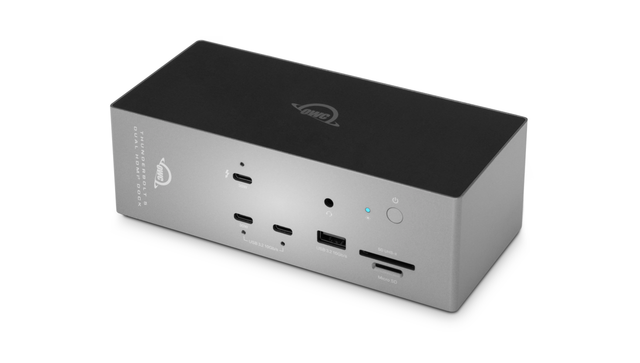
OWC Thunderbolt 5 Dock with Dual HDMI
Expert rating7.5 / 10
- Connection Type:
- Thunderbolt 5
- Total Ports:
- 8
- Max Displays:
- 3 (2x HDMI native + 1 via downstream TB/USB-C)
- Power Delivery:
- 140W host charging
Consumercarts is reader-supported. Learn more
Disclaimer: The price and specification of the given product may differ from the actual product. Please confirm on the retailer's website before buying.
Manufacturer: OWC Last updated: 2026-09-14
OWC Thunderbolt 5 Dock with Dual HDMI (Thunderbolt 5 / 8 Ports / 140W Host Charging / Dual HDMI 2.1 up to 4K@240Hz or 8K@60Hz / 2.5GbE / ~$350) Review
If you're looking for the OWC Thunderbolt 5 Dock with Dual HDMI, this is OWC's newest Thunderbolt 5 dock, announced September 8, 2026, and it's the first dock in OWC's lineup to drive two HDMI displays natively instead of forcing you through DisplayPort adapters or a DisplayLink chip.
Short version: it's a Thunderbolt 5 dock built for people who plug into HDMI monitors or TVs, not DisplayPort ones. Two native HDMI 2.1 ports handle up to 4K@240Hz each (or 8K@60Hz with DSC), you get 140W of host charging, a 2.5GbE jack, dual card readers, and a front USB-C port for topping off a phone. It ships in early November 2026 at $349.99, and because it only just leaked out of IBC 2026 as a press release, real-world review data doesn't exist yet, so treat the numbers below as manufacturer-stated until independent testing lands.
Why Dual HDMI Matters Here
Almost every Thunderbolt dock on the market, including OWC's own existing Thunderbolt Dock, assumes you're running DisplayPort monitors and leaves HDMI as an afterthought handled through adapters or a single passthrough port. OWC built this one specifically for the HDMI crowd: two full HDMI 2.1 ports run natively off the Thunderbolt 5 controller, each capable of 4K at 240Hz or 8K at 60Hz with Display Stream Compression. That's a real spec bump over typical HDMI docks, which usually cap out around 4K60 or 4K120 per port. If you've got two HDMI-only displays (a lot of TVs, budget monitors, and older 4K panels are HDMI-only), you no longer need MST hubs or DisplayPort-to-HDMI adapters that quietly cap your refresh rate.
Power, Networking, and Everyday Ports
140W of host charging is enough for any MacBook Pro or high-power Windows laptop OWC sells this alongside, and the separate 30W front USB-C port is a nice touch for topping off a phone or tablet without hogging the main charging line. 2.5GbE covers most home and small-office needs, though it's worth noting this isn't the 5G or 10G tier you'll find on some higher-end Kensington and CalDigit docks. The SD and microSD combo on the front is convenient for photographers, and the OWC Dock Ejector utility (carried over from earlier OWC docks) lets you safely unmount every connected drive with one click instead of ejecting them individually.
Comparison to Alternatives
We already carry OWC's original Thunderbolt Dock (Thunderbolt 4, 14 ports, dual 4K@60Hz over DisplayPort/HDMI mix, 96W charging, ~$300) and the newer OWC Thunderbolt 5 Hub (Thunderbolt 5, 11 ports, 140W charging, 2.5GbE, ~$329) in this catalog. This new Dual HDMI dock sits between them: it moves to Thunderbolt 5 like the Hub, matches its 140W charging and 2.5GbE, but trades some of the Hub's port count for two dedicated high-bandwidth HDMI outputs. Against Kensington's Thunderbolt lineup, the Kensington SD5000T5 EQ (Thunderbolt 5, 11-in-1, triple 4K@144Hz, 140W, ~$270) still wins on raw port count and price, and the Kensington SD5700T (Thunderbolt 4, 12 ports, dual 4K@60Hz or single 8K@30Hz, 96W, ~$270) is the cheaper TB4 option if you don't need Thunderbolt 5 speeds at all. The OWC's real edge is that per-port HDMI ceiling: 4K@240Hz on two separate displays natively is not something the Kensington docks or OWC's own older Thunderbolt Dock can match without dropping to a lower refresh rate or leaning on DisplayLink.
Specifications
Connectivity
| Connection Type | Thunderbolt 5 (backward compatible with Thunderbolt 4, Thunderbolt 3, USB4, USB-C) |
|---|---|
| Port Configuration | 1x Thunderbolt 5 host, 1x Thunderbolt 5 downstream, 2x HDMI 2.1, 3x USB-C (front up to 30W), USB-A, 1x 2.5GbE, UHS-II SD + microSD, audio |
| Max Display Support | Up to 3 displays (Thunderbolt 5 host) |
Host connection
| Host Interface | Thunderbolt 5 |
|---|---|
| Thunderbolt Version | 5 |
| Host Bandwidth | 80 Gbps |
| Host Cable Length | 1 m |
Ports & Power
| Max Display Resolution | Single 8K@60Hz or 4K@240Hz; dual 8K@60Hz or 4K@240Hz; triple 6K@60Hz or 4K@144Hz (TB5 host) |
|---|---|
| Power Delivery | 140 W |
| Ethernet | Yes |
Host power
| Host Power Delivery | 140 W |
|---|---|
| Bus Powered | No |
Display engine
| Video Path | Thunderbolt Native |
|---|---|
| DisplayLink Driver Required | No |
| Max Displays Windows | 3 |
Display output
| Max Single Display Resolution | 8K |
|---|---|
| Max Single Display Refresh | 60 Hz |
| Max Dual Display Resolution | 8K |
| Max Dual Display Refresh | 60 Hz |
Video ports
| HDMI Port Count | 2 |
|---|---|
| HDMI Version | 2.1 |
| DisplayPort Port Count | 0 |
| DisplayPort Version | None |
Data ports
| Downstream Thunderbolt Port Count | 1 |
|---|---|
| USB-C Data Port Count | 3 |
Downstream power
| Max Downstream USB-C Power | 30 W |
|---|
Network and storage
| Ethernet Speed | 2.5GbE |
|---|---|
| SD Card Slot | UHS-II |
| microSD Card Slot | UHS-II |
Compatibility and physical
| macOS Supported | Yes |
|---|---|
| Windows Supported | Yes |
| ChromeOS Supported | Yes |
| Orientation | Either |
| Brand | OWC (Other World Computing) |
|---|---|
| Model | Thunderbolt 5 Dock with Dual HDMI |
| OS Compatibility | macOS 14+, Windows 11, ChromeOS, iPadOS |
| Extra Features | Horizontal or vertical desktop positioning, OWC Dock Ejector utility for one-click storage unmounting, macOS driver support for the discontinued Apple USB SuperDrive |
| Announced | September 8, 2026 (IBC 2026) |
| Release Date | Early November 2026 |
| Price | $349.99 (pre-order/launch MSRP) |
| Source URL | https://www.owc.com/solutions/thunderbolt-5-dock-with-dual-hdmi |
Expert Review
Reviewed by Burooj Alam. Rated by us, not by users.
Expert rating7.5 / 10
A smart, narrowly-targeted Thunderbolt 5 dock for HDMI-monitor households. We'd hold off on a final verdict until independent reviews confirm the 4K@240Hz claim under real workloads, but on paper this fills a gap OWC's own lineup and most competitors have left open.
Best for
- Thunderbolt 5 laptop owners running two HDMI-only monitors or TVs who want native high-refresh output without adapters
- Creative pros who want fast card readers plus dual display support in one box
- Anyone already invested in OWC's Dock Ejector software ecosystem
Not for
- DisplayPort-only monitor setups, where the OWC Thunderbolt 5 Hub or Kensington SD5000T5 EQ make more sense
- Budget buyers, since $349.99 undercuts nothing else in OWC's own lineup
- Anyone needing more than 2.5GbE networking or SFP+ throughput
FAQs
What are the key specifications of the OWC Thunderbolt 5 Dock with Dual HDMI (Thunderbolt 5 / 8 Ports / 140W Host Charging / Dual HDMI 2.1 up to 4K@240Hz or 8K@60Hz / 2.5GbE / ~$350)?
The OWC Thunderbolt 5 Dock with Dual HDMI (Thunderbolt 5 / 8 Ports / 140W Host Charging / Dual HDMI 2.1 up to 4K@240Hz or 8K@60Hz / 2.5GbE / ~$350) is a docking station from OWC. Key specs: Connection Type Thunderbolt 5 (backward compatible with Thunderbolt 4, Thunderbolt 3, USB4, USB-C), Total Ports 8, Port Configuration 1x Thunderbolt 5 host upstream, 1x Thunderbolt 5 downstream, 2x HDMI 2.1, 1x front USB-C (up to 30W device charging), 1x 2.5GbE, 1x UHS-II SD, 1x microSD, Max Display Support Up to 3 displays (2 native HDMI + 1 more via downstream Thunderbolt/USB-C depending on host GPU), Max Display Resolution Two displays at up to 4K@240Hz, or 8K@60Hz using DSC, per HDMI port.
Who is the OWC Thunderbolt 5 Dock with Dual HDMI (Thunderbolt 5 / 8 Ports / 140W Host Charging / Dual HDMI 2.1 up to 4K@240Hz or 8K@60Hz / 2.5GbE / ~$350) best suited to?
It suits thunderbolt 5 laptop owners running two hdmi-only monitors or tvs who want native high-refresh output without adapters, creative pros who want fast card readers plus dual display support in one box, anyone already invested in owc's dock ejector software ecosystem.
What are the drawbacks of the OWC Thunderbolt 5 Dock with Dual HDMI (Thunderbolt 5 / 8 Ports / 140W Host Charging / Dual HDMI 2.1 up to 4K@240Hz or 8K@60Hz / 2.5GbE / ~$350)?
It is a poor fit for displayport-only monitor setups, where the owc thunderbolt 5 hub or kensington sd5000t5 eq make more sense, budget buyers, since $349.99 undercuts nothing else in owc's own lineup, anyone needing more than 2.5gbe networking or sfp+ throughput.
Compare and read more
- Anker 575 USB-C Hub (USB-C / 13 Ports / 100W Pass-Through / Dual 4K@30Hz DisplayLink / Windows/Mac / ~$110) vs OWC Thunderbolt 5 Dock with Dual HDMI (Thunderbolt 5 / 8 Ports / 140W Host Charging / Dual HDMI 2.1 up to 4K@240Hz or 8K@60Hz / 2.5GbE / ~$350)
- Belkin Thunderbolt 4 Dock Pro (12 Ports / 90W Upstream + 15W Downstream TB4 / Dual HDMI 2.0 / 8K30 or Dual 4K60 / Gigabit Ethernet) vs OWC Thunderbolt 5 Dock with Dual HDMI (Thunderbolt 5 / 8 Ports / 140W Host Charging / Dual HDMI 2.1 up to 4K@240Hz or 8K@60Hz / 2.5GbE / ~$350)
- Dell WD22TB4 (Thunderbolt 4 / 130W Power Delivery on Dell Systems / Quad Display / Gigabit Ethernet) vs OWC Thunderbolt 5 Dock with Dual HDMI (Thunderbolt 5 / 8 Ports / 140W Host Charging / Dual HDMI 2.1 up to 4K@240Hz or 8K@60Hz / 2.5GbE / ~$350)
- Hyper HyperDrive Next 10-Port USB-C Hub (USB-C / 10 Ports / 100W Pass-Through / Single 4K@60Hz / Windows/Mac/iPad / ~$100) vs OWC Thunderbolt 5 Dock with Dual HDMI (Thunderbolt 5 / 8 Ports / 140W Host Charging / Dual HDMI 2.1 up to 4K@240Hz or 8K@60Hz / 2.5GbE / ~$350)
- Jsaux 12-in-1 USB4 Docking Station (USB4 / 12 Ports / 100W Pass-Through / Dual 4K@60Hz / Windows/Mac / ~$140) vs OWC Thunderbolt 5 Dock with Dual HDMI (Thunderbolt 5 / 8 Ports / 140W Host Charging / Dual HDMI 2.1 up to 4K@240Hz or 8K@60Hz / 2.5GbE / ~$350)