
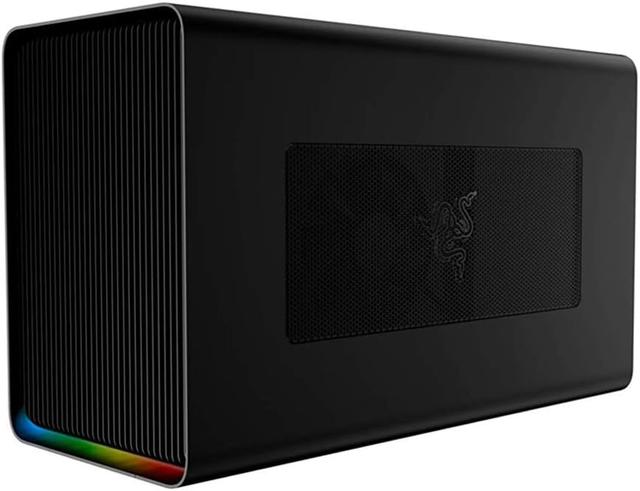
Razer Core X Chroma
Expert rating8 / 10
- Connection Standard:
- Thunderbolt 3
- PSU Wattage:
- 700 W
- Cooling Type:
- Active enclosure fan
Consumercarts is reader-supported. Learn more
Disclaimer: The price and specification of the given product may differ from the actual product. Please confirm on the retailer's website before buying.
Manufacturer: Razer Last updated: September 10, 2026
Razer Core X Chroma (Thunderbolt 3 eGPU Enclosure / 700W PSU / Triple-Slot GPU Support / Chroma RGB / Ethernet + USB) Review
The Razer Core X Chroma is a Thunderbolt 3 eGPU enclosure with a 700W internal PSU, support for full-size triple-slot graphics cards, Chroma RGB lighting, and built-in Ethernet and USB ports, around $399.
The Core X Chroma is Razer's higher-end eGPU enclosure, essentially the standard Core X with a beefier 700W PSU (enough headroom for genuinely high-end GPUs) and Chroma RGB lighting built into the case itself, which is a strange but real selling point if you're already bought into the Razer ecosystem and want your eGPU box to sync with your other Chroma peripherals. The 700W PSU is the more practically important spec than the lighting, it gives you meaningfully more GPU headroom than lower-wattage enclosures, so a genuinely powerful graphics card isn't power-constrained by the box itself.
700W Headroom Matters for High-End Cards
Cheaper eGPU enclosures often ship with 500-550W internal supplies, fine for midrange cards but tight for anything drawing close to 300-350W on its own. The Core X Chroma's 700W supply removes that as a concern for the vast majority of consumer GPUs on the market, high-end included.
Comparison to Alternatives
Against our ADT-Link UT3G, a compact minimalist enclosure without an internal PSU (it uses your own external supply), the Core X Chroma is bulkier but self-contained and ready to run a high-power card out of the box. Against our GPD G1, a completely different form factor built into a handheld dock, the Core X Chroma is the traditional external-box approach at a lower price point with more raw GPU wattage headroom.
Specifications
Identity
| Brand | Razer |
|---|
Connectivity
| Extra Ports | Ethernet, USB |
|---|
| Model | Core X Chroma |
|---|---|
| Interface | Thunderbolt 3 |
| Internal PSU | 700W |
| GPU Support | Full-size, full-length, triple-slot |
| Lighting | Razer Chroma RGB |
| Price | ~$399 |
Expert Review
Reviewed by Burooj Alam. Rated by us, not by users.
Expert rating8 / 10
Plenty of power headroom in a self-contained box, with lighting you can ignore if you want.
Best for
- Buyers wanting maximum GPU wattage headroom in a self-contained enclosure.
- Razer ecosystem owners who want Chroma-synced lighting on their eGPU box.
Not for
- Anyone chasing the smallest possible eGPU footprint, this is a full-size box.
- Buyers who don't care about lighting and can save money on a non-Chroma equivalent enclosure.
FAQs
What are the key specifications of the Razer Core X Chroma (Thunderbolt 3 eGPU Enclosure / 700W PSU / Triple-Slot GPU Support / Chroma RGB / Ethernet + USB)?
The Razer Core X Chroma (Thunderbolt 3 eGPU Enclosure / 700W PSU / Triple-Slot GPU Support / Chroma RGB / Ethernet + USB) is a eGPU enclosure from Razer. Key specs: Interface Thunderbolt 3, Internal PSU 700W, GPU Support Full-size, full-length, triple-slot, Lighting Razer Chroma RGB, Extra Ports Ethernet, USB.
Will the Razer Core X Chroma (Thunderbolt 3 eGPU Enclosure / 700W PSU / Triple-Slot GPU Support / Chroma RGB / Ethernet + USB) work with my current setup?
The Razer Core X Chroma (Thunderbolt 3 eGPU Enclosure / 700W PSU / Triple-Slot GPU Support / Chroma RGB / Ethernet + USB) lists Interface is Thunderbolt 3. Check that against the hardware you already own before buying, since this is the field that most often decides whether a part fits.
Who is the Razer Core X Chroma (Thunderbolt 3 eGPU Enclosure / 700W PSU / Triple-Slot GPU Support / Chroma RGB / Ethernet + USB) best suited to?
It suits buyers wanting maximum gpu wattage headroom in a self-contained enclosure., razer ecosystem owners who want chroma-synced lighting on their egpu box..
What are the drawbacks of the Razer Core X Chroma (Thunderbolt 3 eGPU Enclosure / 700W PSU / Triple-Slot GPU Support / Chroma RGB / Ethernet + USB)?
It is a poor fit for anyone chasing the smallest possible egpu footprint, this is a full-size box., buyers who don't care about lighting and can save money on a non-chroma equivalent enclosure..
Compare and read more
- AOOSTAR AG01 (OCuLink eGPU Dock / 400W Built-In PSU / Open-Frame / Budget Handheld & Mini PC GPU Dock) vs Razer Core X Chroma (Thunderbolt 3 eGPU Enclosure / 700W PSU / Triple-Slot GPU Support / Chroma RGB / Ethernet + USB)
- GIGABYTE AORUS RTX 3080 Gaming Box Rev 2.0 (Pre-Installed RTX 3080 10GB / Thunderbolt 3 / WATERFORCE AIO Cooling / Plug-and-Play) vs Razer Core X Chroma (Thunderbolt 3 eGPU Enclosure / 700W PSU / Triple-Slot GPU Support / Chroma RGB / Ethernet + USB)
- AOOSTAR AG02 (OCuLink + USB4 eGPU Dock / 800W Built-In PSU / Open-Frame / Up to RTX 4090) vs Razer Core X Chroma (Thunderbolt 3 eGPU Enclosure / 700W PSU / Triple-Slot GPU Support / Chroma RGB / Ethernet + USB)
- Razer Core X Chroma (Thunderbolt 3 eGPU Enclosure / 700W PSU / Triple-Slot GPU Support / Chroma RGB / Ethernet + USB) vs Sonnet eGFX Breakaway Box 650 (Thunderbolt 3 / 650W PSU / 87W Laptop Charging / Double-Wide GPU / Mac-Certified)
- Alienware Graphics Amplifier (Proprietary PCIe Connector / 460W PSU / Full-Length GPU / Compatible Alienware & Dell G-Series Only) vs Razer Core X Chroma (Thunderbolt 3 eGPU Enclosure / 700W PSU / Triple-Slot GPU Support / Chroma RGB / Ethernet + USB)