
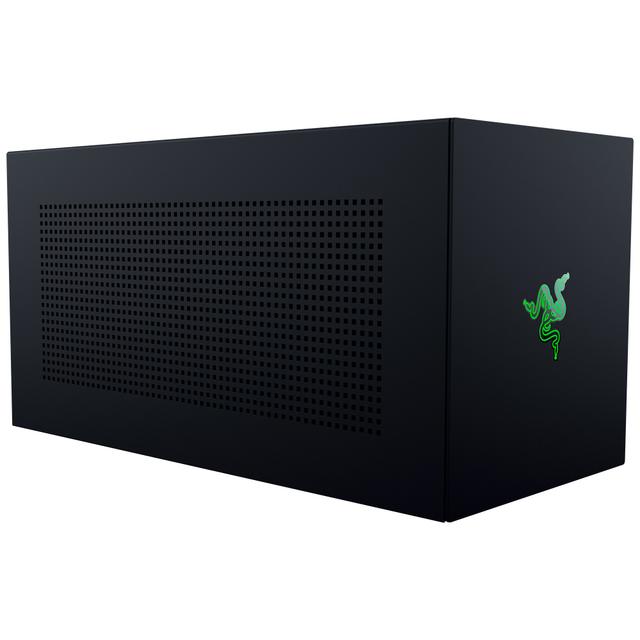
Razer Core X V2
Expert rating7 / 10
- Model:
- Razer Core X V2
- Connection Standard:
- Thunderbolt 5
- PCIe Tunnel:
- PCIe 4.0 x4
- PSU Wattage:
- Not Included (Bring Your Own ATX)
- Host Power Delivery:
- 140 W
- GPU Slot Support:
- Up to 4-Slot
- Cooling Type:
- 120mm exhaust fan
- Price:
- $349.99 (Enclosure Only)
Consumercarts is reader-supported. Learn more
Disclaimer: The price and specification of the given product may differ from the actual product. Please confirm on the retailer's website before buying.
Manufacturer: Razer Last updated: September 16, 2026
Razer Core X V2 (Thunderbolt 5 eGPU Enclosure / No PSU Included / 140W Host Charging / 4-Slot GPU Support / 120mm Fan) Review
The Razer Core X V2 is a $349.99 Thunderbolt 5 eGPU enclosure, and the two things buyers need to know before ordering are that it ships without a power supply and that Thunderbolt 5's 80 Gbps headline does not translate into 80 Gbps of graphics bandwidth.
Real entry cost is $440 to $510 once you add an ATX unit. Expect roughly 10 percent less performance than the same card in a desktop, more on a 5090. It is still the best enclosure on the market. Just go in with the right numbers.
Specifications
Model RC21-02270200-R3U1. Thunderbolt 5 host connection, 80 Gbps link, backward compatible with Thunderbolt 4 and USB4.
Supports PCIe desktop cards up to four slots wide, NVIDIA or AMD.
No power supply included. Takes a standard ATX unit.
140W host charging over the Thunderbolt 5 cable.
Dimensions 421 x 197 x 82mm. One 120mm exhaust fan, vented steel chassis. Two-year warranty. $349.99.
In the box
Enclosure, Thunderbolt 5 cable, and the mounting hardware. That is it.
No graphics card, no power supply, no I/O ports of any kind. If you want USB or Ethernet at the far end of the cable, you buy a separate Thunderbolt 5 dock.
Razer recommends allocating 230W on top of whatever your card draws. A 5080 at 360W therefore wants a 650W unit minimum, and an 850W unit is the sensible buy at around $110.
Design and build
Vented steel, plain black, no lighting. It looks like a small PC case because that is essentially what it is now.
The slide-and-click GPU tray from the original Core X survives, and it is still the fastest card swap in the category. A four-slot card goes in without a screwdriver.
The single 120mm exhaust fan is quiet and effective. Our reading of the available thermal data puts a card in here several degrees cooler than the same card on an open bench, because the airflow is directed rather than recirculated.
The headline claim examined
Thunderbolt 5 advertises 80 Gbps. Your graphics card does not get 80 Gbps.
The PCIe tunnel inside Thunderbolt 5 is fixed at PCIe 4.0 x4, which is 64 Gbps of raw signalling. Measured transfer rates land at 5.6 to 5.8 GB/s.
A desktop PCIe 5.0 x16 slot moves roughly 63 GB/s. So this enclosure gives a card about 9.2 percent of the bandwidth it would have in a tower. That is the whole story of eGPU performance in one number.
The defining limitation
Frame rate loss versus the same card in a desktop.
CGMagazine's testing puts it around 10 percent on mid-range cards. On an RTX 5090 the gap opens to about 28 percent, because a faster card spends proportionally more time waiting on the link.
The counterintuitive part: the loss shrinks at 4K, it does not grow. Higher resolutions keep the GPU busy longer per frame, so the link matters less. If you plan to run 1080p at 240Hz on a 5090, an eGPU is the wrong purchase.
The missing power supply
The original Core X included a 650W unit. The V2 does not include anything.
Razer's own page points buyers at XPG supplies, which carry a 10-year warranty of their own. Any standard ATX unit fits.
Add $90 to $160 for the PSU and the real entry cost is $440 to $510 before you own a graphics card. Compared like for like against the old Core X at $299 with a PSU, this is a price increase dressed as a price cut.
Living with it
Hot plug works. Windows detects the card, and unplugging while a game is running does what you expect, which is crash it.
On a laptop with an internal GPU, you decide per application which one renders. That is a Windows setting, not a Razer one, and it is the most common source of confusion for new eGPU owners.
The 140W of host charging covers most gaming laptops. Thin and light machines are covered comfortably. A 17-inch workstation pulling 230W is not.
Reliability and warranty
Two years from Razer on the enclosure. The card and the power supply carry their own terms.
There is very little to fail here. The board carries the Thunderbolt controller and the PCIe slot, and the only moving part is the fan.
Worth noting: only one substantive independent review of this unit exists so far. Long-term reliability data does not yet. The original Core X had a good record over seven years, which is the best signal available.
Versus the competition
Winner overall: this one, on price and card support.
Against the Sonnet Breakaway Box 750ex at about $550, the Sonnet includes a power supply and is the safer Mac choice. Add a PSU to the Razer and the gap closes to roughly $60.
Against the AOOSTAR AG02 at around $200, the AOOSTAR adds OCuLink, which measures 6.6 to 6.7 GB/s against Thunderbolt 5's 5.6 to 5.8. That is real, and it is the reason to look elsewhere if your laptop has an OCuLink port.
Price and availability
$349.99 direct from Razer and widely in stock.
Budget $450 to $510 all in with a power supply, and more again for the card. An RTX 5070 Ti build lands near $1,200 total.
We would only buy this if you already own a desktop graphics card, or if a laptop is genuinely your only machine. For anyone else, $1,200 buys a desktop that will beat it by 10 to 28 percent.
FAQ: compatibility
Does it work with Thunderbolt 4 or USB4? Yes, at reduced bandwidth.
Does it work with a MacBook? Apple Silicon Macs do not support external GPUs at all. Intel Macs do.
What size card fits? Up to four slots wide, which covers every current card including the largest 5090 partner designs.
FAQ: performance
How much performance do I lose? Around 10 percent on mid-range cards, up to 28 percent on a 5090.
Does 4K make it worse? No, it makes it better. Higher resolution hides the link bottleneck.
Is Thunderbolt 5 faster than Thunderbolt 4 here? Yes, but not doubled. The PCIe tunnel is the limit, not the cable.
FAQ: buying
What power supply should I buy? Your card's rated draw plus 230W. An 850W ATX unit covers everything up to a 5090.
Does it include a graphics card? No.
Does it have USB ports? No. You need a separate Thunderbolt 5 dock for I/O.
Specifications
Identity
| Brand | Razer |
|---|---|
| Model Number | RC21-02270200-R3U1 |
Connectivity
| Connection Standard | Thunderbolt 5 |
|---|
Power & Compatibility
| Host Power Delivery | 140 W |
|---|---|
| Cooling Type | 120mm Exhaust Fan |
Measured performance
| Measured Transfer Rate | 5.6 GB/s |
|---|
Internal power
| PSU Form Factor | Standard ATX |
|---|
| Series | Core X |
|---|---|
| Link Bandwidth | 80 Gbps |
| PCIe Tunnel | PCIe 4.0 x4 |
| Recommended PSU Headroom | GPU Rating Plus 230W |
| GPU Slot Support | Up to 4-Slot |
| Chassis | Vented Steel |
| Dimensions | 421 x 197 x 82mm |
| Warranty | 2 Years |
| Price | $349.99 |
Expert Review
Reviewed by Burooj Alam. Rated by us, not by users.
Expert rating7 / 10
The best Thunderbolt 5 enclosure you can buy, held back by physics and a missing power supply. Budget $450, not $350.
Best for
- Laptop owners who already own a desktop graphics card and want to use it.
- Anyone who upgrades cards regularly. The toolless four-slot tray makes swaps a 90-second job.
- 4K gaming on a laptop, where the bandwidth penalty is smallest.
Not for
- Not for buyers who read $349.99 as the total cost. You need a power supply and a card on top.
- Not for high-refresh 1080p on a flagship card. The link penalty is worst exactly there.
- Not for Apple Silicon Macs, which do not support eGPUs at all.
FAQs
What are the key specifications of the Razer Core X V2 (Thunderbolt 5 eGPU Enclosure / No PSU Included / 140W Host Charging / 4-Slot GPU Support / 120mm Fan)?
The Razer Core X V2 (Thunderbolt 5 eGPU Enclosure / No PSU Included / 140W Host Charging / 4-Slot GPU Support / 120mm Fan) is a eGPU enclosure from Razer. Key specs: Connection Standard Thunderbolt 5, Link Bandwidth 80 Gbps, PCIe Tunnel PCIe 4.0 x4, Measured Transfer Rate 5.6, PSU Form Factor Standard ATX.
Who is the Razer Core X V2 (Thunderbolt 5 eGPU Enclosure / No PSU Included / 140W Host Charging / 4-Slot GPU Support / 120mm Fan) best suited to?
It suits laptop owners who already own a desktop graphics card and want to use it., anyone who upgrades cards regularly. the toolless four-slot tray makes swaps a 90-second job., 4k gaming on a laptop, where the bandwidth penalty is smallest..
What are the drawbacks of the Razer Core X V2 (Thunderbolt 5 eGPU Enclosure / No PSU Included / 140W Host Charging / 4-Slot GPU Support / 120mm Fan)?
It is a poor fit for not for buyers who read $349.99 as the total cost. you need a power supply and a card on top., not for high-refresh 1080p on a flagship card. the link penalty is worst exactly there., not for apple silicon macs, which do not support egpus at all..
Compare and read more
- AOOSTAR AG01 (OCuLink eGPU Dock / 400W Built-In PSU / Open-Frame / Budget Handheld & Mini PC GPU Dock) vs Razer Core X V2 (Thunderbolt 5 eGPU Enclosure / No PSU Included / 140W Host Charging / 4-Slot GPU Support / 120mm Fan)
- AOOSTAR AG02 (OCuLink + USB4 eGPU Dock / 800W Built-In PSU / Open-Frame / Up to RTX 4090) vs Razer Core X V2 (Thunderbolt 5 eGPU Enclosure / No PSU Included / 140W Host Charging / 4-Slot GPU Support / 120mm Fan)
- GIGABYTE AORUS RTX 3080 Gaming Box Rev 2.0 (Pre-Installed RTX 3080 10GB / Thunderbolt 3 / WATERFORCE AIO Cooling / Plug-and-Play) vs Razer Core X V2 (Thunderbolt 5 eGPU Enclosure / No PSU Included / 140W Host Charging / 4-Slot GPU Support / 120mm Fan)
- Razer Core X V2 (Thunderbolt 5 eGPU Enclosure / No PSU Included / 140W Host Charging / 4-Slot GPU Support / 120mm Fan) vs Sonnet eGFX Breakaway Box 650 (Thunderbolt 3 / 650W PSU / 87W Laptop Charging / Double-Wide GPU / Mac-Certified)
- Alienware Graphics Amplifier (Proprietary PCIe Connector / 460W PSU / Full-Length GPU / Compatible Alienware & Dell G-Series Only) vs Razer Core X V2 (Thunderbolt 5 eGPU Enclosure / No PSU Included / 140W Host Charging / 4-Slot GPU Support / 120mm Fan)