
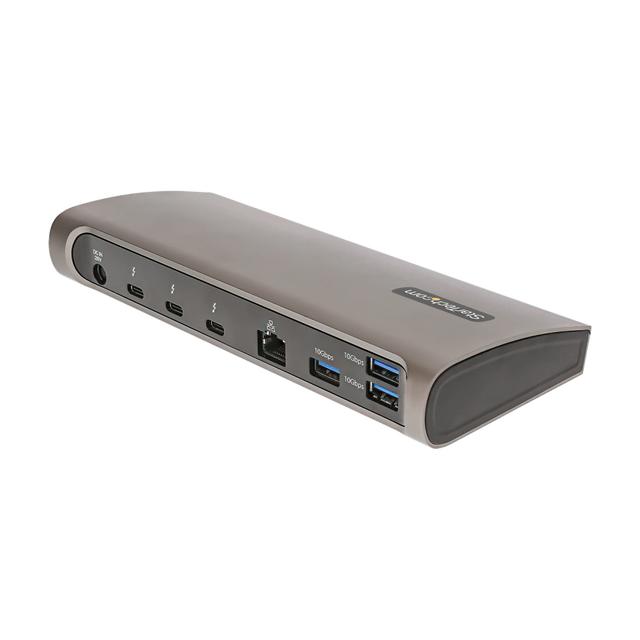
StarTech.com 2-Port Thunderbolt 4 Hub
Expert rating5 / 10
- Connection Type:
- Thunderbolt 4 (pure hub)
- Total Ports:
- 2
- Max Display Support:
- None
- Power Delivery:
- None
Consumercarts is reader-supported. Learn more
Disclaimer: The price and specification of the given product may differ from the actual product. Please confirm on the retailer's website before buying.
Manufacturer: StarTech.com Last updated: September 12, 2026
StarTech.com 2-Port Thunderbolt 4 Hub (Thunderbolt 4 / 2 Ports / No Charging / No Display Output / Mac/Windows / ~$70) Review
The StarTech.com 2-Port Thunderbolt 4 Hub is a bare-bones port expander with just two Thunderbolt 4 ports and nothing else, no display output, no charging, no Ethernet, aimed purely at daisy-chaining one extra Thunderbolt device off a laptop that's already out of ports.
Every other dock in this catalog tries to do more with more ports, displays, and charging. This one deliberately does less: it takes a single Thunderbolt 4 port and splits it into two, full stop. For someone whose laptop has only one Thunderbolt port but two Thunderbolt peripherals to connect, like an external drive and a display adapter, this hub solves that specific problem for a fraction of what a full dock costs, without paying for docking features they'll never use.
Comparison to Alternatives
Against the CalDigit Element Hub, the Element Hub adds three extra USB-C ports and 60W of charging for a similar price, making it the better value if you need any charging at all, while the StarTech stays purely about Thunderbolt port count. Against the Plugable TBT4-UDZ, the Plugable is a full 16-in-1 dock with quad display support, illustrating just how stripped down the StarTech hub is by comparison, useful only for the narrow case of needing one more Thunderbolt port.
Specifications
Connectivity
| Connection Type | Thunderbolt 4 |
|---|---|
| Port Configuration | 1x TB4 upstream, 1x TB4 downstream (daisy chain / port expansion only) |
| Max Display Support | None (pass-through only, relies on host GPU) |
Ports & Power
| Max Display Resolution | N/A (pass-through) |
|---|---|
| Total Ports | 2 |
| Power Delivery | None (no host charging) |
| Ethernet | No |
| Brand | StarTech.com |
|---|---|
| Model | 2-Port Thunderbolt 4 Hub |
| OS Compatibility | Mac, Windows |
| Price | ~$70 |
Expert Review
Reviewed by Burooj Alam. Rated by us, not by users.
Expert rating5 / 10
Does exactly one job, adding a second Thunderbolt port, and does it cheaply; not a dock replacement.
Best for
- Laptops with only one Thunderbolt port needing to daisy-chain a second device
- Users who already have display and charging solved and just need port count
- Minimalist setups that don't want to pay for unused dock features
Not for
- Anyone needing display output, since it has no video ports at all
- Anyone needing the hub to charge their laptop
- Buyers wanting a full-featured docking station rather than a pure port splitter
FAQs
What are the key specifications of the StarTech.com 2-Port Thunderbolt 4 Hub (Thunderbolt 4 / 2 Ports / No Charging / No Display Output / Mac/Windows / ~$70)?
The StarTech.com 2-Port Thunderbolt 4 Hub (Thunderbolt 4 / 2 Ports / No Charging / No Display Output / Mac/Windows / ~$70) is a docking station from StarTech.com. Key specs: Connection Type Thunderbolt 4, Total Ports 2, Port Configuration 1x TB4 upstream, 1x TB4 downstream (daisy chain / port expansion only), Max Display Support None (pass-through only, relies on host GPU), Max Display Resolution N/A (pass-through).
Who is the StarTech.com 2-Port Thunderbolt 4 Hub (Thunderbolt 4 / 2 Ports / No Charging / No Display Output / Mac/Windows / ~$70) best suited to?
It suits laptops with only one thunderbolt port needing to daisy-chain a second device, users who already have display and charging solved and just need port count, minimalist setups that don't want to pay for unused dock features.
What are the drawbacks of the StarTech.com 2-Port Thunderbolt 4 Hub (Thunderbolt 4 / 2 Ports / No Charging / No Display Output / Mac/Windows / ~$70)?
It is a poor fit for anyone needing display output, since it has no video ports at all, anyone needing the hub to charge their laptop, buyers wanting a full-featured docking station rather than a pure port splitter.
Compare and read more
- ASUS DC5 Universal Dock (USB-C / 5 Ports / 100W Pass-Through Charging / Single 4K@60Hz / Windows/Mac/Chrome / ~$70) vs StarTech.com 2-Port Thunderbolt 4 Hub (Thunderbolt 4 / 2 Ports / No Charging / No Display Output / Mac/Windows / ~$70)
- HP USB-C Dock G5 (USB-C / 8 Ports / 65W Host Charging / Dual 4K@30Hz / Windows / ~$130) vs StarTech.com 2-Port Thunderbolt 4 Hub (Thunderbolt 4 / 2 Ports / No Charging / No Display Output / Mac/Windows / ~$70)
- StarTech.com 2-Port Thunderbolt 4 Hub (Thunderbolt 4 / 2 Ports / No Charging / No Display Output / Mac/Windows / ~$70) vs Wavlink Universal Docking Station (USB-A / 9 Ports / No Host Charging / Dual 4K@30Hz DisplayLink / Windows Only / ~$90)
- CalDigit Element Hub (Thunderbolt 4 / 4 Ports / 60W Host Charging / Data-Only / Mac/Windows / ~$100) vs StarTech.com 2-Port Thunderbolt 4 Hub (Thunderbolt 4 / 2 Ports / No Charging / No Display Output / Mac/Windows / ~$70)
- Dell WD19S (USB-C / 8 Ports / 65W Host Charging / Single 4K@60Hz / Windows / ~$150) vs StarTech.com 2-Port Thunderbolt 4 Hub (Thunderbolt 4 / 2 Ports / No Charging / No Display Output / Mac/Windows / ~$70)