
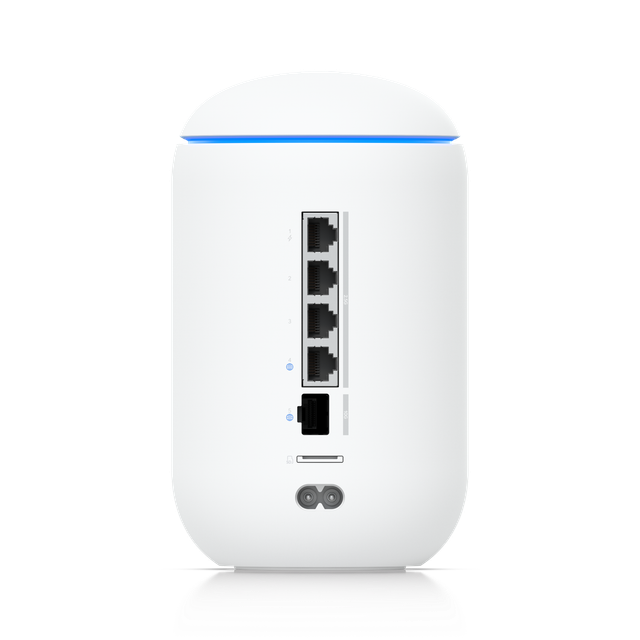
Ubiquiti UniFi Dream Router 7
Expert rating8 / 10
- WiFi Standard:
- WiFi 7 (802.11be)
- Platform:
- UniFi OS (built-in)
- Ethernet:
- 10G port
- Form Factor:
- Desktop all-in-one gateway
- Target User:
- Prosumer / small office
Consumercarts is reader-supported. Learn more
Disclaimer: The price and specification of the given product may differ from the actual product. Please confirm on the retailer's website before buying.
Manufacturer: Ubiquiti Last updated: September 11, 2026
Ubiquiti UniFi Dream Router 7 Review
The UDR7 packs Ubiquiti's full UniFi OS controller software, WiFi 7 radios, and a 10G port into a single desktop box, aimed at buyers who want UniFi's ecosystem without racking separate controller and access point hardware.
Where many UniFi deployments require a separate cloud key or controller device, the UDR7 runs the full UniFi OS stack internally, making it a genuinely self-contained starting point for the ecosystem.
A True All-in-One UniFi Box
Where many UniFi deployments require a separate cloud key or controller device, the UDR7 runs the full UniFi OS stack internally, making it a genuinely self-contained starting point for the ecosystem.
10-Gigabit Ready
A 10G port future-proofs the wired side of the network for buyers on fast fiber plans, a spec uncommon in compact all-in-one routers at this price point.
Comparison to Alternatives
Against the Ubiquiti UniFi Express 7 already on this site, the UDR7 is the larger, more capable all-in-one option with a 10G port, while the Express 7 is the smaller, more compact entry point. Against the Netgear Orbi RBK863S already on this site, the UDR7 trades Orbi's simpler mesh-focused approach for UniFi's deeper (and more technical) network management platform.
Our verdict
Reviewed by Burooj Alam. Rated by us, not by users.
Expert rating8 / 10
A self-contained UniFi gateway with WiFi 7 and a 10G port, minus the usual controller hardware.
Best for
- Buyers who want a fully self-contained UniFi ecosystem starting point with a 10G port.
Not for
- Households that want the simplest possible setup without any UniFi learning curve.
Specifications
What these specs meanWireless
| WiFi Standard | WiFi 7 (802.11be) |
|---|---|
| Band Configuration | Tri-Band |
Identity
| Brand | Ubiquiti |
|---|---|
| Model Number | UDR7 |
Form and topology
| Device Type | Standalone Router |
|---|
Wireless standard
| WiFi Generation | WiFi 7 |
|---|---|
| Supports 6GHz | Yes |
Radio capability
| Max Channel Width | 320MHz |
|---|---|
| Spatial Streams Total | 6 |
Wired networking
| WAN Port Speed | 10GbE |
|---|---|
| Max LAN Port Speed | 2.5GbE |
| LAN Port Count | 4 ports |
| Multi-Gig Port Count | 5 ports |
| SFP+ Port | Yes |
Hardware
| CPU Cores | 4 cores |
|---|---|
| CPU Clock | 1.5 GHz |
| RAM | 3072 MB |
| PoE Powered | No |
Coverage and capacity
| Max Client Devices | 300 devices |
|---|
Security and software
| VPN Server | Yes |
|---|---|
| VPN Client | Yes |
| VLAN Support | Yes |
Management
| Mesh Ecosystem | UniFi |
|---|---|
| Management Interface | Cloud Controller |
| Local Management | Yes |
FAQs
What are the key specifications of the Ubiquiti UniFi Dream Router 7 (WiFi 7/Gateway Router/Built-In UniFi OS/10G Port)?
The Ubiquiti UniFi Dream Router 7 (WiFi 7/Gateway Router/Built-In UniFi OS/10G Port) is a router from Ubiquiti. Key specs: WiFi Standard WiFi 7 (802.11be), Platform UniFi OS (built-in), Ethernet 10G port, Target User Prosumer / small office.
Will the Ubiquiti UniFi Dream Router 7 (WiFi 7/Gateway Router/Built-In UniFi OS/10G Port) work with my current setup?
The Ubiquiti UniFi Dream Router 7 (WiFi 7/Gateway Router/Built-In UniFi OS/10G Port) lists WiFi Standard is WiFi 7 (802.11be). Check that against the hardware you already own before buying, since this is the field that most often decides whether a part fits.
Who is the Ubiquiti UniFi Dream Router 7 (WiFi 7/Gateway Router/Built-In UniFi OS/10G Port) best suited to?
Best suited to: Buyers who want a fully self-contained UniFi ecosystem starting point with a 10G port.
What are the drawbacks of the Ubiquiti UniFi Dream Router 7 (WiFi 7/Gateway Router/Built-In UniFi OS/10G Port)?
Not the best fit for: Households that want the simplest possible setup without any UniFi learning curve.
Compare and read more
- Amazon eero 6+ (WiFi 6/Mesh System/4,500 sq ft 3-Pack/$299.99/Gigabit Coverage) vs Ubiquiti UniFi Dream Router 7 (WiFi 7/Gateway Router/Built-In UniFi OS/10G Port)
- Amazon eero Max 7 (WiFi 7/Mesh System/Flagship Premium/Optional eero Plus) vs Ubiquiti UniFi Dream Router 7 (WiFi 7/Gateway Router/Built-In UniFi OS/10G Port)
- Amazon eero Pro 6E (WiFi 6E/Mesh System/Tri-Band/Zigbee Smart Home Hub/AXE5400) vs Ubiquiti UniFi Dream Router 7 (WiFi 7/Gateway Router/Built-In UniFi OS/10G Port)
- ASUS ROG Rapture GT6 (WiFi 6E/Tri-Band Gaming Mesh System/Far-Reaching Coverage/ROG RGB Design) vs Ubiquiti UniFi Dream Router 7 (WiFi 7/Gateway Router/Built-In UniFi OS/10G Port)
- Amazon eero 7 (WiFi 7/Mesh System/2-Pack/Dual-Band/TrueMesh Routing) vs Ubiquiti UniFi Dream Router 7 (WiFi 7/Gateway Router/Built-In UniFi OS/10G Port)
- Mesh Router vs Single Router: What Actually Covers Your House
- Best Routers with VLAN Support for a Home Lab