
Consumercarts is reader-supported. Learn more
Adder Technology Adder AdderLink IPEPS vs StarTech.com StarTech SV231DPDDUA2: Comparison
StarTech.com StarTech SV231DPDDUA2 has the higher maximum resolution (3840x2160 vs 1600x1200). StarTech.com StarTech SV231DPDDUA2 also has the higher maximum resolution (3840x2160 vs 1600x1200).
Pick the StarTech.com StarTech SV231DPDDUA2 if that matters to you: higher maximum resolution (3840x2160 vs 1600x1200), so it can pass through a sharper or faster display. Match the switch's video ports to your monitor's inputs to avoid adapters.
Which is better, Adder Technology Adder AdderLink IPEPS or StarTech.com StarTech SV231DPDDUA2?
On paper, StarTech.com StarTech SV231DPDDUA2 has the edge on max resolution, at 3840x2160 vs Adder Technology Adder AdderLink IPEPS at 1600x1200.
What is the main difference between Adder Technology Adder AdderLink IPEPS and StarTech.com StarTech SV231DPDDUA2?
The StarTech.com StarTech SV231DPDDUA2 is the stronger choice on paper: it has higher maximum resolution (3840x2160 vs 1600x1200), so it can pass through a sharper or faster display. It also has 2 computers computers supported to the Adder Technology Adder AdderLink IPEPS's 1 computers, so it can switch between more PCs.

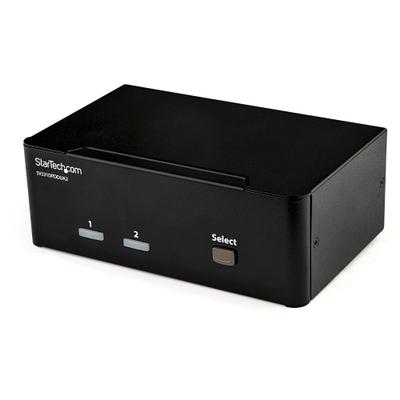
Specs and benchmarks
Capability Score
- Adder Technology Adder AdderLink IPEPS
- –
- StarTech.com StarTech SV231DPDDUA2
- 5.1/10
These are different kinds of KVM, scored on separate scales, so the two scores can't be compared directly.
Computers Supported
- Adder Technology Adder AdderLink IPEPS
- 1 computers
- StarTech.com StarTech SV231DPDDUA2
- 2 computers
Port Count
- Adder Technology Adder AdderLink IPEPS
- 1-50%
- StarTech.com StarTech SV231DPDDUA2
- 2
Displays Per Computer
- Adder Technology Adder AdderLink IPEPS
- 1 displays
- StarTech.com StarTech SV231DPDDUA2
- 2 displays
Video Standard
- Adder Technology Adder AdderLink IPEPS
- VGA
- StarTech.com StarTech SV231DPDDUA2
- DisplayPort
Max Resolution
- Adder Technology Adder AdderLink IPEPS
- 1600x1200-77%
- StarTech.com StarTech SV231DPDDUA2
- 3840x2160 @ 60HzBest
Video Path Type
- Adder Technology Adder AdderLink IPEPS
- KVM over IP
- StarTech.com StarTech SV231DPDDUA2
- Independent heads
KVM Segment
- Adder Technology Adder AdderLink IPEPS
- KVM over IP
- StarTech.com StarTech SV231DPDDUA2
- Desk
Video Connector
- Adder Technology Adder AdderLink IPEPS
- VGA
- StarTech.com StarTech SV231DPDDUA2
- DisplayPort
Brand
- Adder Technology Adder AdderLink IPEPS
- Adder
- StarTech.com StarTech SV231DPDDUA2
- StarTech
Model
- Adder Technology Adder AdderLink IPEPS
- IPEPS
- StarTech.com StarTech SV231DPDDUA2
- SV231DPDDUA2
Max Resolution Per Display
- Adder Technology Adder AdderLink IPEPS
- 1600x1200-77%
- StarTech.com StarTech SV231DPDDUA2
- 3840x2160Best


Which one should you pick?
Choose Adder Technology Adder AdderLink IPEPS if you already have it on hand or find it at a lower price.
Choose StarTech.com StarTech SV231DPDDUA2 if you want the higher port count (2 vs 1), the higher max resolution (3840x2160 @ 60Hz vs 1600x1200) and the higher max resolution per display (3840x2160 vs 1600x1200).
Price comparison
| Retailer | Adder Technology Adder AdderLink IPEPS | StarTech.com StarTech SV231DPDDUA2 |
|---|---|---|
| Amazon | $599.40 View on Amazon |
Disclaimer: The price and specification of the given product may differ from the actual product. Please confirm on the retailer's website before buying.
Verdict
Adder Technology Adder AdderLink IPEPS
7 / 10 Expert Rating
A focused, affordable way to get true remote BIOS-level access to one critical server without a full IP KVM matrix.
StarTech.com StarTech SV231DPDDUA2
8 / 10 Expert Rating
The enterprise-grade dual-monitor KVM with reliable USB hub implementation and full audio/mic support.
More comparisons in KVM Switches
- Adder Technology Adder AdderLink IPEPS vs UGREEN HDMI KVM Switch
- Adder Technology Adder AdderLink IPEPS vs IOGEAR GCS1642
- Adder Technology Adder AdderLink IPEPS vs SmartAVI SM-QKVM-S
- Adder Technology Adder AdderLink IPEPS vs IOGEAR GCS1964
- Adder Technology Adder AdderLink IPEPS vs Vertiv (Avocent) Avocent Cybex Secure SCKM140PP4-400 4-Port Desktop KVM
- Adder Technology Adder AdderLink IPEPS vs UGREEN 8K@60Hz HDMI+DisplayPort KVM Switch