
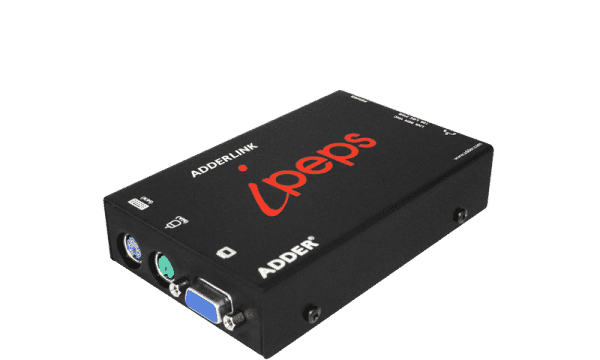
Adder AdderLink IPEPS
Expert rating7 / 10
- Video:
- VGA
- Max Resolution:
- 1600x1200
- Computers:
- 1
- Segment:
- KVM over IP
Consumercarts is reader-supported. Learn more
Disclaimer: The price and specification of the given product may differ from the actual product. Please confirm on the retailer's website before buying.
Manufacturer: Adder Technology Last updated: September 12, 2026
Where to buy
- AmazonGo to store
Adder AdderLink IPEPS Review
The Adder AdderLink IPEPS is a single-server VGA KVM-over-IP unit giving remote BIOS-level access and virtual media mounting over a standard IP network.
Unlike every other product in this batch, the IPEPS isn't a local multi-computer switch at all - it's a one-server-at-a-time IP extender for remote access to a single critical machine, the same category as a Raritan Dominion but scaled down to just one port.
One Server, Anywhere Access
The IPEPS targets a single important machine - a branch-office server or an isolated piece of lab equipment - that needs occasional remote BIOS-level troubleshooting without installing a full rack-scale IP KVM matrix.
Virtual Media Without a Matrix Switch
Remote virtual media mounting (booting the target from a remote ISO) is normally a feature reserved for expensive rack-scale IP KVMs; the IPEPS brings it down to single-server deployments at a fraction of the cost.
Comparison to Alternatives
Versus the Raritan Dominion KX III - a full multi-port IP KVM matrix managing up to 64 servers, appropriate once remote access needs to scale past one machine. Versus the Raritan Dominion KSX II - that adds serial and power-control access alongside IP KVM for up to 8 servers, a step up if more than one server needs remote reach. Versus the ATEN 2XRT-0021G - a local port-selector accessory, not a remote-IP solution at all.
Our verdict
Reviewed by Burooj Alam. Rated by us, not by users.
Expert rating7 / 10
A focused, affordable way to get true remote BIOS-level access to one critical server without a full IP KVM matrix.
Best for
- Branch offices needing remote BIOS-level access to one critical server
- Labs with a single piece of isolated equipment requiring occasional remote troubleshooting
- IT teams wanting virtual media mounting without a full rack-scale IP KVM
Not for
- Data centers managing more than one remote server (see the Dominion KX III or KSX II)
- Local desk switching between multiple co-located computers
- Buyers needing serial console or power-control access (see the Dominion KSX II)
Specifications
What these specs meanIdentity
| Brand | Adder |
|---|---|
| Model Number | IPEPS |
| Switching Method | IP-based remote access (single-computer KVM over IP) |
Topology
| Computers Supported | 1 computers |
|---|---|
| Displays Per Computer | 1 displays |
| Video Path Type | KVM over IP |
| KVM Segment | KVM over IP |
Video & Features
| Video Standard | VGA |
|---|---|
| Max Resolution | 1600x1200 |
Video interface
| Video Connector | VGA |
|---|---|
| Video Interface Version | VGA |
Per display capability
| Max Resolution Single Display | 1600x1200 |
|---|
Switching control
| Serial Or Network Control | IP KVM |
|---|
In the box and price
| Price | 599.40 USD |
|---|
FAQs
What are the key specifications of the Adder AdderLink IPEPS (IPEPS) (1 Server / IP-Based Remote KVM over IP / Single-Port Extender)?
Key specs for the Adder AdderLink IPEPS: Max Resolution 1600x1200, Max Resolution Per Display 1600x1200, Computers Supported 1 computers, Displays Per Computer 1 displays, Switching Method IP-based remote access (single-computer KVM over IP), Video Standard VGA.
Who is the Adder AdderLink IPEPS (IPEPS) (1 Server / IP-Based Remote KVM over IP / Single-Port Extender) best suited to?
Best suited to: Branch offices needing remote BIOS-level access to one critical server; Labs with a single piece of isolated equipment requiring occasional remote troubleshooting; IT teams wanting virtual media mounting without a full rack-scale IP KVM.
What are the drawbacks of the Adder AdderLink IPEPS (IPEPS) (1 Server / IP-Based Remote KVM over IP / Single-Port Extender)?
Not the best fit for: Data centers managing more than one remote server (see the Dominion KX III or KSX II); Local desk switching between multiple co-located computers; Buyers needing serial console or power-control access (see the Dominion KSX II).
Featured in
Compare and read more
- Adder AdderLink IPEPS (IPEPS) (1 Server / IP-Based Remote KVM over IP / Single-Port Extender) vs CKL CKL-42MVKVM-A (4x2 Multi-Viewer HDMI KVM Switch / Dual Monitor / 4K@30Hz)
- Adder AdderLink IPEPS (IPEPS) (1 Server / IP-Based Remote KVM over IP / Single-Port Extender) vs UGREEN 8K@60Hz HDMI+DisplayPort KVM Switch (3 Monitors, 2 Computers, Aluminum)
- Adder AdderLink IPEPS (IPEPS) (1 Server / IP-Based Remote KVM over IP / Single-Port Extender) vs Level1Techs USB-C KVM Switch v3 (USB-C / 2 Computers / 1 Monitor / DisplayPort 1.4 / 135W PSU)
- Adder AdderLink IPEPS (IPEPS) (1 Server / IP-Based Remote KVM over IP / Single-Port Extender) vs Adder AV4PRO-VGA-Quad (4-Port / 4 Monitors / VGA Quad-Head KVM)
- Adder AdderLink IPEPS (IPEPS) (1 Server / IP-Based Remote KVM over IP / Single-Port Extender) vs AdderView DDX10 (1-9 Port Matrix KVM)
- Does a KVM Switch Work With Two Different Monitors?
- Best KVM Switches (2026 Buying Guide)