
Consumercarts is reader-supported. Learn more
Adder Technology Adder ADDERView PRO vs StarTech.com StarTech SV1631DUSBU: Comparison
Adder Technology Adder ADDERView PRO has the higher maximum resolution (2560x1600 vs 1920x1440). Adder Technology Adder ADDERView PRO also has the higher maximum resolution (2560x1600 vs 1920x1440). They match on usb hub ports and max refresh at max resolution.
Pick the Adder Technology Adder ADDERView PRO if that matters to you: higher maximum resolution (2560x1600 vs 1920x1440), so it can pass through a sharper or faster display. Match the switch's video ports to your monitor's inputs to avoid adapters.
Which is better, Adder Technology Adder ADDERView PRO or StarTech.com StarTech SV1631DUSBU?
On paper, Adder Technology Adder ADDERView PRO has the edge on max resolution, at 2560x1600 vs StarTech.com StarTech SV1631DUSBU at 1920x1440.
What is the main difference between Adder Technology Adder ADDERView PRO and StarTech.com StarTech SV1631DUSBU?
The Adder Technology Adder ADDERView PRO is the stronger choice on paper: it has higher maximum resolution (2560x1600 vs 1920x1440), so it can pass through a sharper or faster display.
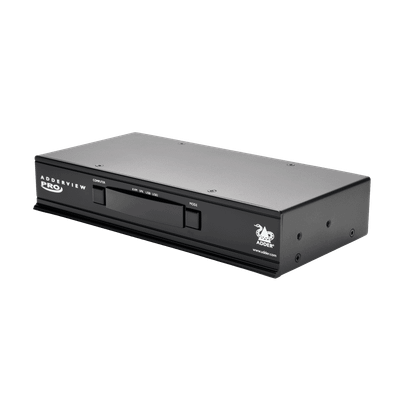
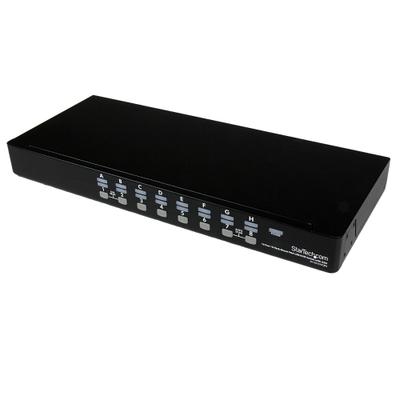
Specs and benchmarks
Capability Score
- Adder Technology Adder ADDERView PRO
- 4.0/10
- StarTech.com StarTech SV1631DUSBU
- 5.3/10
These are different kinds of KVM, scored on separate scales, so the two scores can't be compared directly.
Switching Method
- Adder Technology Adder ADDERView PRO
- Front-panel buttons, keyboard hotkeys, three-button mouse, RS232, optional RC4 remote
- StarTech.com StarTech SV1631DUSBU
- Button, Hotkey
Video Standard
- Adder Technology Adder ADDERView PRO
- DVI
- StarTech.com StarTech SV1631DUSBU
- VGA
Max Resolution
- Adder Technology Adder ADDERView PRO
- 2560x1600 @ 60HzBest
- StarTech.com StarTech SV1631DUSBU
- 1920 x 1440 @ 60Hz (1920 x 1200 widescreen)-32%
USB Hub Ports
- Adder Technology Adder ADDERView PRO
- 2
- StarTech.com StarTech SV1631DUSBU
- 2
Audio Support
- Adder Technology Adder ADDERView PRO
- Yes
- StarTech.com StarTech SV1631DUSBU
- No
KVM Segment
- Adder Technology Adder ADDERView PRO
- Desk
- StarTech.com StarTech SV1631DUSBU
- Rack
Max Refresh At Max Resolution
- Adder Technology Adder ADDERView PRO
- 60 HzBest
- StarTech.com StarTech SV1631DUSBU
- 60 Hz-32%
Max Resolution Per Display
- Adder Technology Adder ADDERView PRO
- 2560x1600Best
- StarTech.com StarTech SV1631DUSBU
- 1920x1440-32%


Which one should you pick?
Choose Adder Technology Adder ADDERView PRO if you want the higher max resolution (2560x1600 @ 60Hz vs 1920 x 1440 @ 60Hz (1920 x 1200 widescreen)), the higher USB hub ports (2 vs 2) and the higher max refresh at max resolution (60 Hz vs 60 Hz).
Choose StarTech.com StarTech SV1631DUSBU if you already have it on hand or find it at a lower price.
Price comparison
| Retailer | Adder Technology Adder ADDERView PRO | StarTech.com StarTech SV1631DUSBU |
|---|---|---|
| Amazon | $540.00 View on Amazon | |
| Insight | View on Insight |
Disclaimer: The price and specification of the given product may differ from the actual product. Please confirm on the retailer's website before buying.
Verdict
Adder Technology Adder ADDERView PRO
7 / 10 Expert Rating
An affordable way to add isolated switching to a 4-port DVI desk without paying for certification or multiviewer features.
StarTech.com StarTech SV1631DUSBU
6.9 / 10 Expert Rating
A 16-port 1U rackmount VGA KVM with OSD, StarTech's dependable small-office/server-room staple for larger PC counts.
More comparisons in KVM Switches
- Adder Technology Adder ADDERView PRO vs Black Box KVS4-8001VX
- Adder Technology Adder ADDERView PRO vs ATEN CS1732B
- Adder Technology Adder ADDERView PRO vs ATEN CS1144DP4
- Adder Technology Adder ADDERView PRO vs UGREEN 8K@60Hz HDMI+DisplayPort KVM Switch
- Adder Technology Adder ADDERView PRO vs CKL CKL-42MVKVM-A
- Adder Technology Adder ADDERView PRO vs Raloy RK119UHD-4KHDMIKVM
Compare Adder Technology Adder ADDERView PRO with
- Adder Technology Adder ADDERView PRO vs Adder AV4PRO-DP (4-Port DisplayPort KVM Switch / USB 2.0 / Audio)
- Adder Technology Adder ADDERView PRO vs Black Box ServSwitch KV9702A (DisplayPort / 2 Computers / Desktop Enterprise)
- Adder Technology Adder ADDERView PRO vs CKL CKL-822UA-3 (2-Port Dual Monitor VGA KVM Switch / 2048x1536)
- Adder Technology Adder ADDERView PRO vs IOGEAR GCS1204 (USB Dual-Link DVI / 4 Computers / 2560x1600 / Audio)