
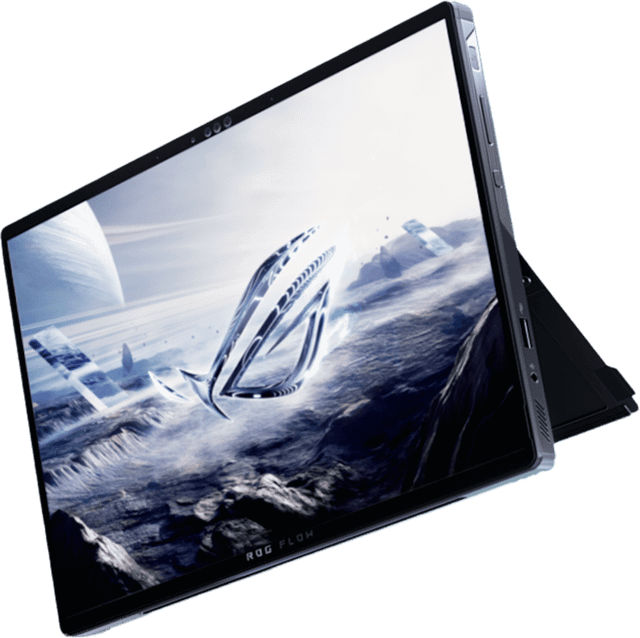
ASUS ROG Flow Z13
- CPU:
- Ryzen AI Max+ 395
- GPU:
- AMD Radeon 8060S
- RAM:
- 32GB LPDDR5X
- Display:
- 13.4" 2560x1600 IPS 180Hz
Upgrade and repair this laptop
Consumercarts is reader-supported. Learn more
Disclaimer: The price and specification of the given product may differ from the actual product. Please confirm on the retailer's website before buying.
Manufacturer: ASUS Last updated: 2026-09-30
Where to buy
- AmazonGo to store
- NeweggGo to store
ASUS ROG Flow Z13 Review
The ASUS ROG Flow Z13 (2025) GZ302EA is a 13.4-inch detachable 2-in-1 from 2025 built around the AMD Ryzen AI Max+ 395. The screen is a 2560x1600 IPS panel at 180Hz. It weighs 1.20 kg.
The strengths: 32GB of memory the GPU can share, a 16-core processor for heavy work, a color-accurate screen and a tablet that doubles as a gaming laptop. What holds it back: soldered memory and no Thunderbolt.
Processor performance
Measurements come from NotebookCheck's review unit GZ302EA-RU073W with the Ryzen AI Max+ 395, Radeon 8060S and 32GB of RAM.
The AMD Ryzen AI Max+ 395 has 16 cores and 32 threads, boosting to 5.1 GHz. That is desktop-class multi-core power: 4K and 8K editing, big code builds and 3D rendering all run well. Its NPU is rated at 50 TOPS for on-device AI features.
NotebookCheck measured about 70W of sustained CPU power in this chassis. The chassis limit, not the chip rating, is what decides long render times. Across the 9 systems NotebookCheck has tested with the AMD Ryzen AI Max+ 395, it averages 1,791 points in Cinebench 2024 multi-core (range 1,648 to 1,912) and 115.4 single-core. Where this laptop lands in that range depends on how much power it lets the chip draw.
Graphics and gaming
There is no separate graphics card: the AMD Radeon 8060S (40 compute units) is built into the processor and draws on the same 32GB memory pool. That is unusual: it gives the GPU far more memory than a typical laptop graphics card, which helps local AI models and large scenes.
Because the 32GB of RAM is shared with the GPU, the owner can set how much becomes dedicated VRAM (up to 24GB on this SKU); ASUS suggests 8GB, and giving too much to the GPU can slow down memory-hungry work like video export.
Gaming (average across systems). These are NotebookCheck's average frame rates for the AMD Radeon 8060S across every system it has tested with this GPU, not this laptop alone. Power limits differ between laptops, so this one can land above or below the average.
| Game | Settings | Average fps | Systems tested |
|---|---|---|---|
| Cyberpunk 2077 | High, 1080p | 94 | 10 |
| Cyberpunk 2077 | Ultra, 1080p | 84 | 10 |
| Cyberpunk 2077 | Ultra, 1440p | 52 | 9 |
| Baldur's Gate 3 | Ultra, 1080p | 96 | 10 |
| Baldur's Gate 3 | Ultra, 1440p | 66 | 9 |
| F1 24 | High, 1080p | 178 | 9 |
| Black Myth: Wukong | Ultra, 1080p | 28 | 7 |
Memory, storage and upgrades
Memory: fixed. 32GB of LPDDR5X-8000 is soldered to the board, so buy the amount you will need for the life of the laptop; configurations go up to 128GB.
Storage: replaceable. One M.2 slot, already in use (M.2 2230), PCIe 4.0 NVMe.
Only the M.2 2230 SSD can be reached, through a small service hatch.
Display
The 13.4-inch IPS panel runs at 2560x1600 (225 pixels per inch) and 180Hz, with touch. It is rated at 500 nits. NotebookCheck measured 489 nits and 1,727:1 contrast. Color coverage is 99.6% sRGB and 100% P3, good enough for photo and video work. Response time is 4.2 ms, so motion stays sharp. No PWM flicker was detected.
Tablet and keyboard
The keyboard cover snaps on magnetically and comes off when you want a tablet. Pen: Stylus supported (ASUS Pen SA203H, MPP 2.0).
The kickstand opens to 170 degrees and holds position well, although the hinges wobble slightly when the screen is touched.
Thermals and noise
NotebookCheck measured 45.4 dB(A) under load and 23.6 dB(A) at idle. You will hear it, but it is not intrusive. The hottest surface reached 44.9 °C.
Battery life
The battery is 70Wh, smaller than 69% of the gaming laptops we list. NotebookCheck got 9 hours 20 minutes of Wi-Fi browsing and 12 hours 44 minutes of video playback, but only 51 minutes under full load. A full charge takes about 1 hour 39 minutes. ASUS's own battery rating: up to 10+ hours. Fast charging: Measured 0 to 60% in 32 minutes and 80% in about 48 minutes with the 200W adapter.
Design and build
Materials: Aluminum chassis with anti-fingerprint coating. At 1.20 kg it is lighter than every other gaming laptop we list. It measures 300 x 204 x 13.0-14.9 mm.
Keyboard and touchpad
The magnetic keyboard cover comes in the box, sits flat or at a slight angle, and types a little firmer and more precisely than the previous model thanks to a stiffer build and slightly larger keycaps. The backlight is 1-zone RGB, three brightness levels.
The clickpad on the keyboard cover grew to about 12.8 x 7.2 cm, glides smoothly with reliable gestures, and its only real flaw is a loud click. Sign-in: IR face recognition (Windows Hello).
Ports and connectivity
There is no Thunderbolt, but 2x USB4 40Gbps ports cover most of the same docks and fast drives. It charges over USB-C.
Full list: 2x USB4 Type-C (40Gbps, DisplayPort and power delivery), 1x USB 3.2 Gen 2 Type-A (10Gbps), 1x HDMI 2.1 FRL, 1x microSD card reader, 1x 3.5mm combo audio jack, XG Mobile interface support. Wireless: Wi-Fi 7 and Bluetooth 5.4.
Webcam, speakers and extras
Webcam: 5MP front IR camera plus 13MP rear camera. Speakers: 2x 2W with Smart Amp, Dolby Atmos.
The two speakers are thin and not very loud, making them one of the weakest parts of the package.
Which configuration to buy
The ASUS ROG Flow Z13 (2025) GZ302EA name covers several builds. Processors: AMD Ryzen AI Max 390 and AMD Ryzen AI Max+ 395. Graphics: AMD Radeon 8050S and AMD Radeon 8060S. Memory: 32GB, 64GB or 128GB LPDDR5X-8000 on board (unified memory; 64GB SKUs can allocate up to 48GB to the GPU and 128GB SKUs up to 96GB). Check the exact configuration on the listing before you buy.
As of September 2026 the GZ302 (2025) is still the current Flow Z13 on ASUS's US store, and the only newer variant found is the January 2026 Flow Z13-KJP special edition, which keeps the same Ryzen AI Max+ 395 and Radeon 8060S rather than moving to a new generation.
Alternatives to consider
- ASUS TUF Gaming A16 (2025) FA608UM-NS73: Ryzen 7 260, heavier at 2.20 kg, a bigger 90Wh battery and upgradeable RAM.
- Razer Blade 16 (2025), Ryzen AI 9 HX 370, RTX 5090, 64GB, 2TB: Ryzen AI 9 HX 370, heavier at 2.14 kg, a 16-inch screen and GeForce RTX 50 series graphics.
- MSI Katana 15 HX B14WGK (Core i9 HX, RTX 5070, 16GB): Intel Core i9 HX (14th Gen), heavier at 2.40 kg, upgradeable RAM and a 15.6-inch screen.
Other things to know
- The keyboard cover attaches magnetically, stays on when the tablet is lifted, and doubles as a screen protector, but the tablet plus cover weighs about 1.62 kg and measures around 20 mm thick, heavier than some 14-inch gaming laptops.
Sources
Measurements come from NotebookCheck's review unit GZ302EA-RU073W with the Ryzen AI Max+ 395, Radeon 8060S and 32GB of RAM.
Our verdict
Reviewed by Burooj Alam. Rated by us, not by users.
Best for
- Gaming and creative work on a tablet you can carry
- Photo and video editing on the built-in screen
- Carrying every day
Not for
- Anyone who wants to upgrade memory later
Specifications
What these specs meanIdentity and variant
| Brand | ASUS |
|---|---|
| Series | ROG Flow Z13 |
| Series ID | asus-rog-flow-z13-2025-gz302 |
| SKU Name | ASUS ROG Flow Z13 (2025) GZ302EA (Ryzen AI Max+ 395, 32GB) |
| Chassis Code | GZ302EA |
| Region Sold | Global |
Class and platform
| Laptop Class | Gaming |
|---|---|
| Release Year | 2025 |
| Operating System | Windows 11 Home |
| Weight | 1.2 kg |
Processor
| CPU Brand | AMD |
|---|---|
| CPU Model | Ryzen AI Max+ 395 |
| CPU Cores | 16 |
Sustained power
| Sustained CPU Power | 70 W |
|---|---|
| Sustained Power Source | Third Party Review |
| Power Adapter Wattage | 200 W |
Graphics
| GPU Brand | AMD |
|---|---|
| GPU Model | AMD Radeon 8060S |
| Graphics Switching | Integrated Only |
Memory
| RAM Capacity | 32 GB |
|---|---|
| RAM Type | LPDDR5X |
| RAM Speed | 8000 MT/s |
| Memory Form Factor | Soldered |
| Memory Soldered | Yes |
| Max RAM Supported | 128 GB |
Upgradability
| RAM Slots | 0 |
|---|---|
| RAM Slots Free | 0 |
| Storage Slots | 1 |
| Storage Slots Free | 0 |
| Storage Form Factor | M.2 2230 |
| Storage Interface | PCIe 4.0 x4 |
| SATA Bay Present | No |
Storage as shipped
| Storage Capacity | 1000 GB |
|---|---|
| Storage Type | NVMe SSD |
Display
| Display Size | 13.4 inches |
|---|---|
| Resolution Width | 2560 px |
| Resolution Height | 1600 px |
| Refresh Rate | 180 Hz |
| Panel Type | IPS |
| Brightness | 500 nits |
| Brightness Condition | SDR Typical |
| sRGB Coverage | 99.6 % |
| Touchscreen | Yes |
Battery and ports
| Battery Capacity | 70 Wh |
|---|---|
| Battery Life Light Load | 9.3 hours |
| Thunderbolt Support | USB4 |
| WiFi Standard | WiFi 7 |
FAQs
Is the RAM upgradeable on the ASUS ROG Flow Z13 (2025) GZ302EA?
No, it is fixed at purchase; the largest option is 128GB.
Is there room for another SSD?
There is no free slot, but the existing SSD can be swapped for a larger one.
How many hours does the ASUS ROG Flow Z13 (2025) GZ302EA last on battery?
9 hours 20 minutes of Wi-Fi browsing in NotebookCheck's test, and about 51 minutes under full load.
Does it have Thunderbolt?
No Thunderbolt, but it has 2x USB4 40Gbps, which works with most USB4 and many Thunderbolt docks.
Is the screen good for photo editing?
Yes. It covers 99.6% of sRGB and 100% of P3.
How powerful is the charger?
A 200W adapter. It can also charge from a USB-C charger.
How much does the ASUS ROG Flow Z13 (2025) GZ302EA weigh?
1.20 kg.