
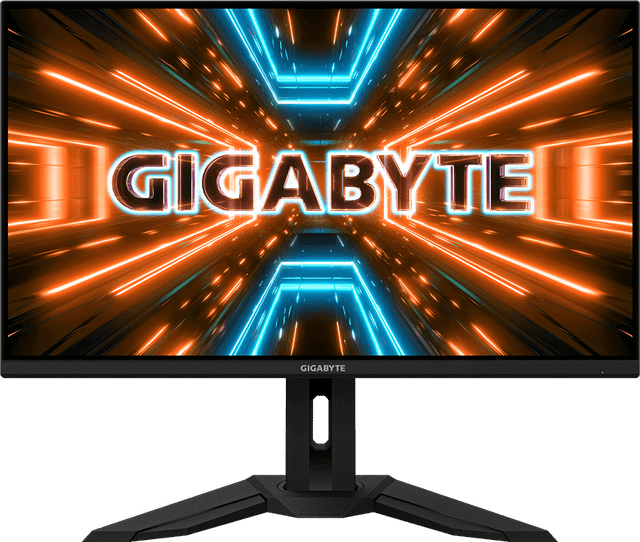
Gigabyte M32U
Expert rating8.8 / 10
- Panel:
- 32-inch IPS 4K
- Refresh Rate:
- 144Hz
- Response Time:
- 1ms MPRT
Consumercarts is reader-supported. Learn more
Disclaimer: The price and specification of the given product may differ from the actual product. Please confirm on the retailer's website before buying.
Manufacturer: Gigabyte Last updated: 2026-09-12
Gigabyte M32U (32-Inch 4K IPS/144Hz/1ms MPRT/94% DCI-P3/HDR400/USB-C 65W KVM) Review
Gigabyte M32U 32-inch 4K IPS gaming monitor with 144Hz refresh rate, 1ms MPRT response time, HDMI 2.1, built-in KVM and 65W USB-C, one of the best value flagship 4K gaming monitors.
The M32U became a favorite among enthusiast reviewers almost immediately for undercutting name-brand 4K/144Hz competitors by a significant margin while matching or beating their feature sets. It's the monitor that made 32-inch 4K/144Hz gaming genuinely affordable rather than a luxury purchase, and years later it remains a benchmark other budget 4K monitors are measured against.
Why It Still Holds Up
The combination of 4K resolution, 144Hz refresh, full HDMI 2.1 bandwidth, and a built-in KVM switch at its price point is still hard to match. Factory calibration is respectable for a gaming-first monitor, and the anti-glare coating handles bright rooms well.
Where It Falls Short
DisplayHDR 400 remains the weakest link, offering minimal real HDR benefit, and the stand, while functional, feels less premium than Gigabyte's AORUS-branded models. Some units have reported minor backlight bleed, a common IPS-panel tradeoff.
Comparison to Alternatives
Against the Gigabyte M32UC, the M32U trades VA's deeper contrast and curved format for IPS's flat design and more consistent off-axis color. Compared to the Samsung Odyssey G7 32-inch, the M32U offers 4K sharpness for productivity and single-player gaming, while the Samsung's 240Hz QHD panel is the better pick for competitive esports.
Specifications
Identity
| Brand | Gigabyte |
|---|---|
| Model Number | M32U |
Panel
| Panel Type | IPS |
|---|---|
| Screen Size | 32 in |
| Resolution | 3840 x 2160 (4K UHD) |
| Aspect Ratio | 16:9 |
Performance
| Refresh Rate | 144 Hz |
|---|---|
| Response Time | 1ms (MPRT) |
| Adaptive Sync | AMD FreeSync Premium Pro, G-Sync Compatible |
| Series | Gigabyte Gaming M32U |
|---|---|
| Color Gamut | ~94% DCI-P3 |
| HDR Formats | VESA DisplayHDR 400 |
| Connectivity | USB-C (65W Power Delivery), HDMI 2.1, Built-In KVM |
Expert Review
Reviewed by Burooj Alam. Rated by us, not by users.
Expert rating8.8 / 10
One of the best value 32-inch 4K/144Hz gaming monitors available, combining strong specs with genuinely useful connectivity.
Best for
- Buyers wanting affordable 4K/144Hz gaming
- Console and PC hybrid setups via HDMI 2.1
- Desks needing a built-in KVM switch
Not for
- Buyers wanting deep local-dimming HDR
- Competitive esports players prioritizing refresh rate over resolution
- Extremely space-constrained desks
FAQs
What are the key specifications of the Gigabyte M32U (32-Inch 4K IPS/144Hz/1ms MPRT/94% DCI-P3/HDR400/USB-C 65W KVM)?
The Gigabyte M32U (32-Inch 4K IPS/144Hz/1ms MPRT/94% DCI-P3/HDR400/USB-C 65W KVM) is a monitor from Gigabyte. Key specs: Panel Type IPS, Screen Size 32, Aspect Ratio 16:9, Resolution 3840 x 2160 (4K UHD), Refresh Rate 144Hz.
Will the Gigabyte M32U (32-Inch 4K IPS/144Hz/1ms MPRT/94% DCI-P3/HDR400/USB-C 65W KVM) work with my current setup?
The Gigabyte M32U (32-Inch 4K IPS/144Hz/1ms MPRT/94% DCI-P3/HDR400/USB-C 65W KVM) lists Panel Type is IPS. Check that against the hardware you already own before buying, since this is the field that most often decides whether a part fits.
Who is the Gigabyte M32U (32-Inch 4K IPS/144Hz/1ms MPRT/94% DCI-P3/HDR400/USB-C 65W KVM) best suited to?
It suits buyers wanting affordable 4k/144hz gaming, console and pc hybrid setups via hdmi 2.1, desks needing a built-in kvm switch.
What are the drawbacks of the Gigabyte M32U (32-Inch 4K IPS/144Hz/1ms MPRT/94% DCI-P3/HDR400/USB-C 65W KVM)?
It is a poor fit for buyers wanting deep local-dimming hdr, competitive esports players prioritizing refresh rate over resolution, extremely space-constrained desks.
Compare and read more
- AOC AGON PRO AG276QSG2 (27-Inch QHD Mini-LED IPS/300Hz/1ms/98% DCI-P3/G-Sync Ultimate/1152-Zone Backlight) vs Gigabyte M32U (32-Inch 4K IPS/144Hz/1ms MPRT/94% DCI-P3/HDR400/USB-C 65W KVM)
- Acer Predator XB273U GX (27-Inch QHD IPS/270Hz/0.5ms/95% DCI-P3/HDR10/NVIDIA Reflex Latency Analyzer) vs Gigabyte M32U (32-Inch 4K IPS/144Hz/1ms MPRT/94% DCI-P3/HDR400/USB-C 65W KVM)
- Acer Predator XB273U (27-Inch QHD IPS/170Hz/1ms GTG/95% DCI-P3/G-Sync Compatible) vs Gigabyte M32U (32-Inch 4K IPS/144Hz/1ms MPRT/94% DCI-P3/HDR400/USB-C 65W KVM)
- Acer Nitro XV320QU (32-Inch QHD IPS/170Hz/1ms VRB/95%+ DCI-P3/HDR10/KVM Switch) vs Gigabyte M32U (32-Inch 4K IPS/144Hz/1ms MPRT/94% DCI-P3/HDR400/USB-C 65W KVM)
- AOC 27G4X (27-Inch QHD IPS/180Hz/1ms MPRT/Standard Gamut/HDR10/Budget High-Refresh Value) vs Gigabyte M32U (32-Inch 4K IPS/144Hz/1ms MPRT/94% DCI-P3/HDR400/USB-C 65W KVM)