
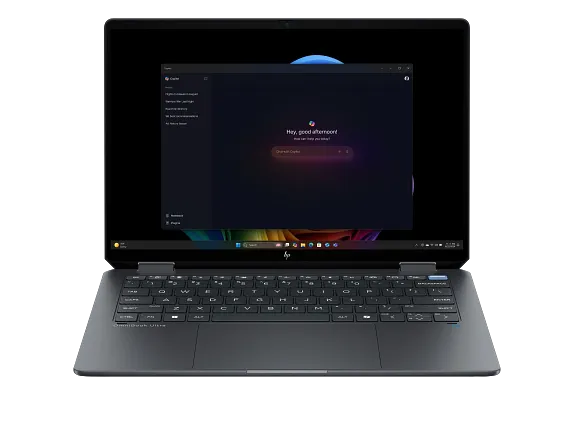
HP OmniBook Ultra Flip 14
- CPU:
- Core Ultra 7 258V
- GPU:
- Intel Arc 140V
- RAM:
- 32GB LPDDR5X
- Display:
- 14" 2880x1800 OLED 120Hz
Upgrade and repair this laptop
Consumercarts is reader-supported. Learn more
Disclaimer: The price and specification of the given product may differ from the actual product. Please confirm on the retailer's website before buying.
Manufacturer: HP Last updated: 2026-09-30
Where to buy
- AmazonGo to store
HP OmniBook Ultra Flip 14 Review
The HP OmniBook Ultra Flip 14 is a 14-inch 2-in-1 convertible from 2024 built around the Intel Core Ultra 7 258V. It uses a 2880x1800 OLED panel at 120Hz. It weighs 1.34 kg.
Where it shines: an OLED screen and long battery life (14 hours of Wi-Fi browsing). What holds it back: soldered memory.
Processor performance
Measurements come from NotebookCheck's review unit with the Core Ultra 7 258V, 32GB of RAM and a 2TB SSD (the review text calls it 16GB, but its spec table lists 32GB).
The Intel Core Ultra 7 258V has 8 cores (4 performance and 4 efficiency), boosting to 4.8 GHz. The focus is efficiency. Office apps, browsing and light editing feel quick, but long 4K exports take far longer than on H-series processors. Its NPU is rated at 47 TOPS for on-device AI features.
NotebookCheck measured about 29W of sustained CPU power in this chassis. Makers publish the chip rating, but this sustained figure is what long exports actually get. Across the 24 systems NotebookCheck has tested with the Intel Core Ultra 7 258V, it averages 555 points in Cinebench 2024 multi-core (range 406 to 660) and 118.7 single-core. Where this laptop lands in that range depends on how much power it lets the chip draw. Under a sustained Prime95 load in Performance mode the CPU briefly hits 38 W and 99 C, then settles near 29 W and 88 C, while Balanced mode drops it to about 22 W.
PugetBench (creative apps). These are Puget Systems' public results for the Intel Core Ultra 7 258V in its standard test, pooled across every system it was tested in, so this laptop's power limits can move them up or down. Higher is better.
| App | PugetBench score | Results |
|---|---|---|
| DaVinci Resolve | 21,202 | 11 |
| Photoshop | 6,860 | 185 |
| Lightroom Classic | 4,684 | 12 |
Graphics and gaming
Graphics come from the integrated Intel Arc Graphics 140V. It handles video playback, photo edits and lighter or older games at modest settings.
Fan noise stays very low, at just under 28 dB(A) in light loads and around 34 dB(A) while gaming, and the keyboard deck and underside peak at only 36 to 38 C.
Gaming (average across systems). These are NotebookCheck's average frame rates for the Intel Arc Graphics 140V across every system it has tested with this GPU, not this laptop alone. Power limits differ between laptops, so this one can land above or below the average.
| Game | Settings | Average fps | Systems tested |
|---|---|---|---|
| Cyberpunk 2077 | Medium, 1080p | 36 | 41 |
| Cyberpunk 2077 | High, 1080p | 30 | 43 |
| Baldur's Gate 3 | Medium, 1080p | 32 | 38 |
| Baldur's Gate 3 | High, 1080p | 28 | 39 |
| F1 24 | High, 1080p | 57 | 28 |
| GTA V | High, 1080p | 61 | 33 |
Memory, storage and upgrades
Memory: fixed. 32GB of LPDDR5x-8533 is soldered to the board, so buy the amount you will need for the life of the laptop.
Storage: replaceable. One M.2 slot, already in use (M.2), PCIe 4.0 x4 NVMe.
Display
The 14-inch OLED panel runs at 2880x1800 (243 pixels per inch) and 120Hz, with touch. It is rated at 400 nits. NotebookCheck measured 363.9 nits with the near-infinite contrast OLED is known for. Color coverage is 100% sRGB and 100% P3, good enough for photo and video work. Response time is 1 ms, so motion stays sharp. The panel flickers at 469 Hz (PWM) at lower brightness, which matters if you are sensitive to it.
The 120 Hz OLED covers essentially all of DCI-P3 with very accurate colors, but it ships set to sRGB, reaches only about 364 nits in SDR, and uses 469 Hz PWM dimming, so outdoor use is merely decent.
Tablet mode and pen
The 360-degree hinge gives four modes: laptop, tent, stand and tablet. It is light enough to hold as a tablet for short sessions. Pen: Native pen support.
The retail box NotebookCheck received included an active stylus, and the touchscreen has native pen support, but HP's own Q&A notes that some US SKUs such as the 14-fh0047nr ship without a pen.
Thermals and noise
NotebookCheck measured 43.4 dB(A) under load and 23.2 dB(A) at idle. You will hear it, but it is not intrusive. The hottest surface reached 37.6 °C.
Battery life
The battery is 64Wh, larger than 54% of the 2-in-1 convertible laptops we list. NotebookCheck got 14 hours of Wi-Fi browsing. A full charge takes about 1 hour 30 minutes. HP's own battery rating: Up to 16 h 15 min mixed use and up to 20 h 30 min video playback (HP, 14-fh0047nr). Fast charging: About 50% in 45 minutes (HP claim).
Design and build
Materials: Mostly aluminum alloy chassis. At 1.34 kg it is lighter than every other 2-in-1 convertible laptop we list. It measures 313.7 x 216.2 x 14.9 mm. HP describes a 360-degree hinge with four usage modes, and the accelerometer, gyroscope and magnetometer handle screen rotation in tablet use.
The smooth aluminum chassis borrows the diamond-cut rear corners of the Spectre x360 14 and weighs about 1.34 kg, lighter than most 14-inch convertibles it competes with.
Keyboard and touchpad
The keyboard uses the same layout as the OmniBook Ultra 14 clamshell, so typing feels essentially identical to that model.
The haptic clickpad measures about 13.9 x 8.8 cm, which is roomier than the clamshell version, but its travel is very shallow and its feedback is weak and quiet, so clicks feel unsatisfying. Sign-in: IR camera for face login; fingerprint reader listed on HP's US spec sheet.
Ports and connectivity
It has 2x Thunderbolt 4, which runs docks, fast external drives and displays over one cable. It charges over USB-C.
Full list: 2x USB-C Thunderbolt 4 (40 Gbps, Power Delivery, DisplayPort 2.1), 1x USB-C 10 Gbps, 1x 3.5 mm headphone/microphone combo. Wireless: Intel Wi-Fi 7 BE201 and Bluetooth 5.4.
Only the battery and the M.2 SSD are replaceable behind four Torx screws, since the RAM and Wi-Fi module are soldered, and the ports are all USB-C with no USB-A.
Webcam, speakers and extras
Webcam: 9 MP IR camera with temporal noise reduction, dual array microphones and a physical privacy shutter. Speakers: Quad speakers, Poly Studio tuning, DTS:X Ultra.
Which configuration to buy
The HP OmniBook Ultra Flip 14 name covers several builds. Processors: Intel Core Ultra 9 288V, Intel Core Ultra 7 258V, Intel Core Ultra 7 256V and Intel Core Ultra 5 226V. Memory: 16 GB or 32 GB LPDDR5x-8533 onboard (max 32 GB). Check the exact configuration on the listing before you buy.
HP still sells this Lunar Lake 14-fh0000 model on its US store, and no Flip successor turned up in search, although HP has launched a redesigned Panther Lake OmniBook Ultra 14 clamshell for 2026.
Alternatives to consider
- HP Spectre x360 14 2024 (Core Ultra 7 155H, 16GB, 1TB): Core Ultra 7 155H, a similar 1.36 kg.
- ASUS ProArt PX13 (Ryzen AI 9 HX 370, RTX 4050, 32GB): Ryzen AI 9 HX 370, heavier at 1.50 kg, a 13.3-inch screen and GeForce RTX 40 series graphics.
- Lenovo Yoga 7 2-in-1 16AKP10 (Ryzen AI 7 350, 32GB, OLED): AMD Ryzen AI 7 350 and a 16-inch screen.
Sources
Measurements come from NotebookCheck's review unit with the Core Ultra 7 258V, 32GB of RAM and a 2TB SSD (the review text calls it 16GB, but its spec table lists 32GB).
- NotebookCheck: HP OmniBook Ultra Flip 14 convertible review: Lighter than expected
- HP Support: HP OmniBook Ultra Flip 14 inch 2-in-1 Laptop Next Gen AI PC 14-fh0000 series specifications
- HP US Store: HP OmniBook Ultra Flip Laptop 14-fh0047nr
- HP Tech Takes (HK): HP OmniBook Ultra Flip 14 for mobile professionals
- Thurrott: HP OmniBook Ultra First Impressions (Panther Lake, 2026)
- Puget Systems PugetBench public results
Our verdict
Reviewed by Burooj Alam. Rated by us, not by users.
Best for
- Photo and video editing on the built-in screen
- A full day away from the charger
- Presenting, note taking and pen input
Not for
- Anyone who wants to upgrade memory later
Specifications
What these specs meanIdentity and variant
| Brand | HP |
|---|---|
| Series | OmniBook Ultra Flip 14 |
| Series ID | hp-omnibook-ultra-flip-14-fh0000 |
| SKU Name | HP OmniBook Ultra Flip 14 (Core Ultra 7 258V, 32GB, 2TB, 2.8K OLED) |
| Chassis Code | 14-fh0000 |
| Region Sold | Global |
Class and platform
| Laptop Class | 2-in-1 Convertible |
|---|---|
| Release Year | 2024 |
| Operating System | Windows 11 Home |
| Weight | 1.336 kg |
Processor
| CPU Brand | Intel |
|---|---|
| CPU Model | Core Ultra 7 258V |
| CPU Cores | 8 |
Sustained power
| Sustained CPU Power | 29 W |
|---|---|
| Sustained Power Source | Third Party Review |
| Power Adapter Wattage | 65 W |
Graphics
| GPU Brand | Intel |
|---|---|
| GPU Model | Intel Arc 140V |
| Graphics Switching | Integrated Only |
Memory
| RAM Capacity | 32 GB |
|---|---|
| RAM Type | LPDDR5X |
| RAM Speed | 8533 MT/s |
| Memory Form Factor | Soldered |
| Memory Soldered | Yes |
| Max RAM Supported | 32 GB |
Upgradability
| RAM Slots | 0 |
|---|---|
| RAM Slots Free | 0 |
| Storage Slots | 1 |
| Storage Slots Free | 0 |
| Storage Form Factor | M.2 2280 |
| Storage Interface | PCIe 4.0 x4 |
| SATA Bay Present | No |
Storage as shipped
| Storage Capacity | 2000 GB |
|---|---|
| Storage Type | NVMe SSD |
Display
| Display Size | 14 inches |
|---|---|
| Resolution Width | 2880 px |
| Resolution Height | 1800 px |
| Refresh Rate | 120 Hz |
| Panel Type | OLED |
| Brightness | 400 nits |
| Brightness Condition | SDR Typical |
| sRGB Coverage | 100 % |
| Touchscreen | Yes |
Battery and ports
| Battery Capacity | 64 Wh |
|---|---|
| Battery Life Light Load | 14 hours |
| Thunderbolt Support | Thunderbolt 4 |
| WiFi Standard | WiFi 7 |
FAQs
Can I add more memory to the HP OmniBook Ultra Flip 14 later?
No. The memory is soldered, so choose the amount you need when you buy (up to 32GB).
Can the storage be upgraded?
There is no free slot, but the existing SSD can be swapped for a larger one.
How long does the battery last?
14 hours of Wi-Fi browsing in NotebookCheck's test.
Which fast ports does it have?
2x Thunderbolt 4.
Can I edit photos on this screen?
Yes. It covers 100% of sRGB and 100% of P3.
What power adapter comes with it?
A 65W adapter. It can also charge from a USB-C charger.
How heavy is it?
1.34 kg.