
Consumercarts is reader-supported. Learn more
OWC Thunderbolt 5 Hub vs Wavlink Universal Docking Station: Comparison
OWC Thunderbolt 5 Hub and Wavlink Universal Docking Station separate most on total ports: OWC Thunderbolt 5 Hub at 5, Wavlink Universal Docking Station at 9, 44% in favour of Wavlink Universal Docking Station.

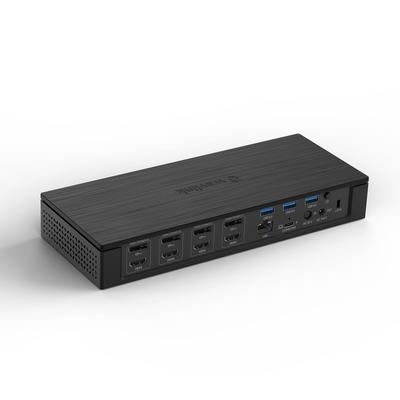
Specs
| Specification |  |  |
|---|---|---|
| Connection Type | Thunderbolt 5 | USB-A (DisplayLink, no USB-C required on host) |
| Port Configuration | 1x TB5 host, 3x TB5 downstream (80Gbps), 1x USB-A 10Gbps | 1x USB-A upstream, 2x HDMI (DisplayLink), 4x USB-A, 1x GbE, 3.5mm audio |
| Max Display Support | Up to 3 displays (host-dependent; Mac max 2 per port) | Dual display |
| Max Display Resolution | Triple 8K@60Hz or dual 8K@120Hz (TB5 host) | Dual 4K@30Hz (DisplayLink) |
| Total Ports | 5-44% | 9 |
| Power Delivery | 140 W | None (bus-powered, no host charging) |
| Ethernet | No | Yes (GbE) |
| Brand | OWC | Wavlink |
| Model | Thunderbolt 5 Hub | Universal Docking Station |
| Price | ~$329 | ~$90 |
Verdict
OWC Thunderbolt 5 Hub
8 / 10 Expert Rating
Cheapest Thunderbolt 5 dock — 140W charging and daisy-chain flexibility in a whisper-quiet aluminum build, with fewer ports and only 2.5GbE.
Wavlink Universal Docking Station
6 / 10 Expert Rating
A niche but genuinely useful fix for older USB-A-only Windows machines needing dual monitors.
More comparisons in Docking Stations and USB-C Hubs
- UGREEN Revodok Pro 210 vs Wavlink Universal Docking Station
- Microsoft Surface Dock 2 vs Wavlink Universal Docking Station
- Baseus UGOS 13-in-1 Docking Station vs Wavlink Universal Docking Station
- Hyper HyperDrive Next 10-Port USB-C Hub vs OWC Thunderbolt 5 Hub
- Dell Universal Dock UD22 vs OWC Thunderbolt 5 Hub
- Anker 575 USB-C Hub vs Wavlink Universal Docking Station