
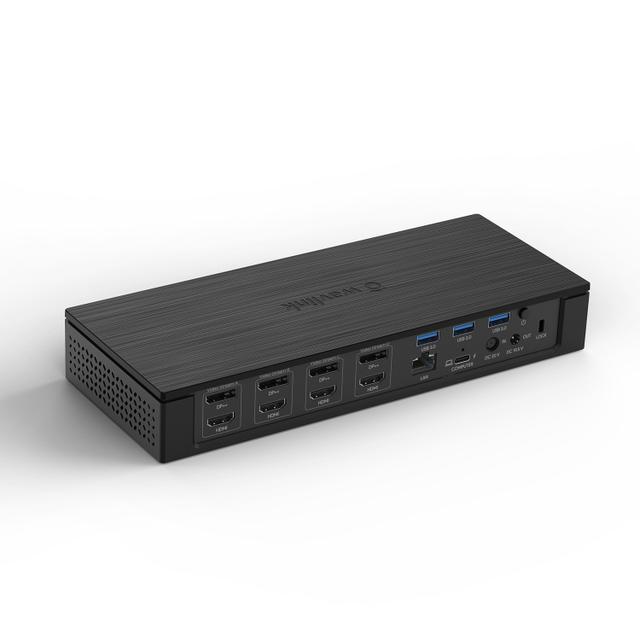
Wavlink Universal Docking Station
Expert rating6 / 10
- Connection Type:
- USB-A (DisplayLink)
- Total Ports:
- 9
- Max Display Support:
- Dual display
- Power Delivery:
- None
Consumercarts is reader-supported. Learn more
Disclaimer: The price and specification of the given product may differ from the actual product. Please confirm on the retailer's website before buying.
Manufacturer: WAVLINK Last updated: September 12, 2026
Wavlink Universal Docking Station Review
The Wavlink Universal Docking Station connects over plain USB-A rather than USB-C, using DisplayLink to add dual external 4K displays and Ethernet to older Windows laptops that never got a USB-C port.
Every other dock in this catalog assumes a USB-C or Thunderbolt host port; the Wavlink assumes the opposite. It's built for the huge installed base of older Windows laptops and desktops that only have USB-A, letting them gain dual monitor support and wired Ethernet without a hardware upgrade. It doesn't charge the host at all, since USB-A can't deliver meaningful power, but for a machine that's plugged into its own charger anyway, that's rarely a dealbreaker.
Comparison to Alternatives
Against the Plugable UD-6950Z, the Plugable also supports USB-A upstream but adds a third display and higher-end DisplayLink compatibility including Mac, while the Wavlink stays Windows-only and simpler. Against the Anker 575 USB-C Hub, the Anker requires a USB-C host port entirely, which makes it useless for the older USB-A-only machines the Wavlink specifically targets.
Our verdict
Reviewed by Burooj Alam. Rated by us, not by users.
Expert rating6 / 10
A niche but genuinely useful fix for older USB-A-only Windows machines needing dual monitors.
Best for
- Older Windows laptops and desktops with only USB-A ports
- Budget dual-monitor upgrades without replacing existing hardware
- Offices standardizing on legacy USB-A docking for aging fleets
Not for
- Mac users, since DisplayLink support here is Windows-only
- Anyone needing the dock to also charge the host laptop
- Modern USB-C or Thunderbolt laptops that have better native options
Specifications
What these specs meanIdentity
| Brand | Wavlink |
|---|---|
| Model Number | Universal Docking Station |
| Connection Type | USB-A (DisplayLink, no USB-C required on host) |
| Port Configuration | 1x USB-A upstream, 2x HDMI (DisplayLink), 4x USB-A, 1x GbE, 3.5mm audio |
| Max Display Support | Dual display |
Ports & Power
| Max Display Resolution | Dual 4K@30Hz (DisplayLink) |
|---|---|
| Total Ports | 9 |
| Ethernet | Yes |
Host power
| Host Power Delivery | None (bus-powered, no host charging) |
|---|
FAQs
What are the key specifications of the Wavlink Universal Docking Station (USB-A / 9 Ports / No Host Charging / Dual 4K@30Hz DisplayLink / Windows Only / ~$90)?
Key specs for the Wavlink Universal Docking Station: Power Delivery None (bus-powered, no host charging), Ethernet Yes (GbE), Connection Type USB-A (DisplayLink, no USB-C required on host), Port Configuration 1x USB-A upstream, 2x HDMI (DisplayLink), 4x USB-A, 1x GbE, 3.5mm audio, Max Display Support Dual display, Max Display Resolution Dual 4K@30Hz (DisplayLink).
Who is the Wavlink Universal Docking Station (USB-A / 9 Ports / No Host Charging / Dual 4K@30Hz DisplayLink / Windows Only / ~$90) best suited to?
Best suited to: Older Windows laptops and desktops with only USB-A ports; Budget dual-monitor upgrades without replacing existing hardware; Offices standardizing on legacy USB-A docking for aging fleets.
What are the drawbacks of the Wavlink Universal Docking Station (USB-A / 9 Ports / No Host Charging / Dual 4K@30Hz DisplayLink / Windows Only / ~$90)?
Not the best fit for: Mac users, since DisplayLink support here is Windows-only; Anyone needing the dock to also charge the host laptop; Modern USB-C or Thunderbolt laptops that have better native options.
Compare and read more
- ASUS DC5 Universal Dock (USB-C / 5 Ports / 100W Pass-Through Charging / Single 4K@60Hz / Windows/Mac/Chrome) vs Wavlink Universal Docking Station (USB-A / 9 Ports / No Host Charging / Dual 4K@30Hz DisplayLink / Windows Only)
- CalDigit Element Hub (Thunderbolt 4 / 4 Ports / 60W Host Charging / Data-Only / Mac/Windows) vs Wavlink Universal Docking Station (USB-A / 9 Ports / No Host Charging / Dual 4K@30Hz DisplayLink / Windows Only)
- Dell WD19S (USB-C / 8 Ports / 65W Host Charging / Single 4K@60Hz / Windows) vs Wavlink Universal Docking Station (USB-A / 9 Ports / No Host Charging / Dual 4K@30Hz DisplayLink / Windows Only)
- HP USB-C Dock G5 (USB-C / 8 Ports / 65W Host Charging / Dual 4K@30Hz / Windows) vs Wavlink Universal Docking Station (USB-A / 9 Ports / No Host Charging / Dual 4K@30Hz DisplayLink / Windows Only)
- UGREEN Revodok Pro 210 (USB-C Dock, 10 Ports, 85W Pass-Through, Dual 4K60) vs Wavlink Universal Docking Station (USB-A / 9 Ports / No Host Charging / Dual 4K@30Hz DisplayLink / Windows Only)
- Docking Station Ethernet Speed: What 1GbE, 2.5GbE and 10GbE Actually Mean
- Docking Station Power Delivery Explained: What the Wattage Actually Means