
HP ZBook Ultra G1a 14
- CPU:
- Ryzen AI Max+ PRO 395
- GPU:
- AMD Radeon 8060S
- RAM:
- 128GB LPDDR5X
- Display:
- 14" 2880x1800 OLED 120Hz
Upgrade and repair this laptop
Consumercarts is reader-supported. Learn more
Disclaimer: The price and specification of the given product may differ from the actual product. Please confirm on the retailer's website before buying.
Manufacturer: HP Last updated: 2026-09-30
Where to buy
- AmazonGo to store
- NeweggGo to store
HP ZBook Ultra G1a 14 Review
The HP ZBook Ultra G1a 14 is a 14-inch mobile workstation from 2025 built around the AMD Ryzen AI Max+ PRO 395. It uses a 2880x1800 OLED panel at 120Hz. It weighs 1.59 kg.
What it does well: 128GB of memory the GPU can share, a 16-core processor for heavy work and an OLED screen. Where it falls short: soldered memory, loud fans under load (49.2 dB(A)) and PWM flicker at lower brightness.
Processor performance
Measurements come from NotebookCheck's review unit with the Ryzen AI Max+ PRO 395, Radeon 8060S, 128GB of RAM, a 2TB SSD and the 2.8K 120Hz OLED touchscreen.
The AMD Ryzen AI Max+ PRO 395 has 16 cores and 32 threads, boosting to 5.1 GHz. That is desktop-class multi-core power: 4K and 8K editing, big code builds and 3D rendering all run well. Its NPU is rated at 50 TOPS for on-device AI features.
NotebookCheck measured about 66W of sustained CPU power in this chassis. The chassis limit, not the chip rating, is what decides long render times. Across the 2 systems NotebookCheck has tested with the AMD Ryzen AI Max+ PRO 395, it averages 1,691 points in Cinebench 2024 multi-core (range 1,643 to 1,738) and 112.6 single-core. Where this laptop lands in that range depends on how much power it lets the chip draw. Under a sustained CPU stress test the chip briefly hits 81W and then settles at about 66W and 71C, which is better sustained performance than expected from a 14-inch chassis.
Graphics and gaming
There is no separate graphics card: the AMD Radeon 8060S (40 compute units) is built into the processor and draws on the same 128GB memory pool. That is unusual: it gives the GPU far more memory than a typical laptop graphics card, which helps local AI models and large scenes.
The standout feature is the unified memory: in the BIOS the Radeon 8060S can be given anywhere from 512MB up to 96GB of the 128GB pool, which leaves 32GB for Windows at the maximum setting.
Gaming (average across systems). These are NotebookCheck's average frame rates for the AMD Radeon 8060S across every system it has tested with this GPU, not this laptop alone. Power limits differ between laptops, so this one can land above or below the average.
| Game | Settings | Average fps | Systems tested |
|---|---|---|---|
| Cyberpunk 2077 | High, 1080p | 94 | 10 |
| Cyberpunk 2077 | Ultra, 1080p | 84 | 10 |
| Cyberpunk 2077 | Ultra, 1440p | 52 | 9 |
| Baldur's Gate 3 | Ultra, 1080p | 96 | 10 |
| Baldur's Gate 3 | Ultra, 1440p | 66 | 9 |
| F1 24 | High, 1080p | 178 | 9 |
| Black Myth: Wukong | Ultra, 1080p | 28 | 7 |
Memory, storage and upgrades
Memory: fixed. 128GB of LPDDR5X-8533 is soldered to the board, so buy the amount you will need for the life of the laptop.
Storage: replaceable. One M.2 slot, already in use (M.2 2280), PCIe Gen4 x4 NVMe. The bottom panel comes off with four Phillips screws; the Wi-Fi card is soldered too.
Display
The 14-inch OLED panel runs at 2880x1800 (243 pixels per inch) and 120Hz, with touch. It is rated at 400 nits. NotebookCheck measured 384.7 nits with the near-infinite contrast OLED is known for. Color coverage is 100% sRGB and 100% P3, good enough for photo and video work. Response time is 1 ms, so motion stays sharp. The panel flickers at 492.6 Hz (PWM) at lower brightness, which matters if you are sensitive to it.
The 2.8K OLED is well calibrated to the P3 color space with near-instant response times, but at roughly 390 nits it is dimmer than the MacBook Pro 14, it lacks HDR and adaptive sync, and it dims using PWM at about 493 Hz.
Local AI and big projects
HP pitches the 128GB model for running large language models offline, naming Llama 3.1 70B at Q8 as an example, and publishes a recommended configuration matrix for local LLM work.
Thermals and noise
NotebookCheck measured 49.2 dB(A) under load and 23.9 dB(A) at idle. Under full load it is loud enough to need headphones. The hottest surface reached 41.4 °C.
The fans stay near silent at around 24 to 28 dB(A) during light office work but ramp up quickly under heavy load to about 49 dB(A), similar to Dell's Precision 5490. The keyboard center gets warmest and the palm rests warm up noticeably under load, while the 140W USB-C power brick is bulky and can pass 48C itself.
Battery life
The battery is 74.5Wh, smaller than 83% of the mobile workstation laptops we list. NotebookCheck got 7 hours of Wi-Fi browsing. HP's own battery rating: Up to 14.5 hours (MobileMark 25). Fast charging: HP Fast Charge: about 50% in 30 minutes with the system off or in standby.
Design and build
Materials: Metal (aluminum) chassis. At 1.59 kg it is lighter than 83% of the mobile workstation laptops we list. It measures 312.2x214.65x18.1 mm.
Keyboard and touchpad
The spill-resistant backlit keyboard is the same one HP uses on its EliteBook X G1a and types very well overall, though the space bar feels softer and quieter than the other keys and the arrow keys are cramped.
The large glass clickpad is a Microsoft Precision touchpad with multi-touch gestures and is the same size as the one on the EliteBook X G1a 14. Sign-in: IR camera for Windows Hello face login; fingerprint reader in the power button on select models.
Ports and connectivity
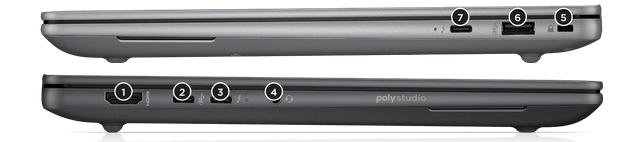
It has 2x Thunderbolt 4, which runs docks, fast external drives and displays over one cable. It charges over USB-C.
Full list: 2x Thunderbolt 4 USB-C 40Gbps, 1x USB-C 10Gbps, 1x USB-A 10Gbps, 1x HDMI 2.1, 1x 3.5mm headphone/mic combo, 1x Nano security lock slot. Wireless: MediaTek Wi-Fi 7 MT7925 and Bluetooth 5.4.
Webcam, speakers and extras
Webcam: 5MP with IR camera and physical privacy shutter. Speakers: Four speakers (Poly Studio, 1W each) with discrete amplifiers.
The four Poly Studio speakers get loud and sound well balanced for a 14-inch laptop.
Which configuration to buy
The HP ZBook Ultra G1a 14 name covers several builds. Processors: AMD Ryzen AI Max+ PRO 395, AMD Ryzen AI Max PRO 390, AMD Ryzen AI Max PRO 385 and AMD Ryzen AI Max PRO 380. Graphics: AMD Radeon 8060S, AMD Radeon 8050S and AMD Radeon 8040S. Memory: 16GB, 32GB, 64GB or 128GB LPDDR5X-8533, soldered, non-ECC; must be chosen at purchase. Screens: 14-inch WUXGA 1920x1200 UWVA anti-glare, 400 nits, 100% sRGB; 14-inch 2.8K 2880x1800 OLED touch, 48-120Hz, 400 nits, 100% DCI-P3. Check the exact configuration on the listing before you buy.
HP now sells the 16-inch ZBook Ultra G3a with Ryzen AI Max PRO 400 series chips and up to 192GB of memory, which HP positions against the G1a, but the 14-inch ZBook Ultra G1a is still listed on HP's site and no 14-inch replacement was found.
Alternatives to consider
- Lenovo ThinkPad P14s Gen 5 AMD (Ryzen 7 PRO 8840HS, 32GB, 1TB): Ryzen 7 PRO 8840HS, a similar 1.52 kg and a smaller 57Wh battery.
- Dell Precision 5690 (Core Ultra 7 165H, RTX 3500 Ada, 32GB): Core Ultra 7 165H, heavier at 2.17 kg, a bigger 99.5Wh battery and a 16-inch screen.
- HP ZBook Fury 16 G11 (Core i9-14900HX, RTX 5000 Ada, 64GB): Core i9-14900HX, heavier at 2.40 kg, a bigger 95Wh battery and upgradeable RAM.
Sources
Measurements come from NotebookCheck's review unit with the Ryzen AI Max+ PRO 395, Radeon 8060S, 128GB of RAM, a 2TB SSD and the 2.8K 120Hz OLED touchscreen.
- NotebookCheck: HP ZBook Ultra G1a 14 review: Powerful MacBook Pro alternative for work and game (Allen Ngo, April 2025)
- NotebookCheck: How to toggle the unique flexible RAM features of the AMD Ryzen AI Max series
- HP ZBook Ultra G1a 14" Mobile Workstation PC product page
- HP ZBook Ultra G1a 14 inch Mobile Workstation PC datasheet
- HP ZBook Ultra 14" G1a Mobile Workstation PC QuickSpecs
- HP ZBook Ultra G3a Mobile Workstation PC page
Our verdict
Reviewed by Burooj Alam. Rated by us, not by users.
Best for
- Running large local AI models
- Photo and video editing on the built-in screen
Not for
- Anyone who wants to upgrade memory later
- Quiet rooms under heavy load
- People sensitive to PWM flicker
Specifications
What these specs meanIdentity and variant
| Brand | HP |
|---|---|
| Series | ZBook Ultra G1a |
| Series ID | hp-zbook-ultra-g1a-14 |
| SKU Name | HP ZBook Ultra G1a 14 (Ryzen AI Max+ PRO 395, 128GB) |
| Chassis Code | HSTNS-I001 |
| Region Sold | Global |
Class and platform
| Laptop Class | Mobile Workstation |
|---|---|
| Release Year | 2025 |
| Operating System | Windows 11 Pro |
| Weight | 1.586 kg |
Processor
| CPU Brand | AMD |
|---|---|
| CPU Model | Ryzen AI Max+ PRO 395 |
| CPU Cores | 16 |
Sustained power
| Sustained CPU Power | 66 W |
|---|---|
| Sustained Power Source | Third Party Review |
| Power Adapter Wattage | 140 W |
Graphics
| GPU Brand | AMD |
|---|---|
| GPU Model | AMD Radeon 8060S |
| Graphics Switching | Integrated Only |
Memory
| RAM Capacity | 128 GB |
|---|---|
| RAM Type | LPDDR5X |
| RAM Speed | 8533 MT/s |
| Memory Form Factor | Soldered |
| Memory Soldered | Yes |
| Max RAM Supported | 128 GB |
Upgradability
| RAM Slots | 0 |
|---|---|
| RAM Slots Free | 0 |
| Storage Slots | 1 |
| Storage Slots Free | 0 |
| Storage Form Factor | M.2 2280 |
| Storage Interface | PCIe 4.0 x4 |
| SATA Bay Present | No |
Storage as shipped
| Storage Capacity | 2000 GB |
|---|---|
| Storage Type | NVMe SSD |
Display
| Display Size | 14 inches |
|---|---|
| Resolution Width | 2880 px |
| Resolution Height | 1800 px |
| Refresh Rate | 120 Hz |
| Panel Type | OLED |
| Brightness | 400 nits |
| Brightness Condition | SDR Typical |
| sRGB Coverage | 100 % |
| Touchscreen | Yes |
Battery and ports
| Battery Capacity | 74.5 Wh |
|---|---|
| Battery Life Light Load | 7 hours |
| Thunderbolt Support | Thunderbolt 4 |
| WiFi Standard | WiFi 7 |
FAQs
Is the RAM upgradeable on the HP ZBook Ultra G1a 14?
No, it is fixed at purchase; the largest option is 128GB.
Is there room for another SSD?
There is no free slot, but the existing SSD can be swapped for a larger one.
What is the battery life like?
7 hours of Wi-Fi browsing in NotebookCheck's test.
Which fast ports does it have?
2x Thunderbolt 4.
Is the screen good for photo editing?
Yes. It covers 100% of sRGB and 100% of P3.
What charger does it use?
A 140W adapter. It can also charge from a USB-C charger.
How heavy is it?
1.59 kg.