
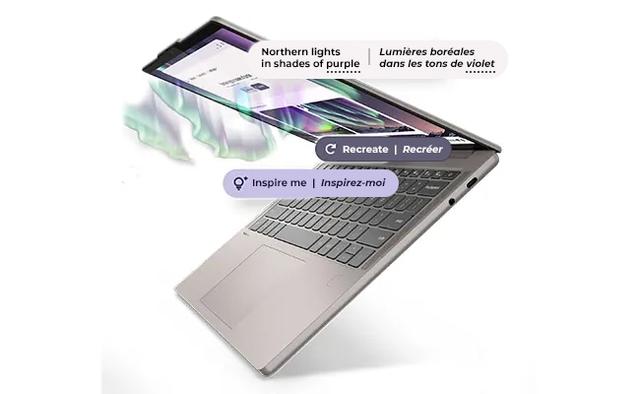
Lenovo Chromebook Plus 14 Gen 10
- CPU:
- Kompanio Ultra 910
- GPU:
- Arm Immortalis-G925 MC11
- RAM:
- 16GB LPDDR5X
- Display:
- 14" 1920x1200 OLED 60Hz
Upgrade and repair this laptop
Consumercarts is reader-supported. Learn more
Disclaimer: The price and specification of the given product may differ from the actual product. Please confirm on the retailer's website before buying.
Manufacturer: Lenovo Last updated: 2026-09-30
Where to buy
- AmazonGo to store
- Best BuyGo to store
Lenovo Chromebook Plus 14 Gen 10 Review
The Lenovo Chromebook Plus 14 Gen 10 is a 14-inch Chromebook from 2025 built around the MediaTek Kompanio Ultra 910. Its display is a 1920x1200 OLED panel at 60Hz. It weighs 1.26 kg.
What it does well: an OLED screen and long battery life (15 hours 12 minutes of Wi-Fi browsing). The trade-offs: soldered memory, storage you cannot upgrade and no Thunderbolt.
Processor performance
Measurements come from NotebookCheck's review unit of the Chromebook Plus 14 (14M9610) with the Kompanio Ultra 910, 16GB of RAM, 256GB UFS 4.0 storage and the 14-inch OLED touchscreen.
The MediaTek Kompanio Ultra 910 has 8 cores, boosting to 3.6 GHz. That is plenty for ChromeOS, Android apps and a browser full of tabs; it is not meant for Windows software or heavy editing. Its NPU is rated at 50 TOPS for on-device AI features.
Across the 2 systems NotebookCheck has tested with the Kompanio Ultra 910, it averages 2,557 single-core and 7,777 multi-core in Geekbench 6.
Graphics and gaming
Graphics come from the integrated Arm Immortalis-G925 MC11. It handles video playback, photo edits and lighter or older games at modest settings.
Android games such as Wuthering Waves ran smoothly on balanced settings, but the Netflix Android app is still limited to non-HD playback on Chromebooks, so the website is the better option for streaming.
Memory, storage and upgrades
Memory: fixed. 16GB of LPDDR5X-8533 is soldered to the board, so buy the amount you will need for the life of the laptop.
Storage: fixed. The 256GB UFS 4.0 cannot be replaced or added to later.
Display
The 14-inch OLED panel runs at 1920x1200 (162 pixels per inch) and 60Hz, with touch. It is rated at 400 nits. NotebookCheck measured 378 nits and 26,986:1 contrast. Color coverage is 100% sRGB and 100% P3, good enough for photo and video work. Response time is 2.4 ms, so motion stays sharp. The panel flickers at 250 Hz (PWM) at lower brightness, which matters if you are sensitive to it.
The OLED screen covers the full sRGB space with accurate colors and very deep blacks, but its glossy glass reflects a lot of light, the tested unit peaked around 380 nits, and it dims with 250 Hz PWM that sensitive eyes may notice.
ChromeOS and apps
It runs ChromeOS, so apps come from the web, the Play Store (Android apps) and Linux if you enable it; Windows programs will not install. Google's update schedule for this model runs to June 2035, per the reviews we read.
Chromebook Plus extras include a year of Google's Gemini paid plan with 2TB of cloud storage, and Gemini tools for summarizing and writing worked well, while the on-device tab grouping and image background removal features were less reliable. Because the chip is Arm-based, the Linux environment runs most tools such as LibreOffice, but some Linux software may not be available.
Thermals and noise
There is no fan at all, so it is silent in every workload. The hottest surface reached 43 °C.
The bottom and the area around the keyboard get noticeably warm during sustained heavy work while staying cool for browsing, video and office apps.
Battery life
The battery is 60Wh. NotebookCheck got 15 hours 12 minutes of Wi-Fi browsing. Lenovo's own battery rating: Up to 17 hours (Google power load test). Fast charging: Rapid Charge, up to 80% in about 1 hour with the 65W adapter.
That is the best result of any Chromebook Plus NotebookCheck has tested, and Lon.TV saw more than 13 hours of typical use.
Design and build
Materials: Anodized aluminum top cover, textured PC-ABS bottom. It measures 314.2 x 219.1 x 15.79 mm.
Keyboard and touchpad
The six-row Chrome keyboard has 1.3 mm of travel and a comfortable, clearly defined typing feel that suits long writing sessions, although the travel is on the shallow side, the deck flexes slightly, and the gray keycaps pick up fingerprints easily. The backlight is adjustable.
The buttonless 75 x 120 mm touchpad has a glass-like Mylar surface, is reasonably roomy, and tracks inputs precisely. Sign-in: Touch fingerprint reader on palm rest, match-on-chip (not on every model).
Ports and connectivity
There is no Thunderbolt, so docks and fast external drives run at USB speeds. It can drive up to 2 external displays. It charges over USB-C.
Full list: 1x USB-A, 2x USB-C with USB PD 3.0 and DisplayPort 1.4, 1x 3.5mm headphone/microphone combo jack. Wireless: MediaTek Wi-Fi 7 MT7925, 802.11be 2x2 and Bluetooth 5.4.
Webcam, speakers and extras
Webcam: 5.0MP fixed-focus camera with privacy shutter. Speakers: Four 2W speakers (upward and downward firing), Dolby Atmos, smart amplifier.
The four Dolby Atmos speakers fire both up and down and deliver loud, balanced sound that ranks among the best NotebookCheck has measured in this class, though bass is a little thin. A camera bump on the lid houses the webcam.
Which configuration to buy
The Lenovo Chromebook Plus 14 Gen 10 name covers several builds. Memory: 12GB or 16GB soldered LPDDR5X-8533, not upgradable. Screens: 14-inch WUXGA 1920x1200 OLED, 400 nits, glossy, 100% DCI-P3, 60Hz, non-touch; 14-inch WUXGA 1920x1200 OLED, 400 nits, glossy, 100% DCI-P3, 60Hz, 10-point touch with glass. Check the exact configuration on the listing before you buy.
As of September 2026 Lenovo's US product page still lists the Chromebook Plus Gen 10 (14-inch MediaTek) as the current MediaTek model, and no MediaTek-based successor turned up in search; the only newer sibling linked from that page is the Intel-based Chromebook Plus i Gen 11 14-inch, which is a different platform rather than a direct replacement.
Alternatives to consider
- Acer Chromebook Spin 714 (Core Ultra 5 125U, 8GB, 256GB): Core Ultra 5 125U, heavier at 1.50 kg.
- ASUS Chromebook Vibe CX34 (Intel N305, 8GB, 128GB): Intel N305, heavier at 1.40 kg and a smaller 50Wh battery.
- HP Chromebook x360 14c (Ryzen 3 7320C, 8GB, 128GB): Ryzen 3 7320C, heavier at 1.50 kg and a smaller 47Wh battery.
Sources
Measurements come from NotebookCheck's review unit of the Chromebook Plus 14 (14M9610) with the Kompanio Ultra 910, 16GB of RAM, 256GB UFS 4.0 storage and the 14-inch OLED touchscreen.
- NotebookCheck: Lenovo Chromebook Plus 14 review: MediaTek's new power play (Marc Herter, Aug 2025)
- Lon.TV: Lenovo Chromebook Plus 14 Review (with MediaTek Kompanio Ultra 910)
- Lenovo PSREF: Lenovo Chrome 14M9610 platform spec PDF
- Lenovo PSREF: Model 83MY0000US
- Lenovo US: Lenovo Chromebook Plus (14" MediaTek)
Our verdict
Reviewed by Burooj Alam. Rated by us, not by users.
Best for
- Photo and video editing on the built-in screen
- A full day away from the charger
- Browser-first work, school and Android apps
- Carrying every day
Not for
- Anyone who wants to upgrade memory later
- Thunderbolt docks and external GPUs
- Windows programs and heavy editing
Specifications
What these specs meanIdentity and variant
| Brand | Lenovo |
|---|---|
| Series | Chromebook Plus 14 Gen 10 |
| Series ID | lenovo-chromebook-plus-14m9610 |
| SKU Name | Lenovo Chromebook Plus 14 Gen 10 (Kompanio Ultra 910, 16GB, 256GB, OLED) |
| Chassis Code | 14M9610 |
| Region Sold | Global |
Class and platform
| Laptop Class | Chromebook |
|---|---|
| Release Year | 2025 |
| Operating System | ChromeOS |
| Weight | 1.26 kg |
Processor
| CPU Brand | MediaTek |
|---|---|
| CPU Model | Kompanio Ultra 910 |
| CPU Cores | 8 |
Sustained power
| Sustained Power Source | Not Measured |
|---|---|
| Power Adapter Wattage | 65 W |
Graphics
| GPU Brand | None Discrete |
|---|---|
| GPU Model | Arm Immortalis-G925 MC11 |
| Graphics Switching | Integrated Only |
Memory
| RAM Capacity | 16 GB |
|---|---|
| RAM Type | LPDDR5X |
| RAM Speed | 8533 MT/s |
| Memory Form Factor | Soldered |
| Memory Soldered | Yes |
| Max RAM Supported | 16 GB |
Upgradability
| RAM Slots | 0 |
|---|---|
| RAM Slots Free | 0 |
| Storage Slots | 0 |
| Storage Slots Free | 0 |
| Storage Form Factor | Soldered |
| SATA Bay Present | No |
Storage as shipped
| Storage Capacity | 256 GB |
|---|---|
| Storage Type | Soldered UFS |
Display
| Display Size | 14 inches |
|---|---|
| Resolution Width | 1920 px |
| Resolution Height | 1200 px |
| Refresh Rate | 60 Hz |
| Panel Type | OLED |
| Brightness | 400 nits |
| Brightness Condition | SDR Typical |
| sRGB Coverage | 100 % |
| Touchscreen | Yes |
Battery and ports
| Battery Capacity | 60 Wh |
|---|---|
| Battery Life Light Load | 15.2 hours |
| Thunderbolt Support | None |
| WiFi Standard | WiFi 7 |
FAQs
Is the RAM upgradeable on the Lenovo Chromebook Plus 14 Gen 10?
No. The memory is soldered, so choose the amount you need when you buy (up to 16GB).
Can the storage be upgraded?
No. Storage is fixed at purchase.
How many hours does the Lenovo Chromebook Plus 14 Gen 10 last on battery?
15 hours 12 minutes of Wi-Fi browsing in NotebookCheck's test.
Does it have Thunderbolt?
No. It has USB-C with DisplayPort and charging, but not Thunderbolt or USB4.
Is the display color accurate?
Yes. It covers 100% of sRGB and 100% of P3.
What power adapter comes with it?
A 65W adapter. It can also charge from a USB-C charger.
How much does the Lenovo Chromebook Plus 14 Gen 10 weigh?
1.26 kg.