
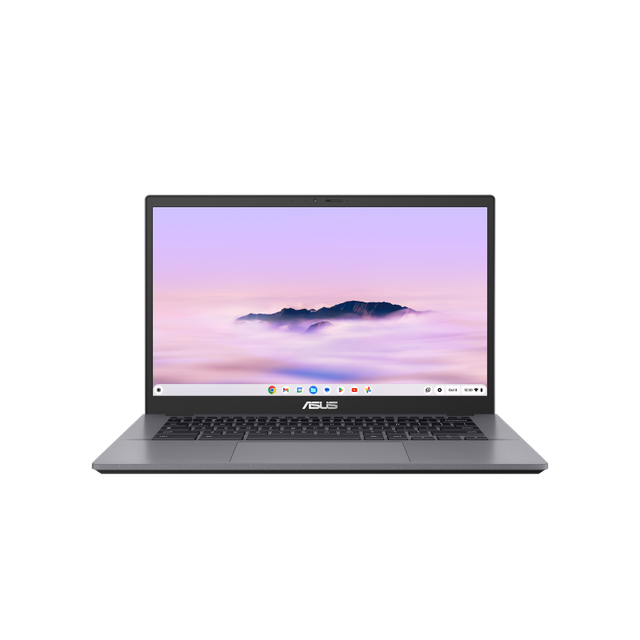
ASUS Chromebook Vibe CX34
Expert rating6.4 / 10
- CPU:
- Intel N305
- RAM:
- 8GB LPDDR5
- Storage:
- 128GB eMMC
- Display:
- 14" 1920x1080 IPS 60Hz
Upgrade and repair this laptop
Consumercarts is reader-supported. Learn more
Disclaimer: The price and specification of the given product may differ from the actual product. Please confirm on the retailer's website before buying.
Manufacturer: ASUS Last updated: 2026-10-10
Where to buy
- ASUS StoreGo to store
ASUS Chromebook Vibe CX34 Review
ASUS Chromebook Vibe CX34 with an Intel N305, 8GB soldered LPDDR5 and 128GB soldered eMMC storage.
An entry-level ChromeOS laptop, fully soldered on both memory and storage in exchange for a low price and long battery life.
Overview
The Chromebook Vibe CX34 targets budget ChromeOS buyers with an Alder Lake-N chip, soldered LPDDR5 and soldered eMMC storage -- nothing here is upgradable.
Our verdict
Reviewed by Burooj Alam. Rated by us, not by users.
Expert rating6.4 / 10
The Chromebook Vibe CX34 pairs an Intel N305 with 8GB of LPDDR5 and a 14 inch 1080p IPS screen. At 1.4 kg with a 50Wh battery and WiFi 6, it is a straightforward ChromeOS laptop for browsing, streaming and schoolwork.
Storage is only 128GB and both it and the RAM are fixed, with no upgrade slots. Heavy multitasking will push the N305, so this fits light use best.
Best for
- Lowest-cost ChromeOS browsing
Not for
- Storage or RAM upgraders
- Heavy multitasking
Specifications
What these specs meanIdentity and variant
| Brand | ASUS |
|---|---|
| Series | Chromebook Vibe CX34 |
| Series ID | asus-chromebook-vibe-cx34 |
| SKU Name | Chromebook Vibe CX34 (N305, 8GB, 128GB) |
| Chassis Code | CX3402 |
| Region Sold | Global |
Class and platform
| Laptop Class | Chromebook |
|---|---|
| Release Year | 2024 |
| Operating System | ChromeOS |
| Weight | 1.4 kg |
Processor
| CPU Brand | Intel |
|---|---|
| CPU Model | Intel N305 |
| CPU Cores | 8 |
Sustained power
| Sustained Power Source | Not Measured |
|---|
Graphics
| GPU Brand | Intel |
|---|---|
| GPU Model | Intel UHD Graphics (integrated) |
| VRAM | 0 GB |
| Graphics Switching | Integrated Only |
Memory
| RAM Capacity | 8 GB |
|---|---|
| RAM Type | LPDDR5 |
| Memory Form Factor | Soldered |
| Memory Soldered | Yes |
Upgradability
| RAM Slots | 0 |
|---|---|
| RAM Slots Free | 0 |
| Storage Slots | 0 |
| Storage Slots Free | 0 |
| Storage Form Factor | Soldered |
| SATA Bay Present | No |
Storage as shipped
| Storage Capacity | 128 GB |
|---|---|
| Storage Type | eMMC |
Display
| Display Size | 14 inches |
|---|---|
| Resolution Width | 1920 px |
| Resolution Height | 1080 px |
| Refresh Rate | 60 Hz |
| Panel Type | IPS |
| Brightness Condition | Vendor Unstated |
| Touchscreen | No |
| Colour Gamut | 45% NTSC |
Battery and ports
| Battery Capacity | 50 Wh |
|---|---|
| Thunderbolt Support | None |
| WiFi Standard | WiFi 6 |
FAQs
Can you upgrade the RAM in the ASUS Chromebook Vibe CX34?
No. The memory (8 GB of LPDDR5) is soldered to the motherboard and there are no memory slots, so it cannot be upgraded after purchase. Choose the capacity you need when you buy.
Can you upgrade the SSD in the ASUS Chromebook Vibe CX34?
No. The storage is not in a replaceable slot, so it cannot be swapped after purchase.
What display does the ASUS Chromebook Vibe CX34 have?
The ASUS Chromebook Vibe CX34 has a 14-inch, 1920x1080, IPS, 60 Hz non-touch display covering 45% NTSC.
Does the ASUS Chromebook Vibe CX34 have Thunderbolt?
No. It does not list Thunderbolt or USB4 support.
How big is the battery in the ASUS Chromebook Vibe CX34?
The ASUS Chromebook Vibe CX34 has a 50 Wh battery.
Compare and read more
- Acer Chromebook Plus 515 (Core i3-1215U, 8GB) vs ASUS Chromebook Vibe CX34 (Intel N305, 8GB, 128GB)
- Acer Chromebook Spin 714 (Core Ultra 5 125U, 8GB, 256GB) vs ASUS Chromebook Vibe CX34 (Intel N305, 8GB, 128GB)
- ASUS Chromebook Vibe CX34 (Intel N305, 8GB, 128GB) vs HP Chromebook x360 14c (Ryzen 3 7320C, 8GB, 128GB)
- ASUS Chromebook Vibe CX34 (Intel N305, 8GB, 128GB) vs Lenovo IdeaPad Flex 5 Chromebook (Ryzen 5 7520C, 8GB, 128GB)
- ASUS Chromebook Vibe CX34 (Intel N305, 8GB, 128GB) vs Samsung Galaxy Chromebook Go (Celeron N4500, 4GB, 32GB)
- How to Judge Laptop Battery Life (and Why Watt-Hours Beat Marketing Claims)
- Laptop Build Quality and MIL-STD 810H Explained