
Consumercarts is reader-supported. Learn more
Razer USB4 Dock vs StarTech.com Thunderbolt 4 Dock: Comparison
Razer USB4 Dock vs StarTech.com Thunderbolt 4 Dock: the host power delivery difference
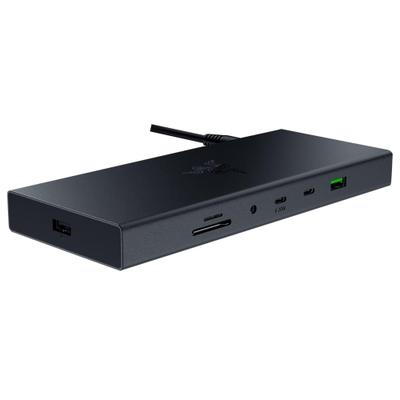
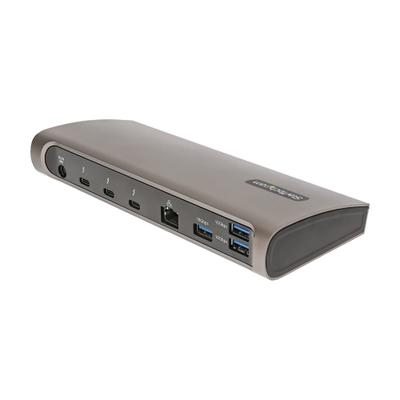
These two are close on paper, and host power delivery is the only measure that separates them at all: Razer USB4 Dock 100 W against StarTech.com Thunderbolt 4 Dock 96 W. Razer USB4 Dock also leads on total ports, 14 on the Razer USB4 Dock versus 11 on the StarTech.com Thunderbolt 4 Dock.
Which should you buy, Razer USB4 Dock or StarTech.com Thunderbolt 4 Dock?
Buy the Razer USB4 Dock for gaming laptop users wanting dual 4K@120Hz external display support specifically. It is equally the pick for users without a Thunderbolt-certified laptop port wanting Thunderbolt-dock-equivalent performance at a lower price. Avoid it for buyers who specifically want official Thunderbolt certification and CalDigit's established track record, the TS4 is the right choice for that priority. The StarTech.com Thunderbolt 4 Dock suits IT departments standardizing docks across a managed fleet of laptops, though it is not built for 16-inch MacBook Pro users needing full sustained charging headroom. The same goes for buyers who want a Kensington lock slot for shared office equipment. Our rating of the Razer USB4 Dock (8/10): best value for non-Thunderbolt laptops, USB4 delivers Thunderbolt 4-equivalent dual 4K@120Hz performance at a lower price.
What Razer USB4 Dock and StarTech.com Thunderbolt 4 Dock have in common
The common ground is wider than the gap: ethernet, host bandwidth, max display support, bus powered and max displays windows are identical here. They match on 5 further specifications as well.
Razer USB4 Dock vs StarTech.com Thunderbolt 4 Dock price
At the last price check the Razer USB4 Dock was $230 and the StarTech.com Thunderbolt 4 Dock $260, a 13% premium.
Frequently asked questions
Do the Razer USB4 Dock and StarTech.com Thunderbolt 4 Dock differ on connection type?
Yes. Connection Type reads USB4 on the Razer USB4 Dock versus Thunderbolt 4 on the StarTech.com Thunderbolt 4 Dock.
Is the Max Dual Display Resolution the same on the Razer USB4 Dock and StarTech.com Thunderbolt 4 Dock?
It is. Both are listed at 4K, so it is not a reason to pick one over the other.
Specs and benchmarks
Brand
- Razer USB4 Dock
- Razer
- StarTech.com Thunderbolt 4 Dock
- StarTech.com
Connection Type
- Razer USB4 Dock
- USB4
- StarTech.com Thunderbolt 4 Dock
- Thunderbolt 4
Host Interface
- Razer USB4 Dock
- USB4
- StarTech.com Thunderbolt 4 Dock
- Thunderbolt 4
Model Number
- Razer USB4 Dock
- USB4 Dock
- StarTech.com Thunderbolt 4 Dock
- TB4CDOCK
Port Configuration
- Razer USB4 Dock
- 1x USB4 host, 2x USB-C 10Gbps, 3x USB-A 10Gbps, 1x USB-A 5Gbps, 1x USB-A (wireless dongle), 1x HDMI 2.1, 1x DisplayPort 1.4, Ethernet, SD + microSD, 3.5mm audio
- StarTech.com Thunderbolt 4 Dock
- 1x TB4 host, 3x TB4 downstream 40Gbps (15W), 3x USB-A 10Gbps, 1x USB-A 2.0 (7.5W), GbE, SD 4.0 UHS-II, 3.5mm TRRS audio
Thunderbolt Version
- Razer USB4 Dock
- None
- StarTech.com Thunderbolt 4 Dock
- 4
Host Bandwidth
- Razer USB4 Dock
- 40 Gbps
- StarTech.com Thunderbolt 4 Dock
- 40 Gbps
Max Display Support
- Razer USB4 Dock
- Dual 4K
- StarTech.com Thunderbolt 4 Dock
- Dual 4K
Max Display Resolution
- Razer USB4 Dock
- Single 4K@120Hz; dual 4K@60Hz
- StarTech.com Thunderbolt 4 Dock
- Dual 4K@60Hz or single 8K@30Hz
Total Ports
- Razer USB4 Dock
- 14Best
- StarTech.com Thunderbolt 4 Dock
- 11-21%
Host Power Delivery
- Razer USB4 Dock
- 100 W
- StarTech.com Thunderbolt 4 Dock
- 96 W-4%
Ethernet
- Razer USB4 Dock
- Yes
- StarTech.com Thunderbolt 4 Dock
- Yes
Bus Powered
- Razer USB4 Dock
- No
- StarTech.com Thunderbolt 4 Dock
- No
Max Displays Windows
- Razer USB4 Dock
- 2
- StarTech.com Thunderbolt 4 Dock
- 2
Max Single Display Resolution
- Razer USB4 Dock
- 4K
- StarTech.com Thunderbolt 4 Dock
- 8K
Max Single Display Refresh
- Razer USB4 Dock
- 120 Hz
- StarTech.com Thunderbolt 4 Dock
- 30 Hz
Max Dual Display Resolution
- Razer USB4 Dock
- 4K
- StarTech.com Thunderbolt 4 Dock
- 4K
Max Dual Display Refresh
- Razer USB4 Dock
- 60 Hz
- StarTech.com Thunderbolt 4 Dock
- 60 Hz
HDMI Port Count
- Razer USB4 Dock
- 1
- StarTech.com Thunderbolt 4 Dock
- 0
HDMI Version
- Razer USB4 Dock
- 2.1
- StarTech.com Thunderbolt 4 Dock
- None
DisplayPort Port Count
- Razer USB4 Dock
- 1
- StarTech.com Thunderbolt 4 Dock
- 0
DisplayPort Version
- Razer USB4 Dock
- 1.4
- StarTech.com Thunderbolt 4 Dock
- None
Downstream Thunderbolt Port Count
- Razer USB4 Dock
- 0
- StarTech.com Thunderbolt 4 Dock
- 3
USB-A Port Count
- Razer USB4 Dock
- 5
- StarTech.com Thunderbolt 4 Dock
- 4
USB-C Data Port Count
- Razer USB4 Dock
- 2
- StarTech.com Thunderbolt 4 Dock
- 0
Max USB Data Rate
- Razer USB4 Dock
- 10Gbps
- StarTech.com Thunderbolt 4 Dock
- 10Gbps
macOS Supported
- Razer USB4 Dock
- Yes
- StarTech.com Thunderbolt 4 Dock
- Yes
Windows Supported
- Razer USB4 Dock
- Yes
- StarTech.com Thunderbolt 4 Dock
- Yes
Price
- Razer USB4 Dock
- ~$230
- StarTech.com Thunderbolt 4 Dock
- ~$260


Which one should you pick?
Choose Razer USB4 Dock if you want the higher total ports (14 vs 11) and the higher host power delivery (100 W vs 96 W).
Choose StarTech.com Thunderbolt 4 Dock if you already have it on hand or find it at a lower price.
Price comparison
| Retailer | Razer USB4 Dock | StarTech.com Thunderbolt 4 Dock |
|---|---|---|
| Amazon | $230.00 View on Amazon | $260.00 View on Amazon |
| Newegg | View on Newegg | View on Newegg |
Disclaimer: The price and specification of the given product may differ from the actual product. Please confirm on the retailer's website before buying.
Verdict
Razer USB4 Dock
8 / 10 Expert Rating
Best value for non-Thunderbolt laptops, USB4 delivers Thunderbolt 4-equivalent dual 4K@120Hz performance at a lower price.
StarTech.com Thunderbolt 4 Dock
8 / 10 Expert Rating
A rugged, IT-friendly Thunderbolt 4 dock built for fleet deployment rather than home enthusiasts.