
Consumercarts is reader-supported. Learn more
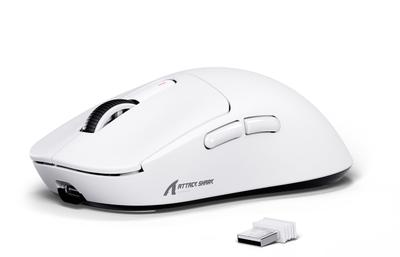
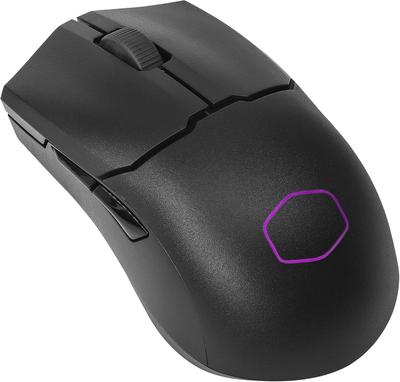
Attack Shark X3 vs Cooler Master MM712: Comparison
Attack Shark X3 vs Cooler Master MM712: the sensor model difference
The first real difference is sensor model: Attack Shark X3 PixArt PAW3395, up to 26,000 DPI against Cooler Master MM712 PixArt PAW3370, up to 19,000 DPI. The weight figures are near enough to ignore, 59 g on the Attack Shark X3 versus 61 g on the Cooler Master MM712. They differ on connectivity too, Wireless , Wired on the Attack Shark X3 versus Wireless on the Cooler Master MM712. On battery life there is little in it, Up to 70 Hours on the Attack Shark X3 versus Up to 60 Hours on the Cooler Master MM712. They differ on shape too, Symmetrical on the Attack Shark X3 versus Symmetrical, Honeycomb Shell on the Cooler Master MM712.
Attack Shark X3 vs Cooler Master MM712: which one fits your build
Take the Attack Shark X3 for budget-conscious buyers who want a flagship-tier sensor without paying boutique brand pricing. This mouse delivers PAW3395 performance at a notably lower cost. It is the wrong buy for buyers who want the highest available polling rate. The Lamzu Atlantis Mini Pro or ASUS ROG Keris II Ace, both covered elsewhere on this site, reach up to 8000Hz. Take the Cooler Master MM712 for Cooler Master ecosystem buyers who want a budget-friendly ultralight wireless mouse to match their existing components. This mouse extends familiar branding into the peripherals category at an accessible price. It is not the one for buyers who want the highest-tier sensor available. The Attack Shark X3 or Lamzu Atlantis Mini Pro, both covered elsewhere on this site, use the newer PAW3395 sensor.
What Attack Shark X3 and Cooler Master MM712 have in common
Where they agree, they agree completely, polling rate, grip type and switch type included, so the decision does not turn on any of those.
Specs and benchmarks
Brand
- Attack Shark X3
- Attack Shark
- Cooler Master MM712
- Cooler Master
Connectivity
- Attack Shark X3
- Wireless (2.4GHz), Wired
- Cooler Master MM712
- Wireless (2.4GHz + Bluetooth)
Grip Type
- Attack Shark X3
- Ambidextrous
- Cooler Master MM712
- Ambidextrous
Model
- Attack Shark X3
- X3
- Cooler Master MM712
- MM712
Shape
- Attack Shark X3
- Symmetrical
- Cooler Master MM712
- Symmetrical, Honeycomb Shell
Sensor Model
- Attack Shark X3
- PixArt PAW3395, up to 26,000 DPI
- Cooler Master MM712
- PixArt PAW3370, up to 19,000 DPI
Polling Rate
- Attack Shark X3
- 1000 Hz
- Cooler Master MM712
- 1000 Hz
Weight
- Attack Shark X3
- 59 gBest
- Cooler Master MM712
- 61 g-3%
Battery Life
- Attack Shark X3
- Up to 70 HoursBest
- Cooler Master MM712
- Up to 60 Hours
Switch Type
- Attack Shark X3
- Optical
- Cooler Master MM712
- Optical


Which one should you pick?
Choose Attack Shark X3 if you want the higher polling rate (1000 Hz vs 1000 Hz) and the lower weight (59 g vs 61 g).
Choose Cooler Master MM712 if you already have it on hand or find it at a lower price.
Price comparison
| Retailer | Attack Shark X3 | Cooler Master MM712 |
|---|---|---|
| Amazon | View on Amazon | View on Amazon |
| Newegg | View on Newegg |
Disclaimer: The price and specification of the given product may differ from the actual product. Please confirm on the retailer's website before buying.