
Consumercarts is reader-supported. Learn more
Cooler Master MM711 vs Logitech G303 Shroud Edition: Comparison
What is the difference between Cooler Master MM711 and Logitech G303 Shroud Edition?
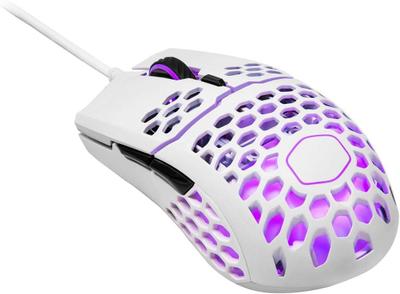
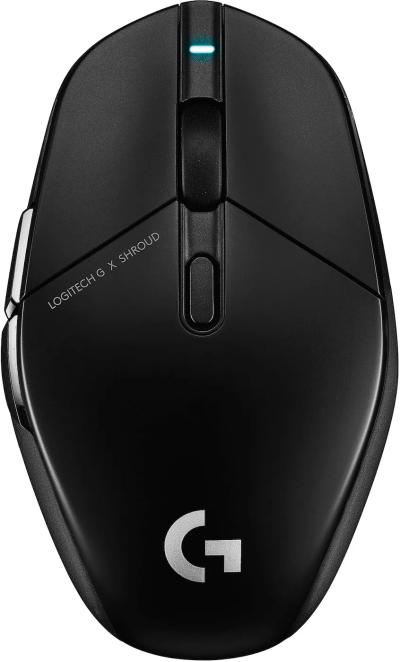
On weight the spread is 17%, Cooler Master MM711 53 g against Logitech G303 Shroud Edition 62 g, so Cooler Master MM711 takes it. They differ on shape too, Ergonomic on the Cooler Master MM711 versus Symmetrical on the Logitech G303 Shroud Edition. There is a split on switch type as well, Mechanical on the Cooler Master MM711 versus Hybrid Mechanical on the Logitech G303 Shroud Edition.
Which should you buy, Cooler Master MM711 or Logitech G303 Shroud Edition?
The Cooler Master MM711 is the one to take for right-handed palm and claw grip players wanting low weight and buyers who want a flagship sensor at a mid-range price, though it is not the pick for ambidextrous or left-handed users and anyone who wants a wireless connection. It also earns its place with anyone upgrading from a heavier ergonomic mouse without changing grip style. Avoid it for players bothered by a perforated shell letting in dust and debris. Take the Logitech G303 Shroud Edition for FPS players who want Logitech's highest-DPI sensor paired with hybrid optical-mechanical switches. This mouse's sensor and switch combination is a specific step up from the standard Superlight lineup. It is not the one for buyers who don't need the absolute highest DPI ceiling. The Logitech G Pro X Superlight, covered elsewhere on this site, offers a lower-cost alternative with a still-capable sensor. Our rating of the Cooler Master MM711 (8/10): A genuinely light ergonomic mouse with flagship internals, and one of the best value picks for palm grip players who want low weight.
Frequently asked questions
Do the Cooler Master MM711 and Logitech G303 Shroud Edition differ on sensor model?
Yes. Sensor Model reads PixArt PMW3389 on the Cooler Master MM711 versus HERO 32K, up to 32,000 DPI on the Logitech G303 Shroud Edition.
Is the Polling Rate the same on the Cooler Master MM711 and Logitech G303 Shroud Edition?
It is. Both are listed at 1000 Hz, so it is not a reason to pick one over the other.
Specs and benchmarks
Brand
- Cooler Master MM711
- Cooler Master
- Logitech G303 Shroud Edition
- Logitech
Connectivity
- Cooler Master MM711
- Wired
- Logitech G303 Shroud Edition
- Wireless (LIGHTSPEED)
Grip Type
- Cooler Master MM711
- Right-Handed
- Logitech G303 Shroud Edition
- Ambidextrous
Model
- Cooler Master MM711
- MM711
- Logitech G303 Shroud Edition
- G303 Shroud Edition
Shape
- Cooler Master MM711
- Ergonomic
- Logitech G303 Shroud Edition
- Symmetrical
Sensor Model
- Cooler Master MM711
- PixArt PMW3389
- Logitech G303 Shroud Edition
- HERO 32K, up to 32,000 DPI
Polling Rate
- Cooler Master MM711
- 1000 Hz
- Logitech G303 Shroud Edition
- 1000 Hz
Weight
- Cooler Master MM711
- 53 gBest
- Logitech G303 Shroud Edition
- 62 g-17%
Switch Type
- Cooler Master MM711
- Mechanical
- Logitech G303 Shroud Edition
- Hybrid Mechanical (LIGHTFORCE)

Which one should you pick?
Choose Cooler Master MM711 if you want the higher polling rate (1000 Hz vs 1000 Hz) and the lower weight (53 g vs 62 g).
Choose Logitech G303 Shroud Edition if you already have it on hand or find it at a lower price.
Price comparison
| Retailer | Cooler Master MM711 | Logitech G303 Shroud Edition |
|---|---|---|
| Amazon | View on Amazon |
Disclaimer: The price and specification of the given product may differ from the actual product. Please confirm on the retailer's website before buying.
Verdict
Cooler Master MM711
8 / 10 Expert Rating
A genuinely light ergonomic mouse with flagship internals, and one of the best value picks for palm grip players who want low weight.