
Consumercarts is reader-supported. Learn more
Corsair Dark Core RGB Pro vs Razer Naga Trinity: Comparison
Corsair Dark Core RGB Pro vs Razer Naga Trinity buttons compared
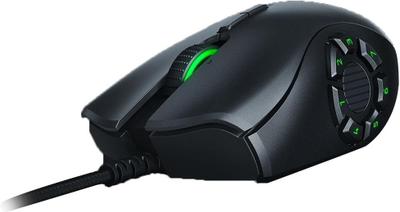
Buttons is where these two genuinely part company, Corsair Dark Core RGB Pro 8 against Razer Naga Trinity 19, a 58% lead for Razer Naga Trinity. Add weight to that, 133 g on the Corsair Dark Core RGB Pro versus 120 g on the Razer Naga Trinity, and the pattern holds. Switch type is not the same on both, Omron on the Corsair Dark Core RGB Pro versus Mechanical, rated 50 million clicks on the Razer Naga Trinity.
Which should you buy, Corsair Dark Core RGB Pro or Razer Naga Trinity?
Buy the Corsair Dark Core RGB Pro for owners of a Qi charging mousepad or Qi charger and right-handed palm grip players wanting a heavier, filled-out shell, though it is not the pick for players chasing sub-100g weight and left-handed users. The Razer Naga Trinity suits multi-genre gamers wanting one mouse for FPS, MOBA, and MMO and fans of physically swappable button layouts, though it is not built for left-handed users and players wanting a wireless MMO mouse. It is equally the pick for right-handed users on a budget vs. flagship MMO mice. Our rating of the Corsair Dark Core RGB Pro (7/10): great for Qi-charging convenience, but its weight and battery life lag behind dedicated lightweight wireless mice. Our rating of the Razer Naga Trinity (7/10): an older design, but the swappable side-plate concept remains genuinely useful for multi-genre players on a budget.
What Corsair Dark Core RGB Pro and Razer Naga Trinity have in common
Everything else lines up. Sensor tier, polling rate, grip type and shape read the same on both, so those are not worth weighing.
Frequently asked questions
Do the Corsair Dark Core RGB Pro and Razer Naga Trinity differ on sensor model?
Yes. Sensor Model reads PixArt PMW3391 Optical, up to 18,000 DPI on the Corsair Dark Core RGB Pro versus Razer 5G Optical, up to 16,000 DPI on the Razer Naga Trinity.

Specs and benchmarks
Brand
- Corsair Dark Core RGB Pro
- Corsair
- Razer Naga Trinity
- Razer
Connectivity
- Corsair Dark Core RGB Pro
- Wireless (2.4GHz SLIPSTREAM), Bluetooth
- Razer Naga Trinity
- Wired
Grip Type
- Corsair Dark Core RGB Pro
- Right-Handed
- Razer Naga Trinity
- Right-Handed
Model
- Corsair Dark Core RGB Pro
- Dark Core RGB Pro
- Razer Naga Trinity
- Naga Trinity
Shape
- Corsair Dark Core RGB Pro
- Ergonomic
- Razer Naga Trinity
- Ergonomic
Sensor Model
- Corsair Dark Core RGB Pro
- PixArt PMW3391 Optical, up to 18,000 DPI
- Razer Naga Trinity
- Razer 5G Optical, up to 16,000 DPI
Sensor Tier
- Corsair Dark Core RGB Pro
- Mid-High
- Razer Naga Trinity
- Mid-High
Buttons
- Corsair Dark Core RGB Pro
- 8-58%
- Razer Naga Trinity
- 19Best
Polling Rate
- Corsair Dark Core RGB Pro
- 1000 Hz
- Razer Naga Trinity
- 1000 Hz
Weight
- Corsair Dark Core RGB Pro
- 133 g-11%
- Razer Naga Trinity
- 120 gBest
Switch Type
- Corsair Dark Core RGB Pro
- Omron
- Razer Naga Trinity
- Mechanical, rated 50 million clicks


Which one should you pick?
Choose Corsair Dark Core RGB Pro if you want the higher polling rate (1000 Hz vs 1000 Hz).
Choose Razer Naga Trinity if you want the higher buttons (19 vs 8) and the lower weight (120 g vs 133 g).
Price comparison
| Retailer | Corsair Dark Core RGB Pro | Razer Naga Trinity |
|---|---|---|
| Amazon | View on Amazon | |
| Best Buy | View on Best Buy |
Disclaimer: The price and specification of the given product may differ from the actual product. Please confirm on the retailer's website before buying.
Verdict
Corsair Dark Core RGB Pro
7 / 10 Expert Rating
Great for Qi-charging convenience, but its weight and battery life lag behind dedicated lightweight wireless mice.
Razer Naga Trinity
7 / 10 Expert Rating
An older design, but the swappable side-plate concept remains genuinely useful for multi-genre players on a budget.