
Consumercarts is reader-supported. Learn more
Corsair Katar Pro XT vs Zowie ZA13-C: Comparison
What is the difference between Corsair Katar Pro XT and Zowie ZA13-C?
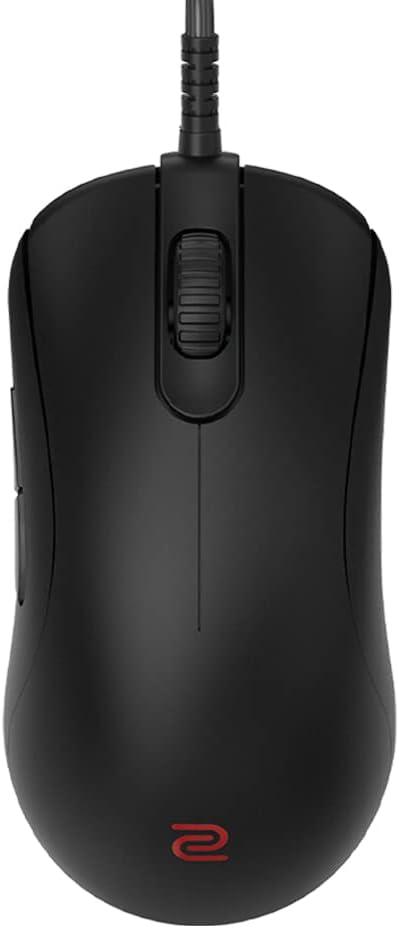
Weight is where these two genuinely part company, Corsair Katar Pro XT 96 g against Zowie ZA13-C 79 g, a 22% lead for Zowie ZA13-C. There is a split on sensor tier as well, Entry-Mid on the Corsair Katar Pro XT versus Mid Tier on the Zowie ZA13-C. Add buttons to that, 6 on the Corsair Katar Pro XT versus 5 on the Zowie ZA13-C, and the pattern holds. Shape is not the same on both, Symmetrical on the Corsair Katar Pro XT versus Symmetrical, taller front hump on the Zowie ZA13-C. Switch type is not the same on both, Omron, rated 50 million clicks on the Corsair Katar Pro XT versus Mechanical on the Zowie ZA13-C.
Which should you buy, Corsair Katar Pro XT or Zowie ZA13-C?
The Corsair Katar Pro XT is the one to take for budget-conscious esports players and ambidextrous claw or fingertip grip users, though it is not the pick for buyers who want wireless freedom and palm grip users wanting an ergonomic shape. Buy the Zowie ZA13-C for palm grip players with larger hands and fans of Zowie's driverless, no-frills philosophy, though it is not built for claw or fingertip grip players wanting a lower profile and buyers wanting RGB or onboard memory. Our rating of the Corsair Katar Pro XT (7/10): solid value wired mouse that covers the fundamentals without any standout feature. Our rating of the Zowie ZA13-C (7/10): A comfortable palm-grip pick for loyal Zowie users, though dated sensor specs limit its appeal outside that shape preference.
Frequently asked questions
Do the Corsair Katar Pro XT and Zowie ZA13-C differ on sensor model?
Yes. Sensor Model reads PixArt PMW3391 Optical, up to 18,000 DPI on the Corsair Katar Pro XT versus PMW3360, native resolutions to 3,200 DPI on the Zowie ZA13-C.
Is the Connectivity the same on the Corsair Katar Pro XT and Zowie ZA13-C?
It is. Both are listed at Wired, so it is not a reason to pick one over the other.

Specs and benchmarks
Brand
- Corsair Katar Pro XT
- Corsair
- Zowie ZA13-C
- Zowie (BenQ)
Connectivity
- Corsair Katar Pro XT
- Wired
- Zowie ZA13-C
- Wired
Grip Type
- Corsair Katar Pro XT
- Ambidextrous
- Zowie ZA13-C
- Ambidextrous
Model
- Corsair Katar Pro XT
- Katar Pro XT
- Zowie ZA13-C
- ZA13-C
Shape
- Corsair Katar Pro XT
- Symmetrical
- Zowie ZA13-C
- Symmetrical, taller front hump
Sensor Model
- Corsair Katar Pro XT
- PixArt PMW3391 Optical, up to 18,000 DPI
- Zowie ZA13-C
- PMW3360, native resolutions to 3,200 DPI
Sensor Tier
- Corsair Katar Pro XT
- Entry-Mid
- Zowie ZA13-C
- Mid Tier
Buttons
- Corsair Katar Pro XT
- 6Best
- Zowie ZA13-C
- 5-17%
Polling Rate
- Corsair Katar Pro XT
- 1000 HzBest
- Zowie ZA13-C
- 125/500/1000Hz
Weight
- Corsair Katar Pro XT
- 96 g-22%
- Zowie ZA13-C
- 79 gBest
Switch Type
- Corsair Katar Pro XT
- Omron, rated 50 million clicks
- Zowie ZA13-C
- Mechanical (Huano)


Which one should you pick?
Choose Corsair Katar Pro XT if you want the higher buttons (6 vs 5) and the higher polling rate (1000 Hz vs 125/500/1000Hz).
Choose Zowie ZA13-C if you want the lower weight (79 g vs 96 g).
Price comparison
| Retailer | Corsair Katar Pro XT | Zowie ZA13-C |
|---|---|---|
| Amazon | View on Amazon | |
| Newegg | View on Newegg |
Disclaimer: The price and specification of the given product may differ from the actual product. Please confirm on the retailer's website before buying.
Verdict
Corsair Katar Pro XT
7 / 10 Expert Rating
Solid value wired mouse that covers the fundamentals without any standout feature.
Zowie ZA13-C
7 / 10 Expert Rating
A comfortable palm-grip pick for loyal Zowie users, though dated sensor specs limit its appeal outside that shape preference.