
Consumercarts is reader-supported. Learn more
Corsair M75 Wireless vs Razer Basilisk X HyperSpeed: Comparison
What is the difference between Corsair M75 Wireless and Razer Basilisk X HyperSpeed?
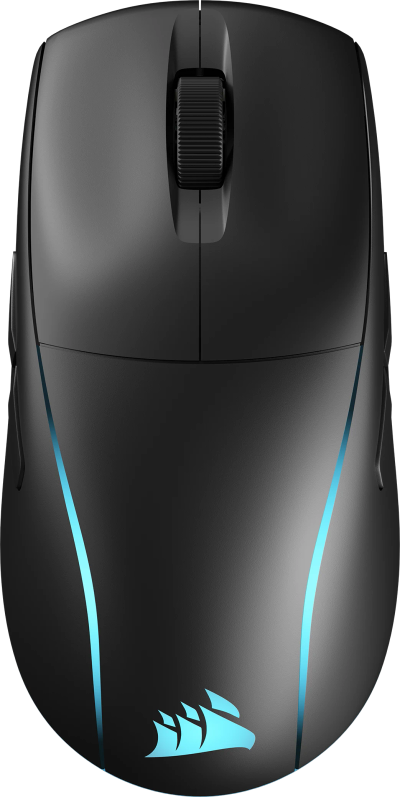
They are built to different briefs, and sensor model shows it, Corsair M75 Wireless Corsair Marksman Optical, up to 26,000 DPI against Razer Basilisk X HyperSpeed Razer Optical. Grip type is not the same on both, Ambidextrous on the Corsair M75 Wireless versus Right-Handed on the Razer Basilisk X HyperSpeed. Shape is not the same on both, Symmetrical-ish, Modular Side Plates on the Corsair M75 Wireless versus Ergonomic on the Razer Basilisk X HyperSpeed. There is a split on switch type as well, Optical on the Corsair M75 Wireless versus Mechanical on the Razer Basilisk X HyperSpeed.
Corsair M75 Wireless vs Razer Basilisk X HyperSpeed: which one fits your build
Take the Corsair M75 Wireless for FPS players who want a configurable shell that adapts to left-hand, right-hand, or minimal-button preferences. This mouse's modular plates are a genuine differentiator over fixed-shell competitors. Avoid it for buyers who want the simplest possible fixed-shell design. The Corsair Katar Pro Wireless, covered elsewhere on this site, offers that more straightforward alternative. Buy the Razer Basilisk X HyperSpeed for palm grip right-handed users and anyone who prefers replaceable AA batteries over built-in cells, though it is not the pick for anyone who wants RGB lighting and left-handed or ambidextrous users. It also earns its place with budget buyers who want wireless without giving up an ergonomic shape. Our rating of the Razer Basilisk X HyperSpeed (7/10): A solid budget wireless ergonomic mouse for anyone who doesn't need RGB or a rechargeable battery.
Frequently asked questions
Do the Corsair M75 Wireless and Razer Basilisk X HyperSpeed differ on weight?
Yes. Weight reads 89 g on the Corsair M75 Wireless versus 86 g on the Razer Basilisk X HyperSpeed.

Specs and benchmarks
Brand
- Corsair M75 Wireless
- Corsair
- Razer Basilisk X HyperSpeed
- Razer
Connectivity
- Corsair M75 Wireless
- Wireless (2.4GHz + Bluetooth), Wired
- Razer Basilisk X HyperSpeed
- Wireless 2.4G
Grip Type
- Corsair M75 Wireless
- Ambidextrous
- Razer Basilisk X HyperSpeed
- Right-Handed
Model
- Corsair M75 Wireless
- M75 Wireless
- Razer Basilisk X HyperSpeed
- Basilisk X HyperSpeed
Shape
- Corsair M75 Wireless
- Symmetrical-ish, Modular Side Plates
- Razer Basilisk X HyperSpeed
- Ergonomic
Sensor Model
- Corsair M75 Wireless
- Corsair Marksman Optical, up to 26,000 DPI
- Razer Basilisk X HyperSpeed
- Razer Optical
Polling Rate
- Corsair M75 Wireless
- 2000Hz (Up to 8000Hz with Adapter)Best
- Razer Basilisk X HyperSpeed
- 1000 Hz
Weight
- Corsair M75 Wireless
- 89 g-3%
- Razer Basilisk X HyperSpeed
- 86 gBest
Battery Life
- Corsair M75 Wireless
- Up to 70 Hours
- Razer Basilisk X HyperSpeed
- 285 hBest
Switch Type
- Corsair M75 Wireless
- Optical
- Razer Basilisk X HyperSpeed
- Mechanical

Which one should you pick?
Choose Corsair M75 Wireless if you want the higher polling rate (2000Hz (Up to 8000Hz with Adapter) vs 1000 Hz).
Choose Razer Basilisk X HyperSpeed if you want the lower weight (86 g vs 89 g).
Price comparison
| Retailer | Corsair M75 Wireless | Razer Basilisk X HyperSpeed |
|---|---|---|
| Amazon | View on Amazon |
Disclaimer: The price and specification of the given product may differ from the actual product. Please confirm on the retailer's website before buying.
Verdict
Razer Basilisk X HyperSpeed
7 / 10 Expert Rating
A solid budget wireless ergonomic mouse for anyone who doesn't need RGB or a rechargeable battery.