
Consumercarts is reader-supported. Learn more
ASUS TUF Gaming A15 FA507 vs MSI Katana 15 HX B14WGK: Comparison
ASUS TUF Gaming A15 FA507 vs MSI Katana 15 HX B14WGK: the series id difference
They are built to different briefs, and series id shows it, ASUS TUF Gaming A15 FA507 asus-tuf-gaming-a15-2023 against MSI Katana 15 HX B14WGK msi-katana-15-hx-b14w.
Which should you buy, ASUS TUF Gaming A15 FA507 or MSI Katana 15 HX B14WGK?
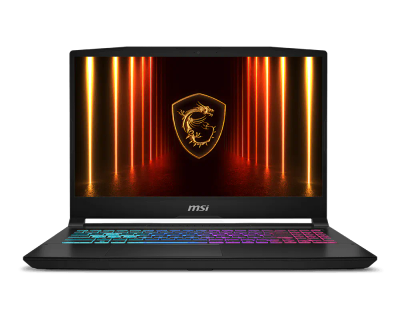
The ASUS TUF Gaming A15 FA507 suits budget 1080p gaming with upgrade room, though it is not built for high-refresh QHD gaming. Buy the MSI Katana 15 HX B14WGK for esports players prioritizing 144Hz over 4K resolution, though it is not the pick for buyers who need Thunderbolt or an external GPU dock. It is equally the pick for 1080p gamers who want RTX 50-series graphics at a mainstream price. It is the wrong buy for anyone who plans to add a second storage drive later, only one M.2 slot. Our rating of the ASUS TUF Gaming A15 FA507 (7.7/10): this TUF Gaming A15 pairs a Ryzen 7 7735HS with an RTX 40 series GPU and 8GB of VRAM. The 15.6-inch 1080p IPS screen refreshes at 144Hz, and the 16GB of DDR5 is in SO-DIMM slots you can upgrade. A 90Wh battery and a free storage slot make it a practical 1080p gaming pick. It weighs 2.2 kg and has no Thunderbolt port, with WiFi 6 rather than newer standards. The 1080p panel is the limit here, so look elsewhere if you want high-refresh QHD gaming.
Where the two are identical
Where they agree, they agree completely, region sold, laptop class, operating system, sustained power source and gpu brand included, so the decision does not turn on any of those. They match on 19 further specifications as well.
Frequently asked questions
Do the ASUS TUF Gaming A15 FA507 and MSI Katana 15 HX B14WGK differ on sku name?
Yes. SKU Name reads TUF Gaming A15 FA507 on the ASUS TUF Gaming A15 FA507 versus Core i9 HX / RTX 5070 8GB / 16GB... on the MSI Katana 15 HX B14WGK.
Is the Graphics Switching the same on the ASUS TUF Gaming A15 FA507 and MSI Katana 15 HX B14WGK?
It is. Both are listed at MUX Switch, so it is not a reason to pick one over the other.
Specs and benchmarks
Brand
- ASUS TUF Gaming A15 FA507
- ASUS
- MSI Katana 15 HX B14WGK
- MSI
Series
- ASUS TUF Gaming A15 FA507
- TUF Gaming A15
- MSI Katana 15 HX B14WGK
- Katana 15 HX
Series ID
- ASUS TUF Gaming A15 FA507
- asus-tuf-gaming-a15-2023
- MSI Katana 15 HX B14WGK
- msi-katana-15-hx-b14w
SKU Name
- ASUS TUF Gaming A15 FA507
- TUF Gaming A15 FA507 (Ryzen 7 7735HS, RTX 4060, 16GB)
- MSI Katana 15 HX B14WGK
- Core i9 HX / RTX 5070 8GB / 16GB / 1TB
Chassis Code
- ASUS TUF Gaming A15 FA507
- FA507NV
- MSI Katana 15 HX B14WGK
- B14WGK
Region Sold
- ASUS TUF Gaming A15 FA507
- Global
- MSI Katana 15 HX B14WGK
- Global
Laptop Class
- ASUS TUF Gaming A15 FA507
- Gaming
- MSI Katana 15 HX B14WGK
- Gaming
Release Year
- ASUS TUF Gaming A15 FA507
- 2023
- MSI Katana 15 HX B14WGK
- 2026
Operating System
- ASUS TUF Gaming A15 FA507
- Windows 11 Home
- MSI Katana 15 HX B14WGK
- Windows 11 Home
Weight
- ASUS TUF Gaming A15 FA507
- 2.2 kgBest
- MSI Katana 15 HX B14WGK
- 2.4 kg
CPU Brand
- ASUS TUF Gaming A15 FA507
- AMD
- MSI Katana 15 HX B14WGK
- Intel
CPU Model
- ASUS TUF Gaming A15 FA507
- Ryzen 7 7735HS
- MSI Katana 15 HX B14WGK
- Intel Core i9-14900HX
CPU Cores
- ASUS TUF Gaming A15 FA507
- 8
- MSI Katana 15 HX B14WGK
- 24Best
CPU Base Power
- ASUS TUF Gaming A15 FA507
- 35 W
- MSI Katana 15 HX B14WGK
- 55 W
Sustained Power Source
- ASUS TUF Gaming A15 FA507
- Not Measured
- MSI Katana 15 HX B14WGK
- Not Measured
GPU Brand
- ASUS TUF Gaming A15 FA507
- NVIDIA
- MSI Katana 15 HX B14WGK
- NVIDIA
GPU Model
- ASUS TUF Gaming A15 FA507
- GeForce RTX 4060 Laptop GPU
- MSI Katana 15 HX B14WGK
- NVIDIA GeForce RTX 5070 Laptop
VRAM
- ASUS TUF Gaming A15 FA507
- 8 GB
- MSI Katana 15 HX B14WGK
- 8 GB
GPU Max Graphics Power
- ASUS TUF Gaming A15 FA507
- 140 W
- MSI Katana 15 HX B14WGK
- 115 W
Graphics Switching
- ASUS TUF Gaming A15 FA507
- MUX Switch
- MSI Katana 15 HX B14WGK
- MUX Switch
RAM Capacity
- ASUS TUF Gaming A15 FA507
- 16 GB
- MSI Katana 15 HX B14WGK
- 16 GB
RAM Type
- ASUS TUF Gaming A15 FA507
- DDR5
- MSI Katana 15 HX B14WGK
- DDR5
RAM Speed
- ASUS TUF Gaming A15 FA507
- 4800 MT/s
- MSI Katana 15 HX B14WGK
- 5600 MT/sBest
Memory Form Factor
- ASUS TUF Gaming A15 FA507
- SO-DIMM
- MSI Katana 15 HX B14WGK
- SO-DIMM
Memory Soldered
- ASUS TUF Gaming A15 FA507
- No
- MSI Katana 15 HX B14WGK
- No
Max RAM Supported
- ASUS TUF Gaming A15 FA507
- 32 GB
- MSI Katana 15 HX B14WGK
- 96 GB
RAM Slots
- ASUS TUF Gaming A15 FA507
- 2
- MSI Katana 15 HX B14WGK
- 2
RAM Slots Free
- ASUS TUF Gaming A15 FA507
- 1
- MSI Katana 15 HX B14WGK
- 1
Storage Slots
- ASUS TUF Gaming A15 FA507
- 2
- MSI Katana 15 HX B14WGK
- 1
Storage Slots Free
- ASUS TUF Gaming A15 FA507
- 1
- MSI Katana 15 HX B14WGK
- 0
Storage Form Factor
- ASUS TUF Gaming A15 FA507
- M.2 2280
- MSI Katana 15 HX B14WGK
- M.2 2280
Storage Interface
- ASUS TUF Gaming A15 FA507
- PCIe 4.0 x4
- MSI Katana 15 HX B14WGK
- PCIe 4.0 x4
SATA Bay Present
- ASUS TUF Gaming A15 FA507
- No
- MSI Katana 15 HX B14WGK
- No
Storage Capacity
- ASUS TUF Gaming A15 FA507
- 512 GB
- MSI Katana 15 HX B14WGK
- 1000 GBBest
Storage Type
- ASUS TUF Gaming A15 FA507
- NVMe SSD
- MSI Katana 15 HX B14WGK
- NVMe SSD
Display Size
- ASUS TUF Gaming A15 FA507
- 15.6 inches
- MSI Katana 15 HX B14WGK
- 15.6 inches
Resolution Width
- ASUS TUF Gaming A15 FA507
- 1920 px
- MSI Katana 15 HX B14WGK
- 1920 px
Resolution Height
- ASUS TUF Gaming A15 FA507
- 1080 px
- MSI Katana 15 HX B14WGK
- 1080 px
Refresh Rate
- ASUS TUF Gaming A15 FA507
- 144 Hz
- MSI Katana 15 HX B14WGK
- 144 Hz
Panel Type
- ASUS TUF Gaming A15 FA507
- IPS
- MSI Katana 15 HX B14WGK
- IPS
Touchscreen
- ASUS TUF Gaming A15 FA507
- No
- MSI Katana 15 HX B14WGK
- No
Battery Capacity
- ASUS TUF Gaming A15 FA507
- 90 WhBest
- MSI Katana 15 HX B14WGK
- 75 Wh
Thunderbolt Support
- ASUS TUF Gaming A15 FA507
- None
- MSI Katana 15 HX B14WGK
- None
WiFi Standard
- ASUS TUF Gaming A15 FA507
- WiFi 6
- MSI Katana 15 HX B14WGK
- WiFi 6E

Which one should you pick?
Choose ASUS TUF Gaming A15 FA507 if you want the higher VRAM (8 GB vs 8 GB) and the higher refresh rate (144 Hz vs 144 Hz).
Choose MSI Katana 15 HX B14WGK if you already have it on hand or find it at a lower price.
Price comparison
| Retailer | ASUS TUF Gaming A15 FA507 | MSI Katana 15 HX B14WGK |
|---|---|---|
| Amazon | View on Amazon | |
| ASUS Store | View on ASUS Store |
Disclaimer: The price and specification of the given product may differ from the actual product. Please confirm on the retailer's website before buying.
Verdict
ASUS TUF Gaming A15 FA507
7.7 / 10 Expert Rating
This TUF Gaming A15 pairs a Ryzen 7 7735HS with an RTX 40 series GPU and 8GB of VRAM.
MSI Katana 15 HX B14WGK
8.1 / 10 Expert Rating
The Katana 15 HX combines a Core i9-14900HX with RTX 50 series graphics and 8GB of VRAM on a 15.6-inch 1920x1080 IPS panel at 144Hz.