
Consumercarts is reader-supported. Learn more
ASUS ROG Falchion vs Epomaker RT100: Comparison
What is the difference between ASUS ROG Falchion and Epomaker RT100?
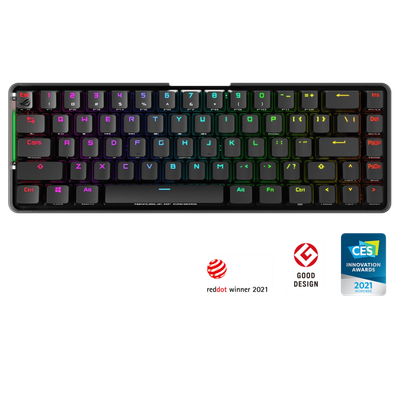
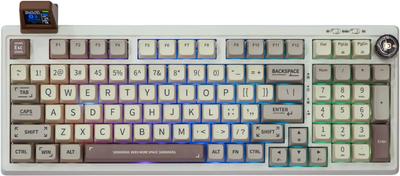
They are built to different briefs, and layout shows it, ASUS ROG Falchion 65% against Epomaker RT100 96%. Switch type is not the same on both, ROG RX Red or Blue Mechanical on the ASUS ROG Falchion versus Epomaker Wisteria / Cocoa Hot-Swap Mechanical on the Epomaker RT100. Connectivity is not the same on both, 2.4GHz RF Wireless / USB-C Wired on the ASUS ROG Falchion versus Bluetooth 5.0 / 2.4GHz RF / USB-C Wired on the Epomaker RT100. There is a split on backlighting as well, Per-Key Aura Sync RGB on the ASUS ROG Falchion versus South-Facing RGB on the Epomaker RT100. There is a split on keycap material as well, ABS on the ASUS ROG Falchion versus PBT Dye-Sublimated on the Epomaker RT100.
Who each one is for
The ASUS ROG Falchion is the one to take for players wanting a switchable 65%/numpad setup and wireless gaming setups, though it is not built for hot-swap tinkerers and buyers wanting PBT keycaps stock. Buy the Epomaker RT100 for enthusiasts wanting a customizable LCD display and numpad users seeking wireless hot-swap, though it is the wrong buy for minimalist aesthetic preference and competitive esports players. Our rating of the ASUS ROG Falchion (7/10): A clever modular 65% board whose detachable numpad genuinely changes how much desk space it needs. Our rating of the Epomaker RT100 (7/10): A feature-rich, screen-equipped 96% that stands out visually as much as it performs functionally.
What ASUS ROG Falchion and Epomaker RT100 have in common
Everything else lines up. Polling rate read the same on both, so those are not worth weighing.
Specs and benchmarks
Brand
- ASUS ROG Falchion
- ASUS
- Epomaker RT100
- Epomaker
Layout
- ASUS ROG Falchion
- 65% (with detachable numpad module)
- Epomaker RT100
- 96%
Model
- ASUS ROG Falchion
- ROG Falchion
- Epomaker RT100
- RT100
Switch Type
- ASUS ROG Falchion
- ROG RX Red (Linear) or Blue (Clicky) Mechanical
- Epomaker RT100
- Epomaker Wisteria / Cocoa Hot-Swap Mechanical
Connectivity
- ASUS ROG Falchion
- 2.4GHz RF Wireless / USB-C Wired
- Epomaker RT100
- Bluetooth 5.0 / 2.4GHz RF / USB-C Wired
Keycap Material
- ASUS ROG Falchion
- ABS
- Epomaker RT100
- PBT Dye-Sublimated
Backlighting
- ASUS ROG Falchion
- Per-Key Aura Sync RGB
- Epomaker RT100
- South-Facing RGB
Polling Rate
- ASUS ROG Falchion
- 1000 Hz
- Epomaker RT100
- 1000 Hz


Which one should you pick?
Choose ASUS ROG Falchion if you want the higher polling rate (1000 Hz vs 1000 Hz).
Choose Epomaker RT100 if you already have it on hand or find it at a lower price.
Price comparison
| Retailer | ASUS ROG Falchion | Epomaker RT100 |
|---|---|---|
| ASUS Store | View on ASUS Store | |
| Epomaker | View on Epomaker |
Disclaimer: The price and specification of the given product may differ from the actual product. Please confirm on the retailer's website before buying.
Verdict
ASUS ROG Falchion
7 / 10 Expert Rating
A clever modular 65% board whose detachable numpad genuinely changes how much desk space it needs.
Epomaker RT100
7 / 10 Expert Rating
A feature-rich, screen-equipped 96% that stands out visually as much as it performs functionally.