
Consumercarts is reader-supported. Learn more
ASUS ROG Falchion vs Roccat Vulcan II Max: Comparison
What is the difference between ASUS ROG Falchion and Roccat Vulcan II Max?
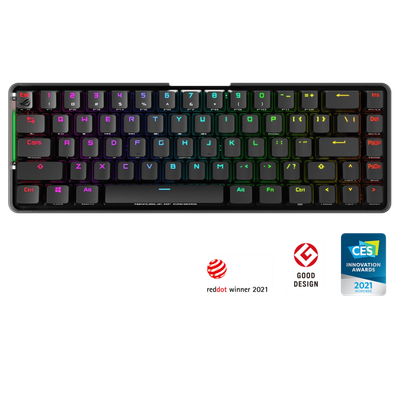
The first real difference is layout: ASUS ROG Falchion 65% against Roccat Vulcan II Max Full-Size. They differ on switch type too, ROG RX Red or Blue Mechanical on the ASUS ROG Falchion versus Titan II Optical-Mechanical on the Roccat Vulcan II Max. They differ on connectivity too, 2.4GHz RF Wireless / USB-C Wired on the ASUS ROG Falchion versus Wired USB on the Roccat Vulcan II Max. Backlighting is not the same on both, Per-Key Aura Sync RGB on the ASUS ROG Falchion versus AIMO Per-Key RGB on the Roccat Vulcan II Max. They differ on keycap material too, ABS on the ASUS ROG Falchion versus PBT with Floating Design on the Roccat Vulcan II Max.
Who each one is for
Buy the ASUS ROG Falchion for players wanting a switchable 65%/numpad setup and wireless gaming setups, though it is not built for hot-swap tinkerers and buyers wanting PBT keycaps stock. The Roccat Vulcan II Max suits buyers wanting a distinctive lighting aesthetic and full-size layout gamers, though it is the wrong buy for hot-swap tinkerers and wireless-only users. Our rating of the ASUS ROG Falchion (7/10): A clever modular 65% board whose detachable numpad genuinely changes how much desk space it needs. Our rating of the Roccat Vulcan II Max (7/10): A visually distinctive full-size optical-mechanical board whose floating keycap design remains instantly recognizable.
What ASUS ROG Falchion and Roccat Vulcan II Max have in common
Where they agree, they agree completely, polling rate and hot-swappable included, so the decision does not turn on any of those.

Specs and benchmarks
Brand
- ASUS ROG Falchion
- ASUS
- Roccat Vulcan II Max
- Roccat
Layout
- ASUS ROG Falchion
- 65% (with detachable numpad module)
- Roccat Vulcan II Max
- Full-Size
Model
- ASUS ROG Falchion
- ROG Falchion
- Roccat Vulcan II Max
- Vulcan II Max
Switch Type
- ASUS ROG Falchion
- ROG RX Red (Linear) or Blue (Clicky) Mechanical
- Roccat Vulcan II Max
- Titan II Optical-Mechanical (Linear/Tactile)
Connectivity
- ASUS ROG Falchion
- 2.4GHz RF Wireless / USB-C Wired
- Roccat Vulcan II Max
- Wired USB (braided cable)
Keycap Material
- ASUS ROG Falchion
- ABS
- Roccat Vulcan II Max
- PBT with Floating Design
Hot-Swappable
- ASUS ROG Falchion
- No
- Roccat Vulcan II Max
- No
Backlighting
- ASUS ROG Falchion
- Per-Key Aura Sync RGB
- Roccat Vulcan II Max
- AIMO Per-Key RGB
Polling Rate
- ASUS ROG Falchion
- 1000 Hz
- Roccat Vulcan II Max
- 1000 Hz


Which one should you pick?
Choose ASUS ROG Falchion if you want the higher polling rate (1000 Hz vs 1000 Hz).
Choose Roccat Vulcan II Max if you already have it on hand or find it at a lower price.
Price comparison
| Retailer | ASUS ROG Falchion | Roccat Vulcan II Max |
|---|---|---|
| ASUS Store | View on ASUS Store | |
| Roccat | View on Roccat |
Disclaimer: The price and specification of the given product may differ from the actual product. Please confirm on the retailer's website before buying.
Verdict
ASUS ROG Falchion
7 / 10 Expert Rating
A clever modular 65% board whose detachable numpad genuinely changes how much desk space it needs.
Roccat Vulcan II Max
7 / 10 Expert Rating
A visually distinctive full-size optical-mechanical board whose floating keycap design remains instantly recognizable.