
Consumercarts is reader-supported. Learn more
Acer Nitro VG272U vs GeChic On-Lap 1503I: Comparison
What is the difference between Acer Nitro VG272U and GeChic On-Lap 1503I?
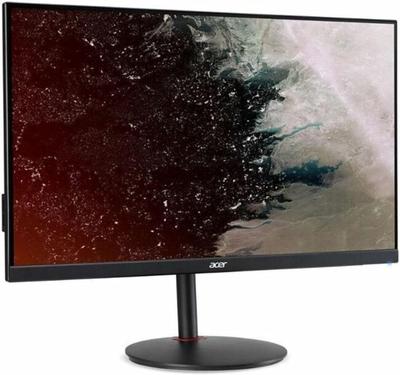
Refresh rate is where these two genuinely part company, Acer Nitro VG272U 180 Hz against GeChic On-Lap 1503I 60 Hz, a 67% lead for Acer Nitro VG272U. Screen size runs the same way, 27 in on the Acer Nitro VG272U versus 15.6 in on the GeChic On-Lap 1503I, another win for Acer Nitro VG272U. They differ on resolution too, 2560 x 1440 on the Acer Nitro VG272U versus 1920 x 1080 on the GeChic On-Lap 1503I. The response time figures are near enough to ignore, 1ms on the Acer Nitro VG272U versus 25 ms on the GeChic On-Lap 1503I. They differ on adaptive sync too, AMD FreeSync Premium on the Acer Nitro VG272U versus None on the GeChic On-Lap 1503I.
Acer Nitro VG272U vs GeChic On-Lap 1503I: which one fits your build
Buy the Acer Nitro VG272U for budget-conscious gamers wanting high refresh QHD and first upgrade from 1080p/60Hz displays, though it is not built for buyers wanting full stand ergonomics and HDR content viewers. The GeChic On-Lap 1503I suits photographers and videographers needing a tripod-mounted field monitor and camera operators wanting touch-to-focus on supported rigs, though it is the wrong buy for laptop users wanting simple single-cable USB-C setup and buyers wanting the lightest possible portable monitor. Our rating of the Acer Nitro VG272U (7.5/10): A genuinely fast budget QHD gaming monitor that sacrifices ergonomics and HDR to hit an aggressive price point. Our rating of the GeChic On-Lap 1503I (7/10): A dated connectivity setup, but still a go-to field monitor for photographers and videographers who need tripod-mountable touch.
What Acer Nitro VG272U and GeChic On-Lap 1503I have in common
Where they agree, they agree completely, aspect ratio included, so the decision does not turn on any of those.

Specs and benchmarks
Panel Type
- Acer Nitro VG272U
- IPS
- GeChic On-Lap 1503I
- IPS (10-point touch)
Brand
- Acer Nitro VG272U
- Acer
- GeChic On-Lap 1503I
- GeChic
Model Number
- Acer Nitro VG272U
- VG272U Mbmiipx
- GeChic On-Lap 1503I
- 1503I
Screen Size
- Acer Nitro VG272U
- 27 inBest
- GeChic On-Lap 1503I
- 15.6 in-42%
Resolution
- Acer Nitro VG272U
- 2560 x 1440 (QHD)
- GeChic On-Lap 1503I
- 1920 x 1080 (Full HD)
Aspect Ratio
- Acer Nitro VG272U
- 16:9
- GeChic On-Lap 1503I
- 16:9
Refresh Rate
- Acer Nitro VG272U
- 180 HzBest
- GeChic On-Lap 1503I
- 60 Hz-67%
Response Time
- Acer Nitro VG272U
- 1ms (VRB)Best
- GeChic On-Lap 1503I
- 25 ms
Adaptive Sync
- Acer Nitro VG272U
- AMD FreeSync Premium
- GeChic On-Lap 1503I
- None
Series
- Acer Nitro VG272U
- Nitro VG272U
- GeChic On-Lap 1503I
- On-Lap 1503I


Which one should you pick?
Choose Acer Nitro VG272U if you want the higher screen size (27 in vs 15.6 in), the higher refresh rate (180 Hz vs 60 Hz) and the lower response time (1ms (VRB) vs 25 ms).
Choose GeChic On-Lap 1503I if you already have it on hand or find it at a lower price.
Price comparison
| Retailer | Acer Nitro VG272U | GeChic On-Lap 1503I |
|---|---|---|
| Amazon | View on Amazon |
Disclaimer: The price and specification of the given product may differ from the actual product. Please confirm on the retailer's website before buying.
Verdict
Acer Nitro VG272U
7.5 / 10 Expert Rating
A genuinely fast budget QHD gaming monitor that sacrifices ergonomics and HDR to hit an aggressive price point.
GeChic On-Lap 1503I
7 / 10 Expert Rating
A dated connectivity setup, but still a go-to field monitor for photographers and videographers who need tripod-mountable touch.