
Consumercarts is reader-supported. Learn more
AOC 27G4X vs Gigabyte M28U: Comparison
What is the difference between AOC 27G4X and Gigabyte M28U?
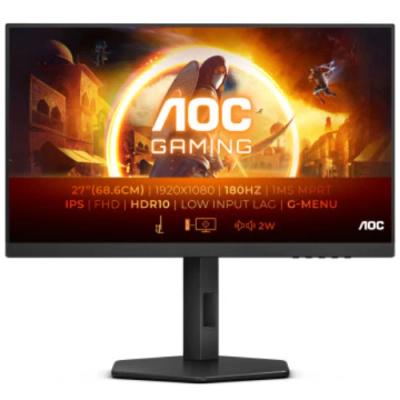
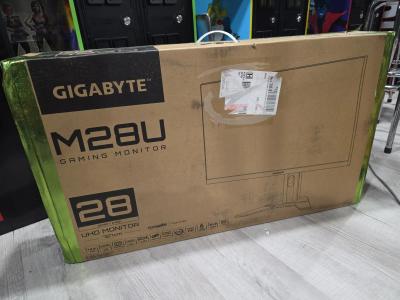
The gap that matters here is refresh rate: AOC 27G4X 180 Hz against Gigabyte M28U 144 Hz, which puts AOC 27G4X 20% ahead. There is a split on hdr certification as well, HDR10 signal only on the AOC 27G4X versus DisplayHDR 400 on the Gigabyte M28U. Hdr formats is not the same on both, HDR10 on the AOC 27G4X versus VESA DisplayHDR 400 on the Gigabyte M28U. There is a split on adaptive sync as well, Adaptive-Sync, NVIDIA G-Sync Compatible on the AOC 27G4X versus AMD FreeSync Premium Pro, G-Sync Compatible on the Gigabyte M28U.
Who each one is for
The AOC 27G4X suits extreme budget-conscious gamers and first-time QHD high-refresh upgraders, though it is the wrong buy for buyers wanting real HDR contrast and anyone wanting a fully adjustable stand. Buy the Gigabyte M28U for console gamers wanting native 4K/120Hz with VRR and dual PC or PC/console desk setups needing KVM, though it is not built for budget or mid-range GPU owners and buyers wanting deep local-dimming HDR. Our rating of the AOC 27G4X (7.6/10): an aggressively priced high-refresh QHD monitor that delivers solid core gaming performance without extra frills. Our rating of the Gigabyte M28U (8.3/10): A well-connected 4K gaming monitor whose HDMI 2.1 bandwidth and built-in KVM make it a strong console-and-PC hybrid pick.
Where the two are identical
Where they agree, they agree completely, hdr support, panel technology, aspect ratio, screen curvature and vesa mount pattern included, so the decision does not turn on any of those.
Frequently asked questions
Do the AOC 27G4X and Gigabyte M28U differ on resolution?
Yes. Resolution reads 1920 x 1080 on the AOC 27G4X versus 3840 x 2160 on the Gigabyte M28U.
Specs and benchmarks
Panel Type
- AOC 27G4X
- IPS
- Gigabyte M28U
- SS IPS
Brand
- AOC 27G4X
- AOC
- Gigabyte M28U
- Gigabyte
Model Number
- AOC 27G4X
- 27G4X
- Gigabyte M28U
- M28U
Screen Size
- AOC 27G4X
- 27 in-4%
- Gigabyte M28U
- 28 inBest
Resolution
- AOC 27G4X
- 1920 x 1080 (Full HD)
- Gigabyte M28U
- 3840 x 2160 (4K UHD)
Panel Technology
- AOC 27G4X
- IPS
- Gigabyte M28U
- IPS
Aspect Ratio
- AOC 27G4X
- 16:9
- Gigabyte M28U
- 16:9
Refresh Rate
- AOC 27G4X
- 180 HzBest
- Gigabyte M28U
- 144 Hz-20%
Response Time
- AOC 27G4X
- 1 ms
- Gigabyte M28U
- 1ms (GtG)
Adaptive Sync
- AOC 27G4X
- Adaptive-Sync, NVIDIA G-Sync Compatible
- Gigabyte M28U
- AMD FreeSync Premium Pro, G-Sync Compatible
HDR Support
- AOC 27G4X
- Yes
- Gigabyte M28U
- Yes
Native Resolution
- AOC 27G4X
- 1920x1080
- Gigabyte M28U
- 3840x2160
Screen Curvature
- AOC 27G4X
- Flat
- Gigabyte M28U
- Flat
HDR Certification
- AOC 27G4X
- HDR10 signal only
- Gigabyte M28U
- DisplayHDR 400
DCI-P3 Coverage
- AOC 27G4X
- 95.5 %
- Gigabyte M28U
- 94 %
DisplayPort Version
- AOC 27G4X
- 1.4
- Gigabyte M28U
- 1.4 DSC
HDMI Version
- AOC 27G4X
- 2.0
- Gigabyte M28U
- 2.1 FRL
VESA Mount Pattern
- AOC 27G4X
- 100x100
- Gigabyte M28U
- 100x100
Series
- AOC 27G4X
- AOC Gaming 27G4X
- Gigabyte M28U
- Gigabyte Gaming M28U
Color Gamut
- AOC 27G4X
- 128.3% sRGB, 95.5% DCI-P3
- Gigabyte M28U
- 94% DCI-P3, 120% sRGB
HDR Formats
- AOC 27G4X
- HDR10
- Gigabyte M28U
- VESA DisplayHDR 400


Which one should you pick?
Choose AOC 27G4X if you want the higher refresh rate (180 Hz vs 144 Hz).
Choose Gigabyte M28U if you want the higher screen size (28 in vs 27 in).
Verdict
AOC 27G4X
7.6 / 10 Expert Rating
An aggressively priced high-refresh QHD monitor that delivers solid core gaming performance without extra frills.
Gigabyte M28U
8.3 / 10 Expert Rating
A well-connected 4K gaming monitor whose HDMI 2.1 bandwidth and built-in KVM make it a strong console-and-PC hybrid pick.