
Consumercarts is reader-supported. Learn more
ASRock B650M Pro RS vs Gigabyte A620M Gaming X: Comparison
ASRock B650M Pro RS vs Gigabyte A620M Gaming X m.2 slots compared
M.2 slots is where these two genuinely part company, ASRock B650M Pro RS 3 against Gigabyte A620M Gaming X 1, a 67% lead for ASRock B650M Pro RS. Pcie x16 slots is not the same on both, 2 on the ASRock B650M Pro RS versus 1 on the Gigabyte A620M Gaming X. Rear usb 10gbps ports is not the same on both, 2 on the ASRock B650M Pro RS versus 1 on the Gigabyte A620M Gaming X.
ASRock B650M Pro RS vs Gigabyte A620M Gaming X: which one fits your build
The ASRock B650M Pro RS is the one to take for the most affordable current-generation AM5 builds, though it is the wrong buy for anyone who wants Wi-Fi included out of the box and builds that want a PCIe 5.0 x16 GPU slot. The same goes for builders who don't need a PCIe 5.0 GPU slot or built-in WiFi. Buy the Gigabyte A620M Gaming X for buyers comfortable double-checking exact SKU/revision details before purchasing, though it is not the pick for overclockers, since A620 doesn't support CPU overclocking on any revision. It also earns its place with budget builders who want the option of a Wi-Fi-equipped revision on an A620 board. It is not the one for anyone who wants certainty about Wi-Fi inclusion without checking the specific listing.
What ASRock B650M Pro RS and Gigabyte A620M Gaming X have in common
The common ground is wider than the gap: memory slots, max memory, max memory capacity, form factor and platform are identical here. They match on 8 further specifications as well.
Frequently asked questions
Do the ASRock B650M Pro RS and Gigabyte A620M Gaming X differ on chipset?
Yes. Chipset reads B650 on the ASRock B650M Pro RS versus A620 on the Gigabyte A620M Gaming X.
Is the Newest CPU Family Supported the same on the ASRock B650M Pro RS and Gigabyte A620M Gaming X?
It is. Both are listed at Ryzen 9000, so it is not a reason to pick one over the other.

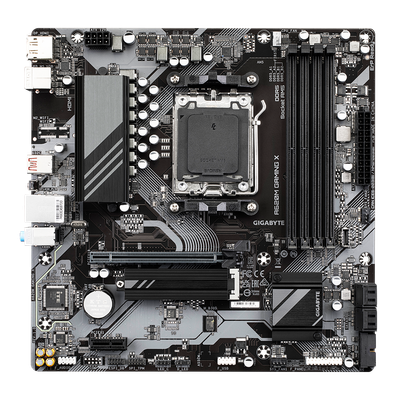
Specs and benchmarks
Platform
- ASRock B650M Pro RS
- AMD
- Gigabyte A620M Gaming X
- AMD
Model Number
- ASRock B650M Pro RS
- B650M Pro RS
- Gigabyte A620M Gaming X
- A620M Gaming X
Socket
- ASRock B650M Pro RS
- AMD Ryzen 9000 / 8000 / 7000 series
- Gigabyte A620M Gaming X
- AMD Ryzen 9000 / 8000 / 7000 series (non-OC)
Form Factor
- ASRock B650M Pro RS
- Micro-ATX
- Gigabyte A620M Gaming X
- Micro-ATX
Chipset
- ASRock B650M Pro RS
- B650
- Gigabyte A620M Gaming X
- A620
Newest CPU Family Supported
- ASRock B650M Pro RS
- Ryzen 9000
- Gigabyte A620M Gaming X
- Ryzen 9000
Memory Type
- ASRock B650M Pro RS
- 4x DDR5 DIMM, up to 256GB, dual-channel, DDR5-7200+ (OC), XMP/EXPO
- Gigabyte A620M Gaming X
- 4x DDR5, up to 256GB, up to 8000 MT/s (OC)
Oldest CPU Family Supported
- ASRock B650M Pro RS
- Ryzen 7000
- Gigabyte A620M Gaming X
- Ryzen 7000
CPU Overclocking Supported
- ASRock B650M Pro RS
- Yes
- Gigabyte A620M Gaming X
- No
Memory Slots
- ASRock B650M Pro RS
- 4
- Gigabyte A620M Gaming X
- 4
Max Memory
- ASRock B650M Pro RS
- 256 GB
- Gigabyte A620M Gaming X
- 256 GB
Board Width
- ASRock B650M Pro RS
- 244 mm
- Gigabyte A620M Gaming X
- 244 mm
M.2 Slots
- ASRock B650M Pro RS
- 3Best
- Gigabyte A620M Gaming X
- 1-67%
PCIe 5.0 Support
- ASRock B650M Pro RS
- Yes
- Gigabyte A620M Gaming X
- No
Wi-Fi Onboard
- ASRock B650M Pro RS
- No
- Gigabyte A620M Gaming X
- No
Max Memory Capacity
- ASRock B650M Pro RS
- 256 GB
- Gigabyte A620M Gaming X
- 256 GB
Max Rated Memory Speed
- ASRock B650M Pro RS
- 7200 MT/s
- Gigabyte A620M Gaming X
- 8000 MT/sBest
SATA Ports
- ASRock B650M Pro RS
- 4
- Gigabyte A620M Gaming X
- 4
PCIe x16 Slots
- ASRock B650M Pro RS
- 2
- Gigabyte A620M Gaming X
- 1
Primary Graphics Slot Gen
- ASRock B650M Pro RS
- PCIe 4.0
- Gigabyte A620M Gaming X
- PCIe 4.0
Rear USB 10Gbps Ports
- ASRock B650M Pro RS
- 2
- Gigabyte A620M Gaming X
- 1
Rear USB 5Gbps Ports
- ASRock B650M Pro RS
- 2
- Gigabyte A620M Gaming X
- 3
Rear USB 2.0 Ports
- ASRock B650M Pro RS
- 4
- Gigabyte A620M Gaming X
- 2
Vcore Power Stages
- ASRock B650M Pro RS
- 8
- Gigabyte A620M Gaming X
- 8
Wi-Fi Standard
- ASRock B650M Pro RS
- None
- Gigabyte A620M Gaming X
- None
Audio Codec
- ASRock B650M Pro RS
- Realtek ALC897, Nahimic enhancement
- Gigabyte A620M Gaming X
- Realtek codec (model not specified)
Expansion
- ASRock B650M Pro RS
- 1x PCIe 4.0 x16, 1x PCIe 3.0 x16 (x4 mode); 1x M.2 PCIe 5.0 x4, 1x M.2 PCIe 4.0 x4, 1x M.2 PCIe 4.0 x2; 4x SATA III; 1x M.2 Key-E (Wi-Fi optional)
- Gigabyte A620M Gaming X
- 1x PCIe 4.0 x16 (CPU), 1x PCIe 3.0 x1 (chipset), 1x M.2 (PCIe 4.0 x4), 4x SATA 6Gb/s
Connectivity
- ASRock B650M Pro RS
- 1x Rear USB 3.2 Gen2 Type-C (10Gbps), 1x Rear USB 3.2 Gen2 Type-A (10Gbps), 2x Rear USB 3.2 Gen1 (5Gbps), 4x Rear USB 2.0; M.2 Key E for optional WiFi module
- Gigabyte A620M Gaming X
- Revision-dependent (confirm SKU before purchase)
Networking
- ASRock B650M Pro RS
- Realtek RTL8125BG 2.5G LAN (WiFi optional via M.2 Key E)
- Gigabyte A620M Gaming X
- Gigabit LAN; Wi-Fi on "Gaming X AX" revision only
Special Features
- ASRock B650M Pro RS
- 3x M.2 (1x Gen5, 1x Gen4, 1x Gen4 x2)
- Gigabyte A620M Gaming X
- Exists in both wired and WiFi-equipped revisions


Which one should you pick?
Choose ASRock B650M Pro RS if you want the higher memory slots (4 vs 4), the higher max memory (256 GB vs 256 GB) and the higher M.2 slots (3 vs 1).
Choose Gigabyte A620M Gaming X if you already have it on hand or find it at a lower price.
Price comparison
| Retailer | ASRock B650M Pro RS | Gigabyte A620M Gaming X |
|---|---|---|
| Newegg | View on Newegg | View on Newegg |
Disclaimer: The price and specification of the given product may differ from the actual product. Please confirm on the retailer's website before buying.