
Consumercarts is reader-supported. Learn more
ASRock X570 Phantom Gaming-ITX/TB3 vs Gigabyte B850I AORUS PRO: Comparison
What is the difference between ASRock X570 Phantom Gaming-ITX/TB3 and Gigabyte B850I AORUS PRO?
Max memory is where these two genuinely part company, ASRock X570 Phantom Gaming-ITX/TB3 64 GB against Gigabyte B850I AORUS PRO 128 GB, a 50% lead for Gigabyte B850I AORUS PRO. Gigabyte B850I AORUS PRO also leads on m.2 slots, 1 on the ASRock X570 Phantom Gaming-ITX/TB3 versus 2 on the Gigabyte B850I AORUS PRO.
ASRock X570 Phantom Gaming-ITX/TB3 vs Gigabyte B850I AORUS PRO: which one fits your build
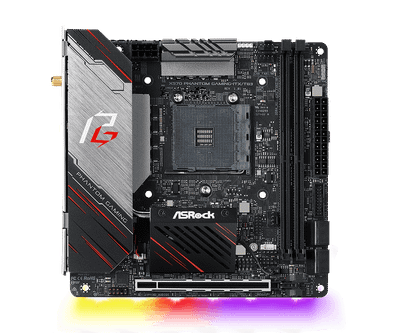
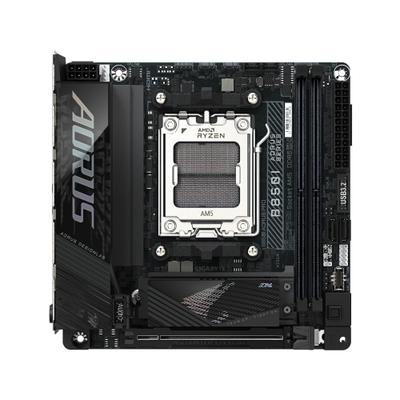
The ASRock X570 Phantom Gaming-ITX/TB3 suits budget Ryzen 5000-series SFF builds using existing AM4 CPUs, though it is not built for anyone needing more than one M.2 slot for storage. It is equally the pick for AM4 builders who specifically need built-in Thunderbolt 3 for eGPU or fast external storage. It is not the one for new builds where AM5 offers a longer upgrade runway for similar money. The Gigabyte B850I AORUS PRO is the one to take for builders who value screwless installation in cramped SFF cases, though it is the wrong buy for extreme overclockers needing more than mainstream-tier VRM headroom. The same goes for Ryzen X3D builders who want X3D Turbo Mode tuning on a clearly specced ITX board. Avoid it for buyers who want three M.2 slots like the B650I AORUS Ultra offers.
What ASRock X570 Phantom Gaming-ITX/TB3 and Gigabyte B850I AORUS PRO have in common
Where they agree, they agree completely, memory slots, form factor, platform, cpu overclocking supported and board width included, so the decision does not turn on any of those. They match on 8 further specifications as well.
Frequently asked questions
Do the ASRock X570 Phantom Gaming-ITX/TB3 and Gigabyte B850I AORUS PRO differ on chipset?
Yes. Chipset reads X570 on the ASRock X570 Phantom Gaming-ITX/TB3 versus B850 on the Gigabyte B850I AORUS PRO.
Is the Wi-Fi Onboard the same on the ASRock X570 Phantom Gaming-ITX/TB3 and Gigabyte B850I AORUS PRO?
It is. Both are listed at Yes, so it is not a reason to pick one over the other.
Specs and benchmarks
Platform
- ASRock X570 Phantom Gaming-ITX/TB3
- AMD
- Gigabyte B850I AORUS PRO
- AMD
Model Number
- ASRock X570 Phantom Gaming-ITX/TB3
- X570 Phantom Gaming-ITX/TB3
- Gigabyte B850I AORUS PRO
- B850I AORUS PRO
Socket
- ASRock X570 Phantom Gaming-ITX/TB3
- AMD Ryzen 2000 / 3000 / 4000 G / 5000 / 5000 G series (AM4)
- Gigabyte B850I AORUS PRO
- AMD Ryzen 9000 / 8000 / 7000 series
Form Factor
- ASRock X570 Phantom Gaming-ITX/TB3
- Mini-ITX
- Gigabyte B850I AORUS PRO
- Mini-ITX
Chipset
- ASRock X570 Phantom Gaming-ITX/TB3
- X570
- Gigabyte B850I AORUS PRO
- B850
Newest CPU Family Supported
- ASRock X570 Phantom Gaming-ITX/TB3
- Ryzen 5000
- Gigabyte B850I AORUS PRO
- Ryzen 9000
Memory Type
- ASRock X570 Phantom Gaming-ITX/TB3
- 2x DDR4, dual-channel, up to 64GB, up to DDR4-4533+ (OC), ECC and non-ECC unbuffered
- Gigabyte B850I AORUS PRO
- 2x DDR5 DIMM, up to 128GB (64GB per DIMM), up to 8400 MT/s (OC)
CPU Overclocking Supported
- ASRock X570 Phantom Gaming-ITX/TB3
- Yes
- Gigabyte B850I AORUS PRO
- Yes
Memory Slots
- ASRock X570 Phantom Gaming-ITX/TB3
- 2
- Gigabyte B850I AORUS PRO
- 2
Max Memory
- ASRock X570 Phantom Gaming-ITX/TB3
- 64 GB-50%
- Gigabyte B850I AORUS PRO
- 128 GBBest
Board Width
- ASRock X570 Phantom Gaming-ITX/TB3
- 170 mm
- Gigabyte B850I AORUS PRO
- 170 mm
M.2 Slots
- ASRock X570 Phantom Gaming-ITX/TB3
- 1-50%
- Gigabyte B850I AORUS PRO
- 2Best
PCIe 5.0 Support
- ASRock X570 Phantom Gaming-ITX/TB3
- No
- Gigabyte B850I AORUS PRO
- Yes
Wi-Fi Onboard
- ASRock X570 Phantom Gaming-ITX/TB3
- Yes
- Gigabyte B850I AORUS PRO
- Yes
Memory Channels
- ASRock X570 Phantom Gaming-ITX/TB3
- 2
- Gigabyte B850I AORUS PRO
- 2
Max Memory Capacity
- ASRock X570 Phantom Gaming-ITX/TB3
- 64 GB
- Gigabyte B850I AORUS PRO
- 128 GBBest
Max Rated Memory Speed
- ASRock X570 Phantom Gaming-ITX/TB3
- 4533 MT/s
- Gigabyte B850I AORUS PRO
- 8400 MT/sBest
ECC Memory Support
- ASRock X570 Phantom Gaming-ITX/TB3
- Unbuffered ECC
- Gigabyte B850I AORUS PRO
- None
M.2 PCIe 5.0 Slots
- ASRock X570 Phantom Gaming-ITX/TB3
- 0
- Gigabyte B850I AORUS PRO
- 1
M.2 PCIe 4.0 Slots
- ASRock X570 Phantom Gaming-ITX/TB3
- 1
- Gigabyte B850I AORUS PRO
- 1
SATA Ports
- ASRock X570 Phantom Gaming-ITX/TB3
- 4
- Gigabyte B850I AORUS PRO
- 2
PCIe x16 Slots
- ASRock X570 Phantom Gaming-ITX/TB3
- 1
- Gigabyte B850I AORUS PRO
- 1
Primary Graphics Slot Gen
- ASRock X570 Phantom Gaming-ITX/TB3
- PCIe 4.0
- Gigabyte B850I AORUS PRO
- PCIe 5.0
Rear USB 10Gbps Ports
- ASRock X570 Phantom Gaming-ITX/TB3
- 2
- Gigabyte B850I AORUS PRO
- 3
Rear USB 5Gbps Ports
- ASRock X570 Phantom Gaming-ITX/TB3
- 2
- Gigabyte B850I AORUS PRO
- 2
Rear USB 2.0 Ports
- ASRock X570 Phantom Gaming-ITX/TB3
- 0
- Gigabyte B850I AORUS PRO
- 2
Front USB-C Header Speed
- ASRock X570 Phantom Gaming-ITX/TB3
- None
- Gigabyte B850I AORUS PRO
- 10Gbps
Fan and Pump Headers
- ASRock X570 Phantom Gaming-ITX/TB3
- 3
- Gigabyte B850I AORUS PRO
- 3
ARGB Headers
- ASRock X570 Phantom Gaming-ITX/TB3
- 1
- Gigabyte B850I AORUS PRO
- 2
Vcore Power Stages
- ASRock X570 Phantom Gaming-ITX/TB3
- 10
- Gigabyte B850I AORUS PRO
- 8
Power Stage Current Rating
- ASRock X570 Phantom Gaming-ITX/TB3
- 60 A
- Gigabyte B850I AORUS PRO
- 80 A
EPS 12V Configuration
- ASRock X570 Phantom Gaming-ITX/TB3
- One 8-pin
- Gigabyte B850I AORUS PRO
- One 8-pin
Max Ethernet Speed
- ASRock X570 Phantom Gaming-ITX/TB3
- 1 Gbps
- Gigabyte B850I AORUS PRO
- 2.5 GbpsBest
Ethernet Port Count
- ASRock X570 Phantom Gaming-ITX/TB3
- 1
- Gigabyte B850I AORUS PRO
- 1
Wi-Fi Standard
- ASRock X570 Phantom Gaming-ITX/TB3
- Wi-Fi 6
- Gigabyte B850I AORUS PRO
- Wi-Fi 7
Bluetooth Version
- ASRock X570 Phantom Gaming-ITX/TB3
- 5.2
- Gigabyte B850I AORUS PRO
- 5.4
Audio Codec
- ASRock X570 Phantom Gaming-ITX/TB3
- Realtek ALC1220
- Gigabyte B850I AORUS PRO
- Realtek ALC4080
Expansion
- ASRock X570 Phantom Gaming-ITX/TB3
- 1x PCIe 4.0 x16 (Ryzen 3000/5000; PCIe 3.0 with APUs and Ryzen 2000)
- Gigabyte B850I AORUS PRO
- 1x PCIe 5.0 x16 (CPU)
Connectivity
- ASRock X570 Phantom Gaming-ITX/TB3
- 1x Thunderbolt 3 Type-C (40Gbps), 2x USB 3.2 Gen2 Type-A, 2x USB 3.2 Gen1 rear
- Gigabyte B850I AORUS PRO
- EZ-Latch screwless M.2/PCIe
Networking
- ASRock X570 Phantom Gaming-ITX/TB3
- 1GbE (Intel I211AT), Intel Wi-Fi 6 (802.11ax), Bluetooth 5.2
- Gigabyte B850I AORUS PRO
- Realtek 2.5GbE LAN, Realtek Wi-Fi 7 RTL8922AE
Special Features
- ASRock X570 Phantom Gaming-ITX/TB3
- Built-in Thunderbolt 3, single Hyper M.2 slot, LGA115x cooler mounting holes
- Gigabyte B850I AORUS PRO
- X3D Turbo Mode


Which one should you pick?
Choose ASRock X570 Phantom Gaming-ITX/TB3 if you want the higher memory slots (2 vs 2) and the higher memory channels (2 vs 2).
Choose Gigabyte B850I AORUS PRO if you want the higher max memory (128 GB vs 64 GB) and the higher M.2 slots (2 vs 1).
Price comparison
| Retailer | ASRock X570 Phantom Gaming-ITX/TB3 | Gigabyte B850I AORUS PRO |
|---|---|---|
| Amazon | View on Amazon | |
| Newegg | View on Newegg |
Disclaimer: The price and specification of the given product may differ from the actual product. Please confirm on the retailer's website before buying.