
Consumercarts is reader-supported. Learn more
Cooler Master Qube 500 Flatpack vs Corsair Frame 4000D: Comparison
Cooler Master Qube 500 Flatpack vs Corsair Frame 4000D: the included fans difference
Start with included fans, because it is the widest measured gap between them: Cooler Master Qube 500 Flatpack 1 against Corsair Frame 4000D 2, 50% in favour of Corsair Frame 4000D.
Who each one is for
Buy the Cooler Master Qube 500 Flatpack for builders who like to change their case's look over time and standard ATX gaming builds wanting some visual customization, though it is the wrong buy for budget builds where extra panels aren't in the budget and anyone who wants a complete look out of the box. It also earns its place with anyone who wants to try a mesh and glass mix-and-match look. The Corsair Frame 4000D suits builders who want to change the case's aesthetic later and standard ATX gaming builds wanting 360mm front radiator room, though it is not the pick for budget builds where the panel kits aren't worth the premium and builders who already know exactly which panel style they want. Our rating of the Cooler Master Qube 500 Flatpack (7.5/10): A fun, genuinely modular case if you want to change its look over time, though the base kit alone is a fairly plain mid-tower. Our rating of the Corsair Frame 4000D (7.5/10): A smart idea for anyone who isn't sure whether they want mesh or glass yet, though it's a premium over the regular 4000D Airflow for the same base performance.
Frequently asked questions
Do the Cooler Master Qube 500 Flatpack and Corsair Frame 4000D differ on gpu clearance?
Yes. GPU Clearance reads 370 mm on the Cooler Master Qube 500 Flatpack versus 360 mm on the Corsair Frame 4000D.
Is the Case Type the same on the Cooler Master Qube 500 Flatpack and Corsair Frame 4000D?
It is. Both are listed at Mid-Tower, so it is not a reason to pick one over the other.
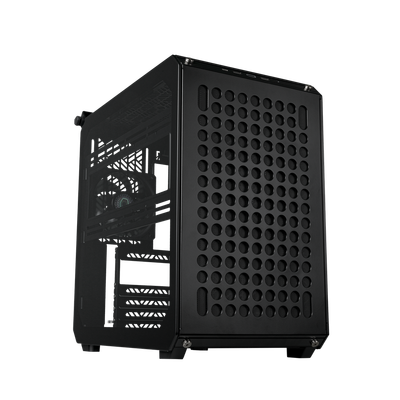

Specs and benchmarks
Motherboard Support
- Cooler Master Qube 500 Flatpack
- ATX, Micro-ATX, Mini-ITX
- Corsair Frame 4000D
- E-ATX, ATX, Micro-ATX, Mini-ITX
Case Type
- Cooler Master Qube 500 Flatpack
- Mid-Tower
- Corsair Frame 4000D
- Mid-Tower
Panel Type
- Cooler Master Qube 500 Flatpack
- Modular mesh or tempered glass flat-pack panels
- Corsair Frame 4000D
- Modular interchangeable mesh or tempered glass panels
GPU Clearance
- Cooler Master Qube 500 Flatpack
- 370 mmBest
- Corsair Frame 4000D
- 360 mm-3%
CPU Cooler Clearance
- Cooler Master Qube 500 Flatpack
- 165 mm-3%
- Corsair Frame 4000D
- 170 mmBest
Included Fans
- Cooler Master Qube 500 Flatpack
- 1-50%
- Corsair Frame 4000D
- 2Best
Radiator Support
- Cooler Master Qube 500 Flatpack
- Front 360mm, Top 280mm
- Corsair Frame 4000D
- Front 360mm, Top 360mm
Case Volume
- Cooler Master Qube 500 Flatpack
- 44 L
- Corsair Frame 4000D
- 48 L
Front USB-C
- Cooler Master Qube 500 Flatpack
- Yes
- Corsair Frame 4000D
- Yes
Colour
- Cooler Master Qube 500 Flatpack
- Black, White
- Corsair Frame 4000D
- Black, White


Which one should you pick?
Choose Cooler Master Qube 500 Flatpack if you want the higher GPU clearance (370 mm vs 360 mm).
Choose Corsair Frame 4000D if you want the higher CPU cooler clearance (170 mm vs 165 mm) and the higher included fans (2 vs 1).
Price comparison
| Retailer | Cooler Master Qube 500 Flatpack | Corsair Frame 4000D |
|---|---|---|
| Cooler Master Store | View on Cooler Master Store | |
| Amazon | View on Amazon | |
| Corsair Store | View on Corsair Store |
Disclaimer: The price and specification of the given product may differ from the actual product. Please confirm on the retailer's website before buying.
Verdict
Cooler Master Qube 500 Flatpack
7.5 / 10 Expert Rating
A fun, genuinely modular case if you want to change its look over time, though the base kit alone is a fairly plain mid-tower.
Corsair Frame 4000D
7.5 / 10 Expert Rating
A smart idea for anyone who isn't sure whether they want mesh or glass yet, though it's a premium over the regular 4000D Airflow for the same base performance.