
Consumercarts is reader-supported. Learn more
Cooler Master Qube 500 Flatpack vs NZXT H1 V2: Comparison
Cooler Master Qube 500 Flatpack vs NZXT H1 V2 cpu cooler clearance compared
On cpu cooler clearance the spread is 64%, Cooler Master Qube 500 Flatpack 165 mm against NZXT H1 V2 60 mm, so Cooler Master Qube 500 Flatpack takes it. Cooler Master Qube 500 Flatpack also leads on gpu clearance, 370 mm on the Cooler Master Qube 500 Flatpack versus 325 mm on the NZXT H1 V2.
Which should you buy, Cooler Master Qube 500 Flatpack or NZXT H1 V2?
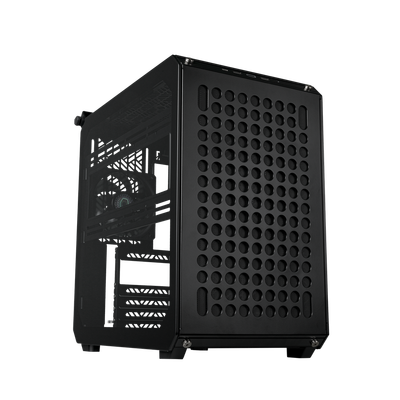
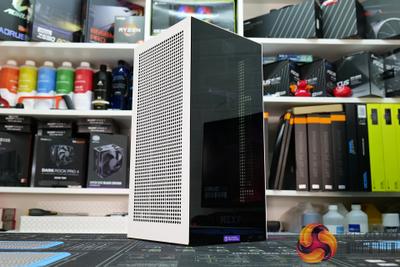
The Cooler Master Qube 500 Flatpack suits builders who like to change their case's look over time and standard ATX gaming builds wanting some visual customization, though it is not built for budget builds where extra panels aren't in the budget and anyone who wants a complete look out of the box. It also earns its place with anyone who wants to try a mesh and glass mix-and-match look. Buy the NZXT H1 V2 for desk-side compact gaming PCs with a single GPU and builders who want a pre-solved cooling loop, though it is not the pick for anyone who wants to pick their own AIO or PSU and high-wattage GPUs beyond the bundled PSU's headroom. Our rating of the Cooler Master Qube 500 Flatpack (7.5/10): A fun, genuinely modular case if you want to change its look over time, though the base kit alone is a fairly plain mid-tower. Our rating of the NZXT H1 V2 (7.5/10): A great pick if the specific bundled AIO and PSU fit your build plan, but its closed design makes it a poor choice if you want to choose your own cooler.
Frequently asked questions
Do the Cooler Master Qube 500 Flatpack and NZXT H1 V2 differ on radiator support?
Yes. Radiator Support reads Front 360mm, Top 280mm on the Cooler Master Qube 500 Flatpack versus 140mm AIO pre-installed only on the NZXT H1 V2.
Is the Included Fans the same on the Cooler Master Qube 500 Flatpack and NZXT H1 V2?
It is. Both are listed at 1, so it is not a reason to pick one over the other.
Specs and benchmarks
Motherboard Support
- Cooler Master Qube 500 Flatpack
- ATX, Micro-ATX, Mini-ITX
- NZXT H1 V2
- Mini-ITX
Case Type
- Cooler Master Qube 500 Flatpack
- Mid-Tower
- NZXT H1 V2
- SFF / Mini-ITX
Panel Type
- Cooler Master Qube 500 Flatpack
- Modular mesh or tempered glass flat-pack panels
- NZXT H1 V2
- Tempered glass side panel
GPU Clearance
- Cooler Master Qube 500 Flatpack
- 370 mmBest
- NZXT H1 V2
- 325 mm-12%
CPU Cooler Clearance
- Cooler Master Qube 500 Flatpack
- 165 mmBest
- NZXT H1 V2
- 60 mm-64%
Included Fans
- Cooler Master Qube 500 Flatpack
- 1
- NZXT H1 V2
- 1
Radiator Support
- Cooler Master Qube 500 Flatpack
- Front 360mm, Top 280mm
- NZXT H1 V2
- 140mm AIO pre-installed only
Case Volume
- Cooler Master Qube 500 Flatpack
- 44 L
- NZXT H1 V2
- 19.9 L
Front USB-C
- Cooler Master Qube 500 Flatpack
- Yes
- NZXT H1 V2
- Yes
Colour
- Cooler Master Qube 500 Flatpack
- Black, White
- NZXT H1 V2
- Black, White


Which one should you pick?
Choose Cooler Master Qube 500 Flatpack if you want the higher GPU clearance (370 mm vs 325 mm), the higher CPU cooler clearance (165 mm vs 60 mm) and the higher included fans (1 vs 1).
Choose NZXT H1 V2 if you already have it on hand or find it at a lower price.
Price comparison
| Retailer | Cooler Master Qube 500 Flatpack | NZXT H1 V2 |
|---|---|---|
| Cooler Master Store | View on Cooler Master Store | |
| NZXT Store | View on NZXT Store |
Disclaimer: The price and specification of the given product may differ from the actual product. Please confirm on the retailer's website before buying.
Verdict
Cooler Master Qube 500 Flatpack
7.5 / 10 Expert Rating
A fun, genuinely modular case if you want to change its look over time, though the base kit alone is a fairly plain mid-tower.
NZXT H1 V2
7.5 / 10 Expert Rating
A great pick if the specific bundled AIO and PSU fit your build plan, but its closed design makes it a poor choice if you want to choose your own cooler.