
Consumercarts is reader-supported. Learn more
Corsair 2500X vs Hyte Y70 Touch: Comparison
Corsair 2500X vs Hyte Y70 Touch: the gpu clearance difference
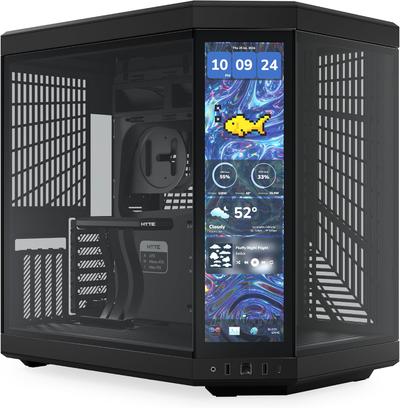
Start with gpu clearance, because it is the widest measured gap between them: Corsair 2500X 340 mm against Hyte Y70 Touch 400 mm, 15% in favour of Hyte Y70 Touch. Add included fans to that, 3 on the Corsair 2500X versus 4 on the Hyte Y70 Touch, and the pattern holds. They differ on motherboard support too, ATX, Micro-ATX, Mini-ITX on the Corsair 2500X versus E-ATX, ATX, mATX, ITX on the Hyte Y70 Touch. Case type is not the same on both, SFF / Mini-ITX on the Corsair 2500X versus Mid-Tower on the Hyte Y70 Touch. There is a split on panel type as well, Tempered glass front and side on the Corsair 2500X versus Panoramic tempered glass with integrated 6.9-inch touchscreen on the Hyte Y70 Touch.
Corsair 2500X vs Hyte Y70 Touch: which one fits your build
Buy the Corsair 2500X for showcase builds on a smaller desk and full ATX boards in a compact dual-chamber layout, though it is not the pick for E-ATX motherboards and large 360mm+ front radiators. The Hyte Y70 Touch suits showcase builds with a functional display and streamers who want on-case stats, though it is not built for budget builds and anyone who won't use the touchscreen. Our rating of the Corsair 2500X (8/10): A strong pick if you want O11-style dual-chamber looks on a smaller desk without giving up full ATX support. Our rating of the Hyte Y70 Touch (8/10): A genuine showpiece if you'll actually use the touchscreen; skip it and save money if you won't.
Frequently asked questions
Do the Corsair 2500X and Hyte Y70 Touch differ on cpu cooler clearance?
Yes. CPU Cooler Clearance reads 170 mm on the Corsair 2500X versus 172 mm on the Hyte Y70 Touch.
Is the Front USB-C the same on the Corsair 2500X and Hyte Y70 Touch?
It is. Both are listed at Yes, so it is not a reason to pick one over the other.

Specs and benchmarks
Motherboard Support
- Corsair 2500X
- ATX, Micro-ATX, Mini-ITX
- Hyte Y70 Touch
- E-ATX, ATX, mATX, ITX
Case Type
- Corsair 2500X
- SFF / Mini-ITX
- Hyte Y70 Touch
- Mid-Tower
Panel Type
- Corsair 2500X
- Tempered glass front and side
- Hyte Y70 Touch
- Panoramic tempered glass with integrated 6.9-inch touchscreen
GPU Clearance
- Corsair 2500X
- 340 mm-15%
- Hyte Y70 Touch
- 400 mmBest
CPU Cooler Clearance
- Corsair 2500X
- 170 mm-1%
- Hyte Y70 Touch
- 172 mmBest
Included Fans
- Corsair 2500X
- 3-25%
- Hyte Y70 Touch
- 4Best
Radiator Support
- Corsair 2500X
- Top 280mm, Front 240mm
- Hyte Y70 Touch
- Front up to 480mm, top up to 360mm
Front USB-C
- Corsair 2500X
- Yes
- Hyte Y70 Touch
- Yes


Which one should you pick?
Choose Corsair 2500X if you already have it on hand or find it at a lower price.
Choose Hyte Y70 Touch if you want the higher GPU clearance (400 mm vs 340 mm), the higher CPU cooler clearance (172 mm vs 170 mm) and the higher included fans (4 vs 3).
Price comparison
| Retailer | Corsair 2500X | Hyte Y70 Touch |
|---|---|---|
| Corsair Store | View on Corsair Store | |
| Amazon | $270.00 View on Amazon | |
| Newegg | View on Newegg | |
| Hyte | View on Hyte |
Disclaimer: The price and specification of the given product may differ from the actual product. Please confirm on the retailer's website before buying.
Verdict
Corsair 2500X
8 / 10 Expert Rating
A strong pick if you want O11-style dual-chamber looks on a smaller desk without giving up full ATX support.
Hyte Y70 Touch
8 / 10 Expert Rating
A genuine showpiece if you'll actually use the touchscreen; skip it and save money if you won't.