
Consumercarts is reader-supported. Learn more
ADATA AD4U3200716G22-BADZ vs Corsair CMH64GX5M2B6000Z28 64GB: Comparison
ADATA AD4U3200716G22-BADZ vs Corsair CMH64GX5M2B6000Z28 64GB capacity per module compared
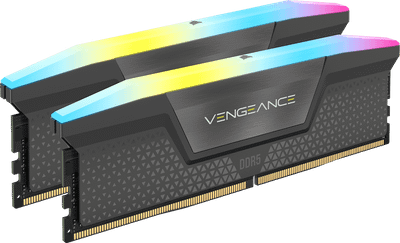
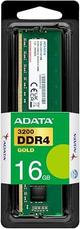
Start with capacity per module, because it is the widest measured gap between them: ADATA AD4U3200716G22-BADZ 16 GB against Corsair CMH64GX5M2B6000Z28 64GB 32 GB, 50% in favour of Corsair CMH64GX5M2B6000Z28 64GB. True latency runs the same way, 13.8 ns on the ADATA AD4U3200716G22-BADZ versus 9.3 ns on the Corsair CMH64GX5M2B6000Z28 64GB, another win for Corsair CMH64GX5M2B6000Z28 64GB. Cas latency runs the same way, 22 on the ADATA AD4U3200716G22-BADZ versus 28 on the Corsair CMH64GX5M2B6000Z28 64GB, another win for ADATA AD4U3200716G22-BADZ. Add peak bandwidth to that, 25.6 GB/s on the ADATA AD4U3200716G22-BADZ versus 96.0 GB/s on the Corsair CMH64GX5M2B6000Z28 64GB, and the pattern holds. Ddr generation is not the same on both, DDR4 on the ADATA AD4U3200716G22-BADZ versus DDR5 on the Corsair CMH64GX5M2B6000Z28 64GB. There is a split on module count as well, 1 on the ADATA AD4U3200716G22-BADZ versus 2 on the Corsair CMH64GX5M2B6000Z28 64GB. They differ on ram segment too, Industrial/Embedded on the ADATA AD4U3200716G22-BADZ versus Desktop DDR5 on the Corsair CMH64GX5M2B6000Z28 64GB. Form factor is not the same on both, DIMM on the ADATA AD4U3200716G22-BADZ versus Desktop DIMM on the Corsair CMH64GX5M2B6000Z28 64GB. Platform optimisation is not the same on both, JEDEC Only on the ADATA AD4U3200716G22-BADZ versus AM5 on the Corsair CMH64GX5M2B6000Z28 64GB.
Who each one is for
Buy the Corsair CMH64GX5M2B6000Z28 64GB for AM5 builds wanting both 64GB capacity and RGB lighting and buyers who want the tightest available 6000MT/s timings, though it is not the pick for buyers who don't want RGB, see the non-RGB CMK64GX5M2B6000C30.

Specs and benchmarks
Speed Score
- ADATA AD4U3200716G22-BADZ
- –
- Corsair CMH64GX5M2B6000Z28 64GB
- 8.8/10
DDR4 and DDR5 kits are scored on separate scales, so these two scores can't be compared directly. Your motherboard supports only one of the two.
DDR Generation
- ADATA AD4U3200716G22-BADZ
- DDR4
- Corsair CMH64GX5M2B6000Z28 64GB
- DDR5
Brand
- ADATA AD4U3200716G22-BADZ
- ADATA
- Corsair CMH64GX5M2B6000Z28 64GB
- Corsair
Part Number
- ADATA AD4U3200716G22-BADZ
- AD4U3200716G22-BADZ
- Corsair CMH64GX5M2B6000Z28 64GB
- CMH64GX5M2B6000Z28
CAS Latency
- ADATA AD4U3200716G22-BADZ
- 22Best
- Corsair CMH64GX5M2B6000Z28 64GB
- 28-27%
Module Count
- ADATA AD4U3200716G22-BADZ
- 1
- Corsair CMH64GX5M2B6000Z28 64GB
- 2
RAM Segment
- ADATA AD4U3200716G22-BADZ
- Industrial/Embedded
- Corsair CMH64GX5M2B6000Z28 64GB
- Desktop DDR5
Form Factor
- ADATA AD4U3200716G22-BADZ
- DIMM
- Corsair CMH64GX5M2B6000Z28 64GB
- Desktop DIMM
Platform Optimisation
- ADATA AD4U3200716G22-BADZ
- JEDEC Only
- Corsair CMH64GX5M2B6000Z28 64GB
- AM5
Capacity Per Module
- ADATA AD4U3200716G22-BADZ
- 16 GB-50%
- Corsair CMH64GX5M2B6000Z28 64GB
- 32 GBBest
True Latency
- ADATA AD4U3200716G22-BADZ
- 13.8 ns-48%
- Corsair CMH64GX5M2B6000Z28 64GB
- 9.3 nsBest
Peak Bandwidth
- ADATA AD4U3200716G22-BADZ
- 25.6 GB/s-73%
- Corsair CMH64GX5M2B6000Z28 64GB
- 96.0 GB/sBest

Which one should you pick?
Choose ADATA AD4U3200716G22-BADZ if you want the lower CAS latency (22 vs 28).
Choose Corsair CMH64GX5M2B6000Z28 64GB if you want the higher capacity per module (32 GB vs 16 GB), the lower true latency (9.3 ns vs 13.8 ns) and the higher peak bandwidth (96.0 GB/s vs 25.6 GB/s).