
Consumercarts is reader-supported. Learn more
ADATA AD4U3200716G22-BADZ vs Kingston FURY Beast RGB KF564C32BBAK2-32: Comparison
ADATA AD4U3200716G22-BADZ vs Kingston FURY Beast RGB KF564C32BBAK2-32 cas latency compared
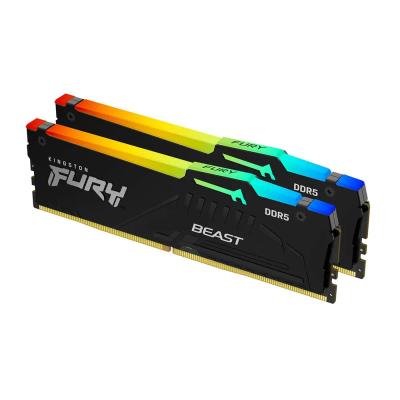
On cas latency the spread is 45%, ADATA AD4U3200716G22-BADZ 22 against Kingston FURY Beast RGB KF564C32BBAK2-32 32, so ADATA AD4U3200716G22-BADZ takes it. Kingston FURY Beast RGB KF564C32BBAK2-32 also leads on true latency, 13.8 ns on the ADATA AD4U3200716G22-BADZ versus 10.0 ns on the Kingston FURY Beast RGB KF564C32BBAK2-32. Add peak bandwidth to that, 25.6 GB/s on the ADATA AD4U3200716G22-BADZ versus 102.4 GB/s on the Kingston FURY Beast RGB KF564C32BBAK2-32, and the pattern holds. Ddr generation is not the same on both, DDR4 on the ADATA AD4U3200716G22-BADZ versus DDR5 on the Kingston FURY Beast RGB KF564C32BBAK2-32. Module count is not the same on both, 1 on the ADATA AD4U3200716G22-BADZ versus 2 on the Kingston FURY Beast RGB KF564C32BBAK2-32. They differ on ram segment too, Industrial/Embedded on the ADATA AD4U3200716G22-BADZ versus Desktop DDR5 on the Kingston FURY Beast RGB KF564C32BBAK2-32. They differ on form factor too, DIMM on the ADATA AD4U3200716G22-BADZ versus UDIMM on the Kingston FURY Beast RGB KF564C32BBAK2-32. There is a split on platform optimisation as well, JEDEC Only on the ADATA AD4U3200716G22-BADZ versus AM5 on the Kingston FURY Beast RGB KF564C32BBAK2-32.
Who each one is for
The Kingston FURY Beast RGB KF564C32BBAK2-32 suits gaming PCs and content creation, though it is not the pick for laptops (wrong form factor) and ECC/server workloads.
Where the two are identical
Everything else lines up. Capacity per module read the same on both, so those are not worth weighing.

Specs and benchmarks
Speed Score
- ADATA AD4U3200716G22-BADZ
- –
- Kingston FURY Beast RGB KF564C32BBAK2-32
- 8.8/10
DDR4 and DDR5 kits are scored on separate scales, so these two scores can't be compared directly. Your motherboard supports only one of the two.
DDR Generation
- ADATA AD4U3200716G22-BADZ
- DDR4
- Kingston FURY Beast RGB KF564C32BBAK2-32
- DDR5
Brand
- ADATA AD4U3200716G22-BADZ
- ADATA
- Kingston FURY Beast RGB KF564C32BBAK2-32
- Kingston
Part Number
- ADATA AD4U3200716G22-BADZ
- AD4U3200716G22-BADZ
- Kingston FURY Beast RGB KF564C32BBAK2-32
- KF564C32BBAK2-32
Series
- ADATA AD4U3200716G22-BADZ
- ADATA Industrial
- Kingston FURY Beast RGB KF564C32BBAK2-32
- FURY Beast RGB
CAS Latency
- ADATA AD4U3200716G22-BADZ
- 22Best
- Kingston FURY Beast RGB KF564C32BBAK2-32
- 32-45%
Module Count
- ADATA AD4U3200716G22-BADZ
- 1
- Kingston FURY Beast RGB KF564C32BBAK2-32
- 2
RAM Segment
- ADATA AD4U3200716G22-BADZ
- Industrial/Embedded
- Kingston FURY Beast RGB KF564C32BBAK2-32
- Desktop DDR5
Form Factor
- ADATA AD4U3200716G22-BADZ
- DIMM
- Kingston FURY Beast RGB KF564C32BBAK2-32
- UDIMM
Platform Optimisation
- ADATA AD4U3200716G22-BADZ
- JEDEC Only
- Kingston FURY Beast RGB KF564C32BBAK2-32
- AM5
Capacity Per Module
- ADATA AD4U3200716G22-BADZ
- 16 GB
- Kingston FURY Beast RGB KF564C32BBAK2-32
- 16 GB
True Latency
- ADATA AD4U3200716G22-BADZ
- 13.8 ns-38%
- Kingston FURY Beast RGB KF564C32BBAK2-32
- 10.0 nsBest
Peak Bandwidth
- ADATA AD4U3200716G22-BADZ
- 25.6 GB/s-75%
- Kingston FURY Beast RGB KF564C32BBAK2-32
- 102.4 GB/sBest

Which one should you pick?
Choose ADATA AD4U3200716G22-BADZ if you want the lower CAS latency (22 vs 32) and the higher capacity per module (16 GB vs 16 GB).
Choose Kingston FURY Beast RGB KF564C32BBAK2-32 if you want the lower true latency (10.0 ns vs 13.8 ns) and the higher peak bandwidth (102.4 GB/s vs 25.6 GB/s).
Price comparison
| Retailer | ADATA AD4U3200716G22-BADZ | Kingston FURY Beast RGB KF564C32BBAK2-32 |
|---|---|---|
| Amazon | View on Amazon |
Disclaimer: The price and specification of the given product may differ from the actual product. Please confirm on the retailer's website before buying.