
Consumercarts is reader-supported. Learn more
ADATA AO2V48UC8W1-BHLS 8GB vs G.Skill Trident Z5 RGB F5-6000J3238G32G 32GB DDR5-6000 CL32: Comparison
What is the difference between ADATA AO2V48UC8W1-BHLS 8GB and G.Skill Trident Z5 RGB F5-6000J3238G32G?
Start with capacity per module, because it is the widest measured gap between them: ADATA AO2V48UC8W1-BHLS 8GB 8 GB against G.Skill Trident Z5 RGB F5-6000J3238G32G 32 GB, 75% in favour of G.Skill Trident Z5 RGB F5-6000J3238G32G. Peak bandwidth runs the same way, 38.4 GB/s on the ADATA AO2V48UC8W1-BHLS 8GB versus 48.0 GB/s on the G.Skill Trident Z5 RGB F5-6000J3238G32G, another win for G.Skill Trident Z5 RGB F5-6000J3238G32G. They differ on form factor too, DIMM on the ADATA AO2V48UC8W1-BHLS 8GB versus Desktop DIMM on the G.Skill Trident Z5 RGB F5-6000J3238G32G. Colour is not the same on both, Black on the ADATA AO2V48UC8W1-BHLS 8GB versus Matte Black on the G.Skill Trident Z5 RGB F5-6000J3238G32G.
Which should you buy, ADATA AO2V48UC8W1-BHLS 8GB or G.Skill Trident Z5 RGB F5-6000J3238G32G?
The ADATA AO2V48UC8W1-BHLS 8GB is the one to take for desktop DDR5 builds needing 8GB of memory. Buy the G.Skill Trident Z5 RGB F5-6000J3238G32G for 32GB single-stick upgrades at the platform's native speed, though it is not built for budget builds where the CL36 stock bin is close enough. It also earns its place with AM5 builds wanting better-than-stock Trident Z5 RGB timing without paying CL28 prices. It is not the one for buyers who'll pay a small premium for the tighter CL28 bin instead.
What ADATA AO2V48UC8W1-BHLS 8GB and G.Skill Trident Z5 RGB F5-6000J3238G32G have in common
Where they agree, they agree completely, ddr generation, module count and ram segment included, so the decision does not turn on any of those.

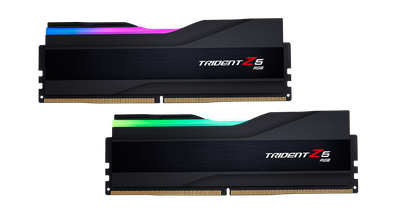
Specs and benchmarks
Speed Score
- ADATA AO2V48UC8W1-BHLS 8GB
- –
- G.Skill Trident Z5 RGB F5-6000J3238G32G 32GB DDR5-6000 CL32
- 7.8/10
DDR4 and DDR5 kits are scored on separate scales, so these two scores can't be compared directly. Your motherboard supports only one of the two.
DDR Generation
- ADATA AO2V48UC8W1-BHLS 8GB
- DDR5
- G.Skill Trident Z5 RGB F5-6000J3238G32G 32GB DDR5-6000 CL32
- DDR5
Brand
- ADATA AO2V48UC8W1-BHLS 8GB
- ADATA
- G.Skill Trident Z5 RGB F5-6000J3238G32G 32GB DDR5-6000 CL32
- G.Skill
Part Number
- ADATA AO2V48UC8W1-BHLS 8GB
- AO2V48UC8W1-BHLS
- G.Skill Trident Z5 RGB F5-6000J3238G32G 32GB DDR5-6000 CL32
- F5-6000J3238G32G
Module Count
- ADATA AO2V48UC8W1-BHLS 8GB
- 1
- G.Skill Trident Z5 RGB F5-6000J3238G32G 32GB DDR5-6000 CL32
- 1
RAM Segment
- ADATA AO2V48UC8W1-BHLS 8GB
- Desktop DDR5
- G.Skill Trident Z5 RGB F5-6000J3238G32G 32GB DDR5-6000 CL32
- Desktop DDR5
Form Factor
- ADATA AO2V48UC8W1-BHLS 8GB
- DIMM
- G.Skill Trident Z5 RGB F5-6000J3238G32G 32GB DDR5-6000 CL32
- Desktop DIMM
Capacity Per Module
- ADATA AO2V48UC8W1-BHLS 8GB
- 8 GB-75%
- G.Skill Trident Z5 RGB F5-6000J3238G32G 32GB DDR5-6000 CL32
- 32 GBBest
Colour
- ADATA AO2V48UC8W1-BHLS 8GB
- Black
- G.Skill Trident Z5 RGB F5-6000J3238G32G 32GB DDR5-6000 CL32
- Matte Black
Peak Bandwidth
- ADATA AO2V48UC8W1-BHLS 8GB
- 38.4 GB/s-20%
- G.Skill Trident Z5 RGB F5-6000J3238G32G 32GB DDR5-6000 CL32
- 48.0 GB/sBest


Which one should you pick?
Choose ADATA AO2V48UC8W1-BHLS 8GB if you already have it on hand or find it at a lower price.
Choose G.Skill Trident Z5 RGB F5-6000J3238G32G 32GB DDR5-6000 CL32 if you want the higher capacity per module (32 GB vs 8 GB) and the higher peak bandwidth (48.0 GB/s vs 38.4 GB/s).