
Consumercarts is reader-supported. Learn more
ADATA AO2V48UC8W1-BHLS 8GB vs Kingston FURY Beast RGB KF556C40BBAK2-16: Comparison
What is the difference between ADATA AO2V48UC8W1-BHLS 8GB and Kingston FURY Beast RGB KF556C40BBAK2-16?
The gap that matters here is total capacity: ADATA AO2V48UC8W1-BHLS 8GB 8 GB against Kingston FURY Beast RGB KF556C40BBAK2-16 16 GB, which puts Kingston FURY Beast RGB KF556C40BBAK2-16 50% ahead. The rated speed figures are near enough to ignore, 4800 MT/s on the ADATA AO2V48UC8W1-BHLS 8GB versus 5600 MT/s on the Kingston FURY Beast RGB KF556C40BBAK2-16. Peak bandwidth runs the same way, 38.4 GB/s on the ADATA AO2V48UC8W1-BHLS 8GB versus 89.6 GB/s on the Kingston FURY Beast RGB KF556C40BBAK2-16, another win for Kingston FURY Beast RGB KF556C40BBAK2-16. There is a split on module count as well, 1 on the ADATA AO2V48UC8W1-BHLS 8GB versus 2 on the Kingston FURY Beast RGB KF556C40BBAK2-16. Kit type is not the same on both, Single Module on the ADATA AO2V48UC8W1-BHLS 8GB versus Dual Channel Kit on the Kingston FURY Beast RGB KF556C40BBAK2-16.
ADATA AO2V48UC8W1-BHLS 8GB vs Kingston FURY Beast RGB KF556C40BBAK2-16: which one fits your build
The ADATA AO2V48UC8W1-BHLS 8GB suits desktop DDR5 builds needing 8GB of memory. Take the Kingston FURY Beast RGB KF556C40BBAK2-16 for budget-conscious builds wanting an entry-level RGB DDR5 kit. Real lighting at the most accessible capacity point in Kingston’s RGB DDR5 lineup. It is the wrong buy for builds needing 32GB or more. Step up within the same FURY Beast RGB line for more capacity.
Where the two are identical
Everything else lines up. Capacity per module, ddr generation, ram segment, form factor and colour read the same on both, so those are not worth weighing.

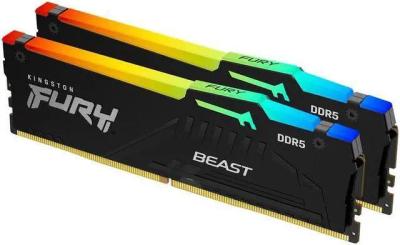
Specs and benchmarks
Speed Score
- ADATA AO2V48UC8W1-BHLS 8GB
- –
- Kingston FURY Beast RGB KF556C40BBAK2-16
- 6.3/10
DDR4 and DDR5 kits are scored on separate scales, so these two scores can't be compared directly. Your motherboard supports only one of the two.
DDR Generation
- ADATA AO2V48UC8W1-BHLS 8GB
- DDR5
- Kingston FURY Beast RGB KF556C40BBAK2-16
- DDR5
Brand
- ADATA AO2V48UC8W1-BHLS 8GB
- ADATA
- Kingston FURY Beast RGB KF556C40BBAK2-16
- Kingston
Part Number
- ADATA AO2V48UC8W1-BHLS 8GB
- AO2V48UC8W1-BHLS
- Kingston FURY Beast RGB KF556C40BBAK2-16
- KF556C40BBAK2-16
Module Count
- ADATA AO2V48UC8W1-BHLS 8GB
- 1
- Kingston FURY Beast RGB KF556C40BBAK2-16
- 2
RAM Segment
- ADATA AO2V48UC8W1-BHLS 8GB
- Desktop DDR5
- Kingston FURY Beast RGB KF556C40BBAK2-16
- Desktop DDR5
Form Factor
- ADATA AO2V48UC8W1-BHLS 8GB
- DIMM
- Kingston FURY Beast RGB KF556C40BBAK2-16
- DIMM
Total Capacity
- ADATA AO2V48UC8W1-BHLS 8GB
- 8 GB-50%
- Kingston FURY Beast RGB KF556C40BBAK2-16
- 16 GBBest
Capacity Per Module
- ADATA AO2V48UC8W1-BHLS 8GB
- 8 GB
- Kingston FURY Beast RGB KF556C40BBAK2-16
- 8 GB
Kit Type
- ADATA AO2V48UC8W1-BHLS 8GB
- Single Module
- Kingston FURY Beast RGB KF556C40BBAK2-16
- Dual Channel Kit
Rated Speed
- ADATA AO2V48UC8W1-BHLS 8GB
- 4800 MT/s
- Kingston FURY Beast RGB KF556C40BBAK2-16
- 5600 MT/sBest
Colour
- ADATA AO2V48UC8W1-BHLS 8GB
- Black
- Kingston FURY Beast RGB KF556C40BBAK2-16
- Black
Peak Bandwidth
- ADATA AO2V48UC8W1-BHLS 8GB
- 38.4 GB/s-57%
- Kingston FURY Beast RGB KF556C40BBAK2-16
- 89.6 GB/sBest


Which one should you pick?
Choose ADATA AO2V48UC8W1-BHLS 8GB if you want the higher capacity per module (8 GB vs 8 GB).
Choose Kingston FURY Beast RGB KF556C40BBAK2-16 if you want the higher total capacity (16 GB vs 8 GB) and the higher peak bandwidth (89.6 GB/s vs 38.4 GB/s).
Price comparison
| Retailer | ADATA AO2V48UC8W1-BHLS 8GB | Kingston FURY Beast RGB KF556C40BBAK2-16 |
|---|---|---|
| Amazon | View on Amazon | |
| Newegg | View on Newegg |
Disclaimer: The price and specification of the given product may differ from the actual product. Please confirm on the retailer's website before buying.