
Consumercarts is reader-supported. Learn more
ASUS NUC 13 Pro Board vs Banana Pi BPI-M7: Comparison
ASUS NUC 13 Pro Board vs Banana Pi BPI-M7 gpu model compared
The first real difference is gpu model: ASUS NUC 13 Pro Board Intel Iris Xe Graphics against Banana Pi BPI-M7 Mali-G610. They differ on onboard storage too, 2 GB on the ASUS NUC 13 Pro Board versus 32 / 64 / 128 GB eMMC plus microSD on the Banana Pi BPI-M7. Memory is closer, Up to 64GB DDR5 SODIMM on the ASUS NUC 13 Pro Board versus 8GB to 32GB LPDDR4x on the Banana Pi BPI-M7. There is a split on soc model as well, 4 Performance-cores + 8 Efficient-cores up to 5.0GHz on the ASUS NUC 13 Pro Board versus Octa-core on the Banana Pi BPI-M7.
ASUS NUC 13 Pro Board vs Banana Pi BPI-M7: which one fits your build
The ASUS NUC 13 Pro Board is the one to take for OEM digital signage and kiosk systems and custom thin client or medical cart builds, though it is not built for hobbyist or budget-constrained projects and GPIO-driven hardware projects. Take the Banana Pi BPI-M7 for Edge-AI and network-appliance builds that want dual 2.5GbE alongside RK3588 compute. It is not the one for buyers who don't need the extra networking ports and want to save money on a single-GbE board. Our rating of the ASUS NUC 13 Pro Board (8/10): A serious, laptop-grade embedded x86 platform for OEM integrators, not a hobbyist SBC and priced accordingly. Our rating of the Banana Pi BPI-M7 (8/10): full RK3588 silicon plus dual 2.5GbE in a Pico-ITX board built for edge-AI and network appliances.
Which is cheaper, ASUS NUC 13 Pro Board or Banana Pi BPI-M7?
At the last price check the Banana Pi BPI-M7 was $165 and the ASUS NUC 13 Pro Board $549, a 233% premium.

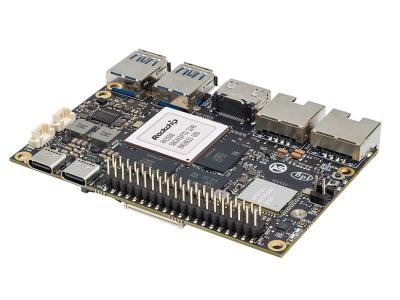
Specs and benchmarks
Brand
- ASUS NUC 13 Pro Board
- ASUS
- Banana Pi BPI-M7
- Banana Pi
Model Number
- ASUS NUC 13 Pro Board
- NUC 13 Pro Board (NUC13ANBi7)
- Banana Pi BPI-M7
- BPI-M7
Memory
- ASUS NUC 13 Pro Board
- Up to 64GB DDR5 SODIMM (dual channel)Best
- Banana Pi BPI-M7
- 8GB to 32GB LPDDR4x
SoC Model
- ASUS NUC 13 Pro Board
- 4 Performance-cores + 8 Efficient-cores (12C/16T) up to 5.0GHz
- Banana Pi BPI-M7
- Octa-core (4x Cortex-A76 + 4x Cortex-A55)
Price
- ASUS NUC 13 Pro Board
- 549 USD
- Banana Pi BPI-M7
- 165 USD
GPU Model
- ASUS NUC 13 Pro Board
- Intel Iris Xe Graphics
- Banana Pi BPI-M7
- Mali-G610
Onboard Storage
- ASUS NUC 13 Pro Board
- 2 GB
- Banana Pi BPI-M7
- 32 / 64 / 128 GB eMMC (default 64 GB) plus microSD


Which one should you pick?
Choose ASUS NUC 13 Pro Board if you want the higher memory (Up to 64GB DDR5 SODIMM (dual channel) vs 8GB to 32GB LPDDR4x).
Choose Banana Pi BPI-M7 if you already have it on hand or find it at a lower price.
Price comparison
| Retailer | ASUS NUC 13 Pro Board | Banana Pi BPI-M7 |
|---|---|---|
| Consumercarts listing | $549.00 View on Consumercarts listing | $165.00 View on Consumercarts listing |
Disclaimer: The price and specification of the given product may differ from the actual product. Please confirm on the retailer's website before buying.
Verdict
ASUS NUC 13 Pro Board
8 / 10 Expert Rating
A serious, laptop-grade embedded x86 platform for OEM integrators, not a hobbyist SBC and priced accordingly.
Banana Pi BPI-M7
8 / 10 Expert Rating
Full RK3588 silicon plus dual 2.5GbE in a Pico-ITX board built for edge-AI and network appliances.