
Consumercarts is reader-supported. Learn more
Acer FA100 vs LaCie Rugged SSD Pro5: Comparison
What is the difference between Acer FA100 and LaCie Rugged SSD Pro5?
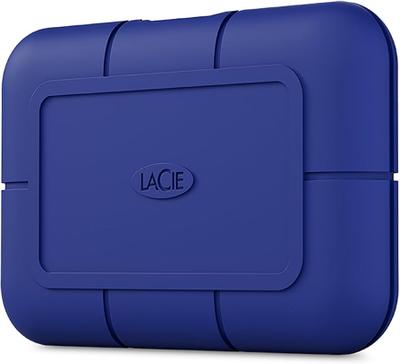
Start with sequential read, because it is the widest measured gap between them: Acer FA100 3300 MB/s against LaCie Rugged SSD Pro5 6700 MB/s, 51% in favour of LaCie Rugged SSD Pro5. LaCie Rugged SSD Pro5 also leads on sequential write, 2700 MB/s on the Acer FA100 versus 5300 MB/s on the LaCie Rugged SSD Pro5. LaCie Rugged SSD Pro5 also leads on capacity, 2000 GB on the Acer FA100 versus 4000 GB on the LaCie Rugged SSD Pro5. There is a split on bus interface as well, PCIe 3.0 x4 on the Acer FA100 versus Thunderbolt 5 on the LaCie Rugged SSD Pro5. They differ on form factor too, M.2 2280 on the Acer FA100 versus Portable Enclosure on the LaCie Rugged SSD Pro5. Drive type is not the same on both, Internal on the Acer FA100 versus External Portable on the LaCie Rugged SSD Pro5.
Which should you buy, Acer FA100 or LaCie Rugged SSD Pro5?
The Acer FA100 suits everyday laptops and desktops with a PCIe 3.0 M.2 slot. It is equally the pick for budget upgrades needing 2000 GB of NVMe storage in a standard M.2 2280 slot. Avoid it for anyone wanting PCIe 4.0 speeds, since this drive tops out at 3300 MB/s reads. Take the LaCie Rugged SSD Pro5 for video editors and content creators working with high-resolution, high-bitrate footage directly from external storage. This is precisely the workflow this drive's speed tier is built to serve. The same goes for buyers with a genuinely Thunderbolt 5-equipped system who want to maximize available bandwidth. The rated speeds here require this specific hardware to actually reach. It is the wrong buy for typical consumer or gaming use. The Kingston XS2000 or Samsung T9, both covered elsewhere on this site, deliver more than sufficient speed for those use cases at a fraction of this drive's price.

Specs and benchmarks
Speed Score
- Acer FA100
- 6.4/10
- LaCie Rugged SSD Pro5
- 10.0/10
Internal and portable SSDs are scored on separate scales, so these two scores can't be compared directly.
Brand
- Acer FA100
- Acer
- LaCie Rugged SSD Pro5
- LaCie
Model Number
- Acer FA100
- Acer FA100 (Micron B27B)
- LaCie Rugged SSD Pro5
- Rugged SSD Pro5
Series
- Acer FA100
- FA100
- LaCie Rugged SSD Pro5
- LaCie Rugged SSD Pro5
Drive Type
- Acer FA100
- Internal
- LaCie Rugged SSD Pro5
- External Portable
Bus Interface
- Acer FA100
- PCIe 3.0 x4
- LaCie Rugged SSD Pro5
- Thunderbolt 5
Form Factor
- Acer FA100
- M.2 2280
- LaCie Rugged SSD Pro5
- Portable Enclosure
Capacity
- Acer FA100
- 2000 GB-50%
- LaCie Rugged SSD Pro5
- 4000 GBBest
Sequential Read
- Acer FA100
- 3300 MB/s-51%
- LaCie Rugged SSD Pro5
- 6700 MB/s
Sequential Write
- Acer FA100
- 2700 MB/s-49%
- LaCie Rugged SSD Pro5
- 5300 MB/s


Which one should you pick?
Choose Acer FA100 if you already have it on hand or find it at a lower price.
Choose LaCie Rugged SSD Pro5 if you want the higher capacity (4000 GB vs 2000 GB), the higher sequential read (6700 MB/s vs 3300 MB/s) and the higher sequential write (5300 MB/s vs 2700 MB/s).