
Consumercarts is reader-supported. Learn more
Creative Live! Cam Sync 4K vs Logitech Brio 300: Comparison
Creative Live! Cam Sync 4K vs Logitech Brio 300 frame rate compared
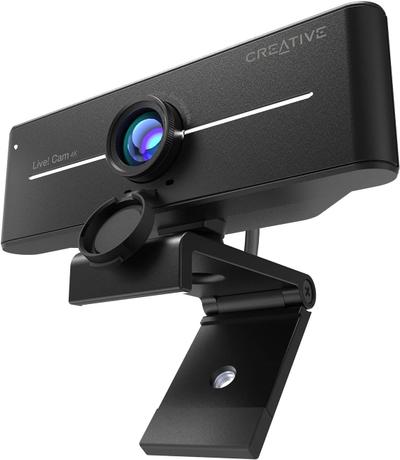
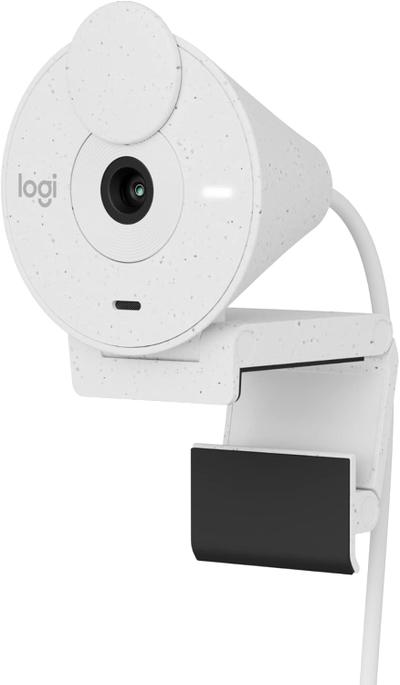
Start with frame rate, because it is the widest measured gap between them: Creative Live! Cam Sync 4K 60 fps against Logitech Brio 300 30 fps, 50% in favour of Creative Live! Cam Sync 4K. Field of view runs the same way, 95 deg on the Creative Live! Cam Sync 4K versus 70 deg on the Logitech Brio 300, another win for Creative Live! Cam Sync 4K. They differ on resolution too, 4K30 on the Creative Live! Cam Sync 4K versus 1080p30 on the Logitech Brio 300. Autofocus type is not the same on both, Autofocus on the Creative Live! Cam Sync 4K versus Fixed Focus on the Logitech Brio 300.
Creative Live! Cam Sync 4K vs Logitech Brio 300: which one fits your build
The Creative Live! Cam Sync 4K suits budget shoppers wanting 4K resolution and multi-person desks needing a wide FOV, though it is not built for users wanting AI auto-framing and professional streamers needing premium optics. The Logitech Brio 300 is the one to take for remote workers wanting Logitech reliability cheaply and users prioritizing consistent color and lighting, though it is the wrong buy for buyers wanting autofocus for movement and streamers wanting 4K or high frame rates. Our rating of the Creative Live! Cam Sync 4K (6/10): the cheapest legitimate route into 4K video calling, with a wide lens that's genuinely useful for shared desks. Our rating of the Logitech Brio 300 (6/10): A well-balanced entry point into the Brio family for buyers who want Logitech's color tuning without autofocus pricing.
What Creative Live! Cam Sync 4K and Logitech Brio 300 have in common
The common ground is wider than the gap: primary use case and privacy shutter are identical here.
Specs and benchmarks
Resolution
- Creative Live! Cam Sync 4K
- 4K30 (1080p at 60 fps)
- Logitech Brio 300
- 1080p30
Brand
- Creative Live! Cam Sync 4K
- Creative
- Logitech Brio 300
- Logitech
Model Number
- Creative Live! Cam Sync 4K
- Live! Cam Sync 4K
- Logitech Brio 300
- Brio 300
Frame Rate
- Creative Live! Cam Sync 4K
- 60 fpsBest
- Logitech Brio 300
- 30 fps-50%
Autofocus Type
- Creative Live! Cam Sync 4K
- Autofocus
- Logitech Brio 300
- Fixed Focus
Field of View
- Creative Live! Cam Sync 4K
- 95 degBest
- Logitech Brio 300
- 70 deg-26%
Primary Use Case
- Creative Live! Cam Sync 4K
- Video Calls
- Logitech Brio 300
- Video Calls
Privacy Shutter
- Creative Live! Cam Sync 4K
- Yes
- Logitech Brio 300
- Yes

Which one should you pick?
Choose Creative Live! Cam Sync 4K if you want the higher frame rate (60 fps vs 30 fps) and the higher field of view (95 deg vs 70 deg).
Choose Logitech Brio 300 if you already have it on hand or find it at a lower price.
Price comparison
| Retailer | Creative Live! Cam Sync 4K | Logitech Brio 300 |
|---|---|---|
| Amazon | View on Amazon | |
| Newegg | View on Newegg |
Disclaimer: The price and specification of the given product may differ from the actual product. Please confirm on the retailer's website before buying.
Verdict
Creative Live! Cam Sync 4K
6 / 10 Expert Rating
The cheapest legitimate route into 4K video calling, with a wide lens that's genuinely useful for shared desks.
Logitech Brio 300
6 / 10 Expert Rating
A well-balanced entry point into the Brio family for buyers who want Logitech's color tuning without autofocus pricing.