
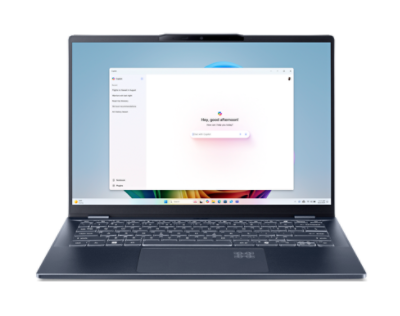
Acer Swift 14 AI SF14-51-58TU
- CPU:
- Core Ultra 5 226V
- GPU:
- Intel Arc 130V
- RAM:
- 16GB LPDDR5X
- Display:
- 14" 2880x1800 OLED 90Hz
Upgrade and repair this laptop
Consumercarts is reader-supported. Learn more
Disclaimer: The price and specification of the given product may differ from the actual product. Please confirm on the retailer's website before buying.
Manufacturer: Acer Last updated: 2026-09-30
Acer Swift 14 AI SF14-51-58TU Review
The Acer Swift 14 AI SF14-51-58TU is a 14-inch thin and light laptop from 2024 built around the Intel Core Ultra 5 226V. The screen is a 2880x1800 OLED panel at 90Hz. It weighs 1.26 kg.
The strengths: an OLED screen, long battery life (12 hours 36 minutes of Wi-Fi browsing) and a light 1.26 kg body. Where it falls short: soldered memory and PWM flicker at lower brightness.
Processor performance
Measurements come from NotebookCheck's review unit with the Core Ultra 5 226V, 16GB of RAM, a 512GB SSD and the 2880x1800 90Hz OLED screen.
The Intel Core Ultra 5 226V has 8 cores (4 performance and 4 efficiency), boosting to 4.5 GHz. It is a low-power chip tuned for battery life: fast for office work, browsing and photo edits, slower than 45W H-series chips in long renders. Its NPU is rated at 40 TOPS for on-device AI features.
Across the 7 systems NotebookCheck has tested with the Intel Core Ultra 5 226V, it averages 556 points in Cinebench 2024 multi-core (range 512 to 609) and 112.8 single-core. Where this laptop lands in that range depends on how much power it lets the chip draw. Day-to-day responsiveness was not always as smooth as expected from this class, and LatencyMon flagged possible trouble with real-time audio and video out of the box.
Graphics and gaming
Graphics come from the integrated Intel Arc Graphics 130V. It handles video playback, photo edits and lighter or older games at modest settings.
Gaming (average across systems). These are NotebookCheck's average frame rates for the Intel Arc Graphics 130V across every system it has tested with this GPU, not this laptop alone. Power limits differ between laptops, so this one can land above or below the average.
| Game | Settings | Average fps | Systems tested |
|---|---|---|---|
| Cyberpunk 2077 | Medium, 1080p | 31 | 10 |
| Cyberpunk 2077 | High, 1080p | 27 | 11 |
| Baldur's Gate 3 | Medium, 1080p | 26 | 10 |
| Baldur's Gate 3 | High, 1080p | 23 | 10 |
| F1 24 | High, 1080p | 47 | 6 |
| GTA V | High, 1080p | 53 | 10 |
Memory, storage and upgrades
Memory: fixed. 16GB of LPDDR5X-8533 is soldered to the board, so buy the amount you will need for the life of the laptop; configurations go up to 32GB.
Storage: replaceable. One M.2 slot, already in use, M.2 NVMe PCIe 4.0.
The bottom cover stays tightly clipped even after removing ten Torx screws, and only the Wi-Fi card, the single M.2 SSD and the battery can be swapped; the RAM cannot be expanded.
Display
The 14-inch OLED panel runs at 2880x1800 (243 pixels per inch) and 90Hz. NotebookCheck measured 499 nits and 50,000:1 contrast. Color coverage is 100% sRGB and 100% P3, good enough for photo and video work. Response time is 0.8 ms, so motion stays sharp. The panel flickers at 360 Hz (PWM) at lower brightness, which matters if you are sensitive to it.
The glossy OLED is highly reflective, so it struggles in bright rooms and outdoors despite its high brightness.
Thermals and noise
NotebookCheck measured 41 dB(A) under load and 25 dB(A) at idle. You will hear it, but it is not intrusive. The hottest surface reached 45 °C, warm enough to notice on your lap.
The fan often switches off at idle but spins up during light jobs such as web browsing and video playback, and it is louder than the thinner Zenbook S 14 in both idle and load.
Battery life
The battery is 65Wh, larger than 50% of the thin and light laptops we list. NotebookCheck got 12 hours 36 minutes of Wi-Fi browsing.
Design and build
Materials: Aluminum chassis with diamond-cut edges. At 1.26 kg it is lighter than 73% of the thin and light laptops we list. It measures 312x221x16 mm. The lid opens with one hand and folds back to lie flat, and the hinges keep wobble low.
Keyboard and touchpad
The chiclet keyboard types well enough with no major flaws, but the power button sits inside the key layout and the up and down arrow keys are very small. Backlight: White, two brightness levels.
The clickpad is large for a 14-inch laptop, smooth and precise with reliable gestures, but its click gives little clear feedback, especially in the lower left corner. Sign-in: Fingerprint reader.
Ports and connectivity
It has 2x Thunderbolt 4 / USB4, which runs docks, fast external drives and displays over one cable. It charges over USB-C.
Full list: 2x USB4 USB-C (40Gbps, Thunderbolt 4, DisplayPort, Power Delivery), left side, 2x USB-A 3.2 Gen 1 (5Gbps), one per side, 1x HDMI 2.1, 1x 3.5mm combo audio jack. Wireless: Wi-Fi 7, Killer BE1750i and Bluetooth 5.4.
All ports sit toward the back of both sides, which leaves room for a mouse, but there is no card reader.
Webcam, speakers and extras
Webcam: 1440p QHD with mechanical privacy shutter. Speakers: Stereo 2.0 speakers with DTS:X Ultra (Acer).
The QHD webcam is sharper than the HD or Full HD cameras common in this class, although its color accuracy is only average. The speakers get loud but deliver almost no bass, and the mids and lows sound thin.
Which configuration to buy
The Acer Swift 14 AI SF14-51-58TU name covers several builds. Processors: Intel Core Ultra 5 226V and Intel Core Ultra 7 258V. Graphics: Intel Arc Graphics 130V and Intel Arc Graphics 140V. Memory: 16GB (Core Ultra 5 226V) or 32GB (Core Ultra 7 258V) LPDDR5X on package, not upgradeable. Screens: 14-inch 2880x1800 90Hz OLED, 100% DCI-P3, DisplayHDR True Black 500; 14-inch 2K touch display option. Check the exact configuration on the listing before you buy.
Acer's US site still lists the Lunar Lake Swift 14 AI, but Acer has since moved its Swift Go 14 AI line to Intel Panther Lake (SFG14-I71) and launched Panther Lake Swift models such as the Swift Air 14; no direct Panther Lake Swift 14 AI successor was confirmed in this search.
Alternatives to consider
- Acer Swift Go 14 SFG14 (Core Ultra 5 125H, 16GB, 512GB): Core Ultra 5 125H, a similar 1.32 kg.
- ASUS Zenbook 14 OLED UX3405 (Core Ultra 7 155H, 32GB, 1TB): Core Ultra 7 155H, a similar 1.20 kg and a bigger 75Wh battery.
- Dell Inspiron 14 Plus 7440 (Core Ultra 7 155H, 16GB, 512GB): Core Ultra 7 155H, heavier at 1.55 kg.
Sources
Measurements come from NotebookCheck's review unit with the Core Ultra 5 226V, 16GB of RAM, a 512GB SSD and the 2880x1800 90Hz OLED screen.
- NotebookCheck: Acer Swift 14 AI review, The first laptop with the Arc Graphics 130V (SF14-51-58TU)
- Acer US: Acer Swift 14 AI and Swift 16 AI (Intel) product page
- Acer Slovenia: Swift 14 AI Intel SF14-51-77Y6 tech specs
- NotebookCheck: Intel Core Ultra 5 226V Processor Benchmarks and Specs
- NotebookCheck: Acer Swift Go 14 AI series reviews collection
- NotebookCheck: Acer Swift 14 AI series reviews collection
Our verdict
Reviewed by Burooj Alam. Rated by us, not by users.
Best for
- Photo and video editing on the built-in screen
- A full day away from the charger
- Carrying every day
Not for
- Anyone who wants to upgrade memory later
- People sensitive to PWM flicker
Specifications
What these specs meanIdentity and variant
| Brand | Acer |
|---|---|
| Series | Swift 14 AI |
| Series ID | acer-swift-14-ai-sf14-51 |
| SKU Name | Acer Swift 14 AI SF14-51-58TU (Core Ultra 5 226V, 16GB, 512GB) |
| Chassis Code | SF14-51 |
| Region Sold | Global |
Class and platform
| Laptop Class | Thin and Light |
|---|---|
| Release Year | 2024 |
| Operating System | Windows 11 Home |
| Weight | 1.26 kg |
Processor
| CPU Brand | Intel |
|---|---|
| CPU Model | Core Ultra 5 226V |
| CPU Cores | 8 |
Sustained power
| Sustained Power Source | Not Measured |
|---|---|
| Power Adapter Wattage | 65 W |
Graphics
| GPU Brand | Intel |
|---|---|
| GPU Model | Intel Arc 130V |
| Graphics Switching | Integrated Only |
Memory
| RAM Capacity | 16 GB |
|---|---|
| RAM Type | LPDDR5X |
| RAM Speed | 8533 MT/s |
| Memory Form Factor | Soldered |
| Memory Soldered | Yes |
| Max RAM Supported | 32 GB |
Upgradability
| RAM Slots | 0 |
|---|---|
| RAM Slots Free | 0 |
| Storage Slots | 1 |
| Storage Slots Free | 0 |
| Storage Interface | PCIe 4.0 x4 |
| SATA Bay Present | No |
Storage as shipped
| Storage Capacity | 512 GB |
|---|---|
| Storage Type | NVMe SSD |
Display
| Display Size | 14 inches |
|---|---|
| Resolution Width | 2880 px |
| Resolution Height | 1800 px |
| Refresh Rate | 90 Hz |
| Panel Type | OLED |
| Brightness Condition | Vendor Unstated |
| sRGB Coverage | 100 % |
| Touchscreen | No |
Battery and ports
| Battery Capacity | 65 Wh |
|---|---|
| Battery Life Light Load | 12.6 hours |
| Thunderbolt Support | Thunderbolt 4 |
| WiFi Standard | WiFi 7 |
FAQs
Can I add more memory to the Acer Swift 14 AI SF14-51-58TU later?
No, it is fixed at purchase; the largest option is 32GB.
Can you add a second SSD?
There is no free slot, but the existing SSD can be swapped for a larger one.
How many hours does the Acer Swift 14 AI SF14-51-58TU last on battery?
12 hours 36 minutes of Wi-Fi browsing in NotebookCheck's test.
Does it have Thunderbolt?
Yes, 2x Thunderbolt 4 / USB4.
Can I edit photos on this screen?
Yes. It covers 100% of sRGB and 100% of P3.
What charger does it use?
A 65W adapter. It can also charge from a USB-C charger.
What does it weigh?
1.26 kg.