
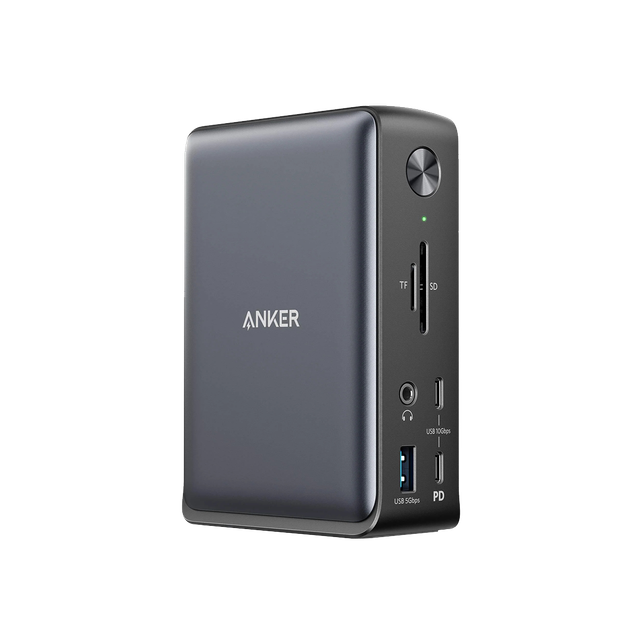
Anker 575 USB-C Docking Station
Expert rating7 / 10
- Connection Type:
- USB-C (DisplayLink)
- Total Ports:
- 13
- Max Display Support:
- Triple display
- Power Delivery:
- 100W passthrough
Consumercarts is reader-supported. Learn more
Disclaimer: The price and specification of the given product may differ from the actual product. Please confirm on the retailer's website before buying.
Manufacturer: Anker Last updated: 2026-10-08
Where to buy
- AmazonGo to store
Anker 575 USB-C Docking Station Review
The Anker 575 USB-C Docking Station (A8392) is a 13-in-1 dock with 2 HDMI 2.0 and 1 DisplayPort output, 85W pass-through charging, three 5Gbps USB-A and two 10Gbps USB-C data ports, SD and microSD slots, gigabit Ethernet and a 3.5mm audio jack, running over one USB-C cable with no driver.
It drives video through DisplayPort Alt Mode rather than DisplayLink, so there is nothing to install. On Windows it runs one 4K 60Hz screen, two at 4K 30Hz, or three at 1080p.
The 30Hz limit with two 4K monitors is the catch: fine for documents, sluggish for anything that moves. On a Mac, macOS does not support the multi-stream mode the dock uses, so extra external screens show the same image rather than an extended desktop.
Anker 575 vs UGREEN Revodok Pro 209
The Anker 575 needs no driver and adds SD, microSD and audio, but two 4K screens run at 30Hz and Macs mirror extra displays. The UGREEN Revodok Pro 209 uses DisplayLink, so it needs a driver, but it runs two 4K screens at 60Hz and extends both on a Mac.
Our verdict
Reviewed by Burooj Alam. Rated by us, not by users.
Expert rating7 / 10
A driver-free 13-port dock with 85W charging and three video outputs. Great for one 4K 60Hz screen or up to three 1080p screens on Windows; two 4K screens drop to 30Hz, and Macs only mirror extra displays.
Best for
- Windows laptops driving one 4K 60Hz monitor or up to three 1080p monitors
- Work laptops where installing drivers is not allowed
- Desks that need card readers, audio and Ethernet on one cable
Not for
- Two 4K monitors at 60Hz, since dual 4K runs at 30Hz
- Mac users who want more than one extended display
- Charging laptops that need more than 85W
Specifications
What these specs meanIdentity
| Brand | Anker |
|---|---|
| Model Number | 575 USB-C Docking Station (A8392) |
| Connection Type | USB-C (DisplayPort Alt Mode) |
| Port Configuration | 1x USB-C upstream, 2x HDMI 2.0, 1x DisplayPort, 3x USB-A 5Gbps, 2x USB-C 10Gbps data, SD + microSD UHS-I, 1GbE, 3.5mm combo audio, DC-in |
| Max Display Support | Triple external (3x 1080p) |
Host connection
| Host Interface | USB-C 3.2 Gen 2 |
|---|---|
| Thunderbolt Version | None |
| Host Cable Captive | No |
| Host Cable Length | 0.9 m |
Ports & Power
| Max Display Resolution | Single 4K@60Hz, dual 4K@30Hz, triple 1080p |
|---|---|
| Total Ports | 13 |
| Ethernet | Yes |
Host power
| Host Power Delivery | 85 W |
|---|---|
| Bus Powered | No |
Display engine
| Video Path | DisplayPort Alt Mode |
|---|---|
| DisplayLink Driver Required | No |
| Max Displays Windows | 3 |
Display output
| Max Single Display Resolution | 4K |
|---|---|
| Max Single Display Refresh | 60 Hz |
| Max Dual Display Resolution | 4K |
| Max Dual Display Refresh | 30 Hz |
Video ports
| HDMI Port Count | 2 |
|---|---|
| HDMI Version | 2.0 |
| DisplayPort Port Count | 1 |
Data ports
| Downstream Thunderbolt Port Count | 0 |
|---|---|
| USB-A Port Count | 3 |
| USB-C Data Port Count | 2 |
| Max USB Data Rate | 10Gbps |
Downstream power
| Max Downstream USB-C Power | 18 W |
|---|
Network and storage
| Ethernet Speed | 1GbE |
|---|---|
| SD Card Slot | UHS-I |
| microSD Card Slot | UHS-I |
Audio and control
| Audio Jack Configuration | Single Combo |
|---|
Compatibility and physical
| macOS Supported | Yes |
|---|---|
| Windows Supported | Yes |
| Weight | 372 g |
FAQs
Can the Anker 575 run two 4K monitors?
Yes, but at 30Hz. It runs one 4K monitor at 60Hz, two at 4K 30Hz, or three at 1080p on Windows.
Does the Anker 575 work with a MacBook?
Yes for charging, ports and one extended display. macOS does not support the multi-stream mode the dock uses for extra screens, so additional monitors mirror the first one.
Does the Anker 575 USB-C Hub require a driver?
No driver installation is required, per Anker's official FAQ for the 575 USB-C Docking Station (A8392), which works with macOS 10.12+ and Windows 8/10/11 out of the box.
Featured in
Compare and read more
- Anker 575 USB-C Docking Station (13-in-1, 85W Pass-Through, Dual Display) vs ATEN UH3238 USB-C Dual Monitor Dock (USB-C / 7 Ports / 90W Host Charging / Dual 4K@60Hz / Fanless with KVM Switching / Windows/Mac)
- Anker 575 USB-C Docking Station (13-in-1, 85W Pass-Through, Dual Display) vs Dell Universal Dock UD22 (USB-C / 10 Ports / 90W Host Charging / Triple 4K@60Hz / Windows/Mac/Chrome)
- Anker 575 USB-C Docking Station (13-in-1, 85W Pass-Through, Dual Display) vs Hyper HyperDrive Next 10-Port USB-C Hub (USB-C / 10 Ports / 100W Pass-Through / Single 4K@60Hz / Windows/Mac/iPad)
- Anker 575 USB-C Docking Station (13-in-1, 85W Pass-Through, Dual Display) vs Lenovo ThinkPad Universal Thunderbolt 4 Dock (Thunderbolt 4 / HDMI + Dual DisplayPort / Gigabit Ethernet / Enterprise Fleet Dock)
- Anker 575 USB-C Docking Station (13-in-1, 85W Pass-Through, Dual Display) vs Plugable UD-6950Z (USB-C/USB-A / 11 Ports / 60W Host Charging / Triple 4K@30Hz DisplayLink / Windows/Mac)
- Anker 575 USB-C Docking Station (13-in-1, 85W Pass-Through, Dual Display) vs UGREEN Revodok Pro 209 (USB-C DisplayLink Dock, 9 Ports, 85W Charging)
- Best Docking Station for a Single-Cable Laptop Setup
- EDID Emulation Explained: Why Your Monitor Resets When You Switch