
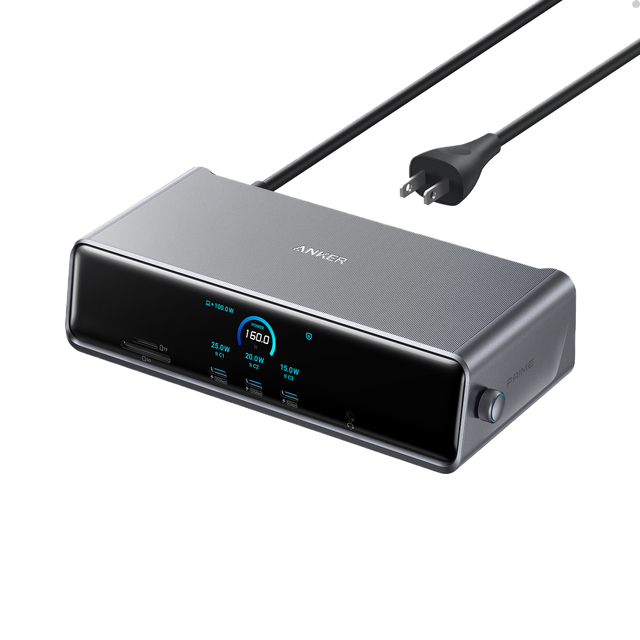
Anker Prime 14-in-2 Docking Station
Expert rating8 / 10
- Connection Type:
- Thunderbolt 4/USB4 (dock + charger)
- Total Ports:
- 14
- Max Display Support:
- Dual 4K
- Power Delivery:
- 140W
Consumercarts is reader-supported. Learn more
Disclaimer: The price and specification of the given product may differ from the actual product. Please confirm on the retailer's website before buying.
Manufacturer: Anker Last updated: September 12, 2026
Where to buy
- AmazonGo to store
- NeweggGo to store
Anker Prime 14-in-2 Docking Station Review
The Anker Prime 14-in-2 Docking Station builds a dual-outlet AC power adapter directly into a 14-port Thunderbolt 4 dock, letting it function as both a laptop charger and a full docking station from a single wall connection.
Anker's Prime charging line is normally sold as standalone GaN wall chargers; this dock merges that lineup with its docking hardware so the two built-in AC outlets can power a monitor, lamp, or second charger directly from the dock itself, while the dock simultaneously charges the laptop at 140W over Thunderbolt 4. It's the only product in this catalog that replaces both a dock and a wall charger with one device, which matters on desks with limited outlets.
Comparison to Alternatives
Against the CalDigit TS4, the TS4 offers slightly more total ports, but neither it nor almost any other dock in the catalog includes a built-in AC power outlet, which is the Prime 14-in-2's clearest differentiator for outlet-starved desks. Against the Anker 777 Thunderbolt Docking Station (Apex), Anker's own 777 focuses on dual HDMI output instead, while the Prime 14-in-2 prioritizes consolidating a wall charger and a dock into one device.
Our verdict
Reviewed by Burooj Alam. Rated by us, not by users.
Expert rating8 / 10
A genuinely unique dual-purpose dock and charger, ideal for desks with limited wall outlets.
Best for
- Desks with limited wall outlets that need extra AC power alongside a dock
- Users who want to replace both a wall charger and a docking station with one device
- High-power Thunderbolt setups needing 140W of laptop charging
Not for
- Buyers who already have plenty of free wall outlets and don't need the built-in AC ports
- Minimalist setups that don't want a bulkier dock housing a power adapter
- Anyone needing more than dual external display support
Specifications
What these specs meanIdentity
| Brand | Anker |
|---|---|
| Model Number | Prime 14-in-2 Docking Station |
| Connection Type | Thunderbolt 4 / USB4 (dual-purpose charger and dock) |
| Port Configuration | 1x TB4 upstream, 2x built-in AC wall outlets (integrated power adapter), 4x USB-A, 3x USB-C, 1x HDMI, 1x DisplayPort, SD + microSD, GbE |
| Max Display Support | Dual 4K |
Ports & Power
| Max Display Resolution | Dual 4K@60Hz |
|---|---|
| Total Ports | 14 |
| Ethernet | Yes |
Host power
| Host Power Delivery | 140W host charging |
|---|
FAQs
What are the key specifications of the Anker Prime 14-in-2 Docking Station (Thunderbolt 4/USB4 / 14 Ports + Built-In Charger / 140W Host Charging / Dual 4K@60Hz / Mac/Windows / ~$280)?
Key specs for the Anker Prime 14-in-2 Docking Station: Power Delivery 140W host charging, Ethernet Yes (GbE), Connection Type Thunderbolt 4 / USB4 (dual-purpose charger and dock), Total Ports 14 dock ports + 2 built-in AC wall outlets, Port Configuration 1x TB4 upstream, 2x built-in AC wall outlets (integrated power adapter), 4x USB-A, 3x USB-C, 1x HDMI, 1x DisplayPort, SD + microSD, GbE, Max Display Support Dual 4K.
Who is the Anker Prime 14-in-2 Docking Station (Thunderbolt 4/USB4 / 14 Ports + Built-In Charger / 140W Host Charging / Dual 4K@60Hz / Mac/Windows / ~$280) best suited to?
Best suited to: Desks with limited wall outlets that need extra AC power alongside a dock; Users who want to replace both a wall charger and a docking station with one device; High-power Thunderbolt setups needing 140W of laptop charging.
What are the drawbacks of the Anker Prime 14-in-2 Docking Station (Thunderbolt 4/USB4 / 14 Ports + Built-In Charger / 140W Host Charging / Dual 4K@60Hz / Mac/Windows / ~$280)?
Not the best fit for: Buyers who already have plenty of free wall outlets and don't need the built-in AC ports; Minimalist setups that don't want a bulkier dock housing a power adapter; Anyone needing more than dual external display support.
Compare and read more
- Anker Prime 14-in-2 Docking Station (Thunderbolt 4/USB4 / 14 Ports + Built-In Charger / 140W Host Charging / Dual 4K@60Hz / Mac/Windows) vs Elgato Thunderbolt Dock (Thunderbolt 4 / 8 Ports / 96W Host Charging / Dual 4K@60Hz / Mac/Windows)
- Anker Prime 14-in-2 Docking Station (Thunderbolt 4/USB4 / 14 Ports + Built-In Charger / 140W Host Charging / Dual 4K@60Hz / Mac/Windows) vs OWC Thunderbolt 5 Hub (Thunderbolt 5 / 11 Ports / 140W Host Charging / 2.5GbE / Aluminum Build)
- Anker Prime 14-in-2 Docking Station (Thunderbolt 4/USB4 / 14 Ports + Built-In Charger / 140W Host Charging / Dual 4K@60Hz / Mac/Windows) vs Plugable TBT4-UDZ (16-in-1 / Thunderbolt 4 / Quad Display / 100W PD)
- Anker Prime 14-in-2 Docking Station (Thunderbolt 4/USB4 / 14 Ports + Built-In Charger / 140W Host Charging / Dual 4K@60Hz / Mac/Windows) vs UGREEN Revodok Pro 209 (USB-C DisplayLink Dock, 9 Ports, 85W Charging)
- Anker Prime 14-in-2 Docking Station (Thunderbolt 4/USB4 / 14 Ports + Built-In Charger / 140W Host Charging / Dual 4K@60Hz / Mac/Windows) vs Belkin Thunderbolt 4 Dock Pro (12 Ports / 90W Upstream + 15W Downstream TB4 / Dual HDMI 2.0 / 8K30 or Dual 4K60 / Gigabit Ethernet)
- Why "Total Ports" on a Docking Station Doesn't Tell You Anything
- EDID Emulation Explained: Why Your Monitor Resets When You Switch