
Apple M5 Pro
Expert rating9 / 10
- Core/Thread Count:
- 18 Core / 18 Thread (6 Super + 12 Performance)
- GPU:
- Up to 20 cores
- Unified Memory:
- Up to 64GB
- Memory Bandwidth:
- Up to 307GB/s
- CPU Process Node:
- 3 Nanometers (third generation, two dies)
- Form Factor:
- Laptop
- Neural Engine:
- 16-core
- Thunderbolt:
- Thunderbolt 5, up to 3 external displays
Consumercarts is reader-supported. Learn more
Disclaimer: The price and specification of the given product may differ from the actual product. Please confirm on the retailer's website before buying.
Manufacturer: Apple Last updated: 2026-09-29
Apple M5 Pro Review
The Apple M5 Pro is an 18-core Apple Silicon chip (6 super cores plus 12 performance cores, with a 15-core version also sold) built from two third-generation 3nm dies, paired with an up-to-20-core GPU, up to 64GB of unified memory and 307GB/s of memory bandwidth in the 2026 MacBook Pro 14-inch and 16-inch.
On the CPU side it is nearly an M5 Max. It has the same 18-core layout, scores about 28,450 in Geekbench 6 multi-core against the Max's 29,730, and matches it in single-core Cinebench 2024. The gap is the GPU and memory: half the GPU cores and half the bandwidth, which shows in video work, where its PugetBench Premiere Pro and DaVinci Resolve scores trail the Max by about 30 percent.
Six Super Cores and Twelve New Performance Cores
Apple dropped efficiency cores from the M5 Pro. The 18-core version pairs 6 super cores, the same design as the base M5's fastest cores, with 12 new performance cores built for multithreaded work. Single-core speed barely moves from the base M5 (Cinebench 2024 single-core 199 here, 200 on the M5). The 15-core version cuts this to 5 super and 10 performance cores.
Benchmarks
The benchmarks below are published results for specific applications. They are measured separately and do not feed the two scores above.
Puget Bench for Photoshop v1.0 - points (More is Better)
- Apple M5 Max15043.83 points
- Apple M5 Pro (this product)14885.21 points
- Apple M512095.89 points
- AMD Ryzen 7 9800X3D12088.31 points
- Intel Core i9-14900KF10029.96 points
- 11th Gen Intel Core i7 11700K7098.88 points
- 10th Gen Intel Core i9-10900KF6892.97 points
- 10th Gen Intel Core i9 109006600 points
Puget Systems runs a fixed set of real Photoshop jobs: opening and saving large files, resizing, content-aware fill, blurs and filters. A higher score means less waiting on the tasks a retoucher repeats all day.
Photoshop is decided mostly by how fast a few cores are, not how many there are, so a chip with fewer but faster cores often beats one with more cores. Treat a gap under about 5 percent as something you would never notice while working.
Puget Bench for After Effects v1.0-1.1 - points (More is Better)
- Intel Core i9-14900KF13588.09 points
- AMD Ryzen 7 9800X3D12906.24 points
- Apple M5 Max11280.89 points
- Apple M5 Pro (this product)9928.85 points
- Apple M57261.63 points
- 9th Gen Intel Core i9-9900K6945.81 points
- 10th Gen Intel Core i9 10900K6799.67 points
- 10th Gen Intel Core i5 10400F5598.67 points
RAM preview and rendering of 2D and 3D compositions in After Effects, including camera tracking.
After Effects still runs largely on one core at a time, so per-core speed decides this and extra cores add very little. This is the benchmark where a high-clock chip pulls ahead of a many-core one.
Puget Bench for Premiere Pro v2.0 - points (More is Better)
- Apple M5 Max149750.46 points
- Intel Core i9-14900KF129174.45 points
- AMD Ryzen 7 9800X3D126611.82 points
- Apple M5 Pro (this product)106874.78 points
- 11th Gen Intel Core i7 11700K82202 points
- 10th Gen Intel Core i9 10850K78258 points
- 9th Gen Intel Core i7-9700K77118.8 points
- Apple M672843.55 points
Plays back and exports 4K and 8K timelines across several camera codecs, with effects and multi-stream sequences, in Adobe Premiere Pro.
Export time rewards more cores, but much of the timeline work runs on the hardware decoder and the graphics card instead of the processor. A small gap here rarely changes how the edit feels.
Puget Bench for DaVinci Resolve v2.0-2.1 - points (More is Better)
- Intel Core i9-14900KF135454.8 points
- Apple M5 Max116240.93 points
- AMD Ryzen 7 9800X3D113372.15 points
- 10th Gen Intel Core i9-10900KF93174 points
- Apple M5 Pro (this product)81178.5 points
- 10th Gen Intel Core i7-10700K81083 points
- Apple M660099 points
- 9th Gen Intel Core i9-9900K59437 points
Grading, effects, AI tools and export in DaVinci Resolve Studio, across the codecs a colourist actually works in.
Resolve leans harder on the graphics card than on the processor, so the CPU difference here is usually smaller than the difference your GPU choice would make. Use it to rule out a bottleneck, not to pick a winner.
Puget Bench for Lightroom Classic v1.0-1.1 - points (More is Better)
- Apple M5 Max11549.6 points
- AMD Ryzen 7 9800X3D10942.9 points
- Apple M5 Pro (this product)10909.17 points
- Apple M56668.19 points
- 11th Gen Intel Core i7 11700K6167.4 points
- 10th Gen Intel Core i9 10850K5769.67 points
- 11th Gen Intel Core i5 11600KF5499.67 points
- 9th Gen Intel Core i9-9900K4635.96 points
Measures a full Lightroom Classic catalogue workflow: importing, building previews, scrolling the library, exporting JPEGs and running the AI tools such as Denoise.
Import and export spread across every core, so core count counts for more here than it does in Photoshop. The AI tools lean on the graphics card, so a CPU gap matters less if you pair either chip with a strong GPU.
Measured results
Cinebench scores
| Cinebench 2026, Multi-Core Median of 3 independently published results. | 9,440 9,144 to 9,481 |
| Cinebench 2024, Single-Core Median of 3 independently published results. | 199 199 to 201 |
Measured results
Geekbench scores
| Geekbench 6, Multi-Core Median of 2 independently published results. | 28,451.5 28,436 to 28,467 |
| Geekbench 6, Single-Core Median of 2 independently published results. | 4,303.5 4,295 to 4,312 |
CPU Speed Close to the M5 Max
The M5 Pro and M5 Max share the same 18-core CPU, and the benchmarks show it. Geekbench 6 multi-core lands around 28,450 against 29,730 on the Max, a gap of about 4 percent, and Cinebench 2026 multi-core sits around 9,440. Apple rates it up to 30 percent faster than the M4 Pro in multithreaded work.
3D Rendering in Blender
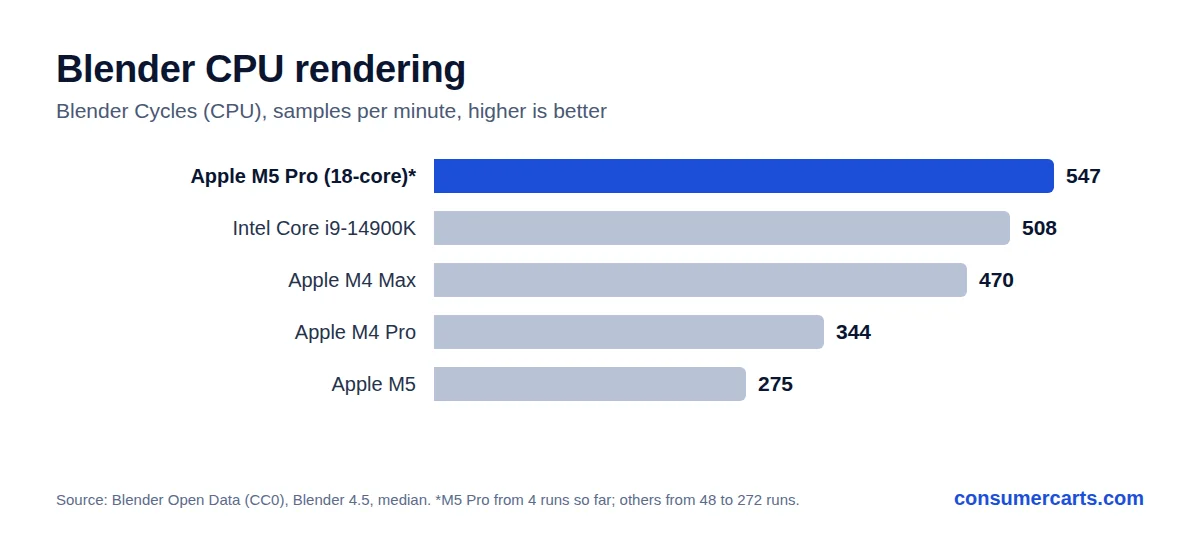
In Blender Cycles on the CPU, early Blender Open Data results put the 18-core M5 Pro at 547 samples per minute. That is ahead of the M4 Max (470), the Core i9-14900K (508) and the base M5 (275), and about 59 percent faster than the M4 Pro (344). Treat it as an early figure: it comes from only 4 test runs so far, against more than 100 for most of those chips.
Where the M5 Max Pulls Ahead
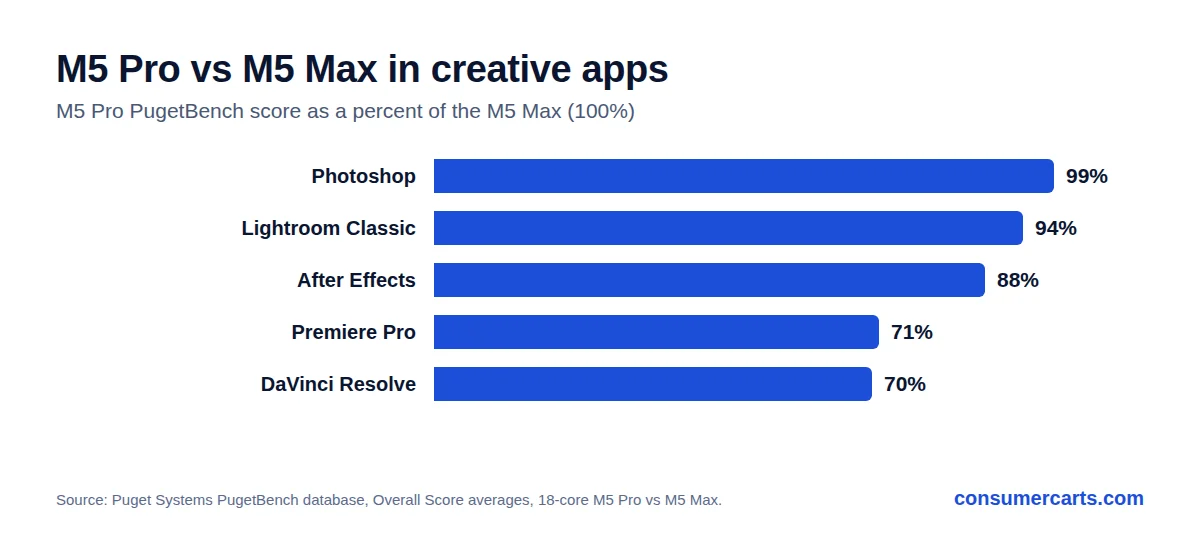
PugetBench results show where the extra GPU cores and bandwidth of the Max matter. The M5 Pro is within 1 percent in Photoshop and 6 percent in Lightroom Classic, but about 12 percent behind in After Effects and about 30 percent behind in Premiere Pro and DaVinci Resolve. The Max has up to 40 GPU cores and 614GB/s of bandwidth against 20 cores and 307GB/s here.
The 64GB Memory Ceiling
The M5 Pro tops out at 64GB of unified memory. That covers photo, code and most video projects, but large local AI models and heavy 3D scenes that need more memory call for the M5 Max, which goes to 128GB.
Should You Upgrade From an M4 Pro or Older?
From an M4 Pro, the jump is real but not dramatic for everyday work: Apple rates the M5 Pro up to 30 percent faster in multithreaded tasks and up to 35 percent faster in ray-traced graphics, with up to 4 times faster LLM prompt processing thanks to Neural Accelerators in every GPU core. From an M1 Pro, Apple's figure is up to 2.5 times the multithreaded performance, which makes it a much easier case. If your M4 Pro already keeps up, AI work and 3D rendering are the two reasons to move now.
Sustained Performance, Power and Fan Noise
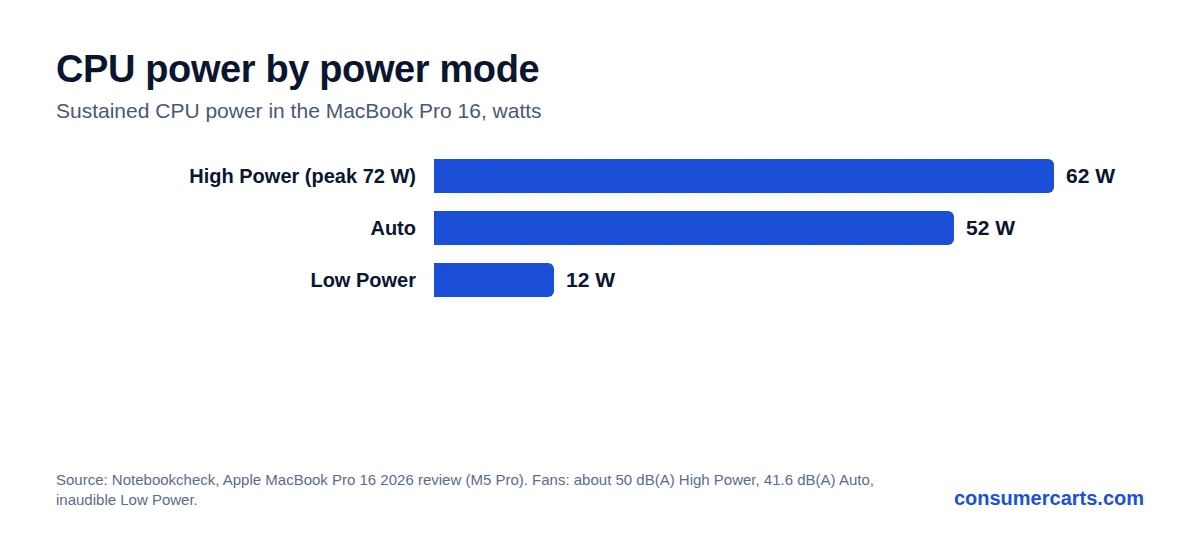
In Notebookcheck's MacBook Pro 16 test, the M5 Pro CPU peaks at 72 W and holds 62 W in High Power mode, or 52 W in Auto mode, and runs at its full speed without throttling. Low Power mode caps it at about 12 W with the fans inaudible. The cost of High Power mode is noise: the fans reach about 50 dB(A) under load, against 41.6 dB(A) in Auto. Palm rests stayed under 33 C even at full load.
Battery Life
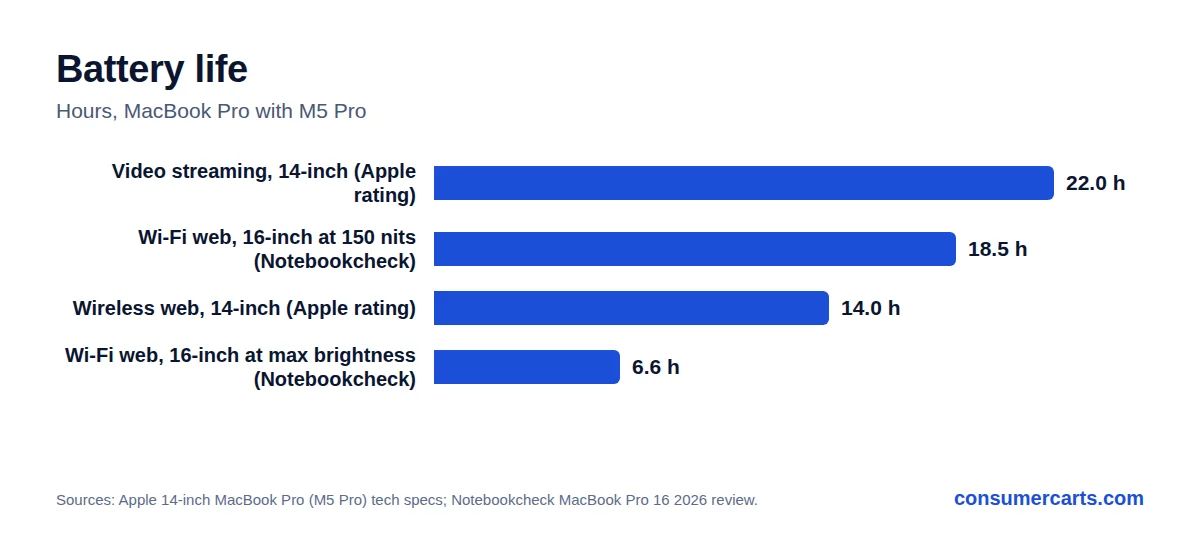
Apple rates the 14-inch MacBook Pro with M5 Pro at up to 22 hours of video streaming and up to 14 hours of wireless web from a 72.4 Wh battery. Notebookcheck measured 18 hours 32 minutes of Wi-Fi browsing on the 16-inch at 150 nits, dropping to 6 hours 36 minutes at full brightness. The 18-core model ships with a 96 W charger, the 15-core with a 70 W one.
GPU and Gaming
Every one of the up to 20 GPU cores has a Neural Accelerator, and Apple rates ray-traced graphics up to 35 percent faster than the M4 Pro. Notebookcheck measured 30 to 50 percent gains over the M4 Pro in synthetic GPU tests. For games it lands about 15 percent behind Windows laptops with an RTX 5070 in benchmarks, close to them in some titles and slower in others. In creator apps it matched or beat a mobile RTX 5090 in some tests. GPU speed held steady under sustained load and on battery.
Media Engine, Neural Engine and Connectivity
The M5 Pro adds a 16-core Neural Engine and a Media Engine with hardware H.264, HEVC and ProRes encode and decode plus AV1 decode, so video exports lean less on the CPU. It drives three Thunderbolt 5 ports, each with its own controller on the chip, at DisplayPort 2.1 speeds. It supports up to three external displays: three at 6K 60Hz or 4K 144Hz, or one at 8K 60Hz or 4K 240Hz plus a second at 5K 120Hz. The 2026 MacBook Pro pairs it with Wi-Fi 7 and PCIe 5.0 storage starting at 1TB.
Workstation-Class Throughput
The M5 Pro has a published result in SPEC CPU 2026, the industry's standard compute benchmark. A 16-inch MacBook Pro scored 82.7 in SPECrate 2026 Integer and 90.7 in SPECrate 2026 Floating Point, level with Intel's Xeon 6513P-B server chip on floating point (91.2). That is server-chip throughput from a laptop.
15-Core vs 18-Core: Which One to Get
The 15-core M5 Pro has 5 super cores and 10 performance cores, a 16-core GPU and a 70 W charger. The 18-core version adds a super core, two performance cores and four GPU cores, and it is the only M5 Pro that can be configured with 64GB of memory; the 15-core tops out lower. In NanoReview's Cinebench 2026 figures the gap is about 20 percent in multi-core, while single-core speed is nearly identical. If you render, compile or export video, the 18-core is worth it. For photo work and coding, the 15-core gives up little.
Our verdict
Reviewed by Burooj Alam. Rated by us, not by users.
Expert rating9 / 10
The M5 Pro gives you nearly all of the M5 Max's CPU speed. Pay for the Max only if your work leans on the GPU or needs more than 64GB of memory.
Best for
- Developers, photographers and data work that loads every CPU core, where it runs within about 4 percent of the M5 Max in Geekbench 6 multi-core.
- Photoshop and Lightroom Classic users, since its PugetBench scores sit within 1 to 6 percent of the M5 Max.
- People who work on battery: Notebookcheck measured over 18 hours of Wi-Fi browsing on the 16-inch model.
- Multi-monitor desks that need up to three external displays over Thunderbolt 5.
Not for
- Heavy video editing and color grading, where Premiere Pro and DaVinci Resolve scores run about 30 percent behind the M5 Max.
- Local AI models or 3D scenes that need more than 64GB of unified memory; the M5 Max goes to 128GB.
- Gaming-first buyers, since its GPU trails Windows laptops with an RTX 5070 by about 15 percent in benchmarks.
Specifications
What these specs meanIdentity
| Brand | Apple |
|---|---|
| Product Line | Apple Silicon |
| Model Number | M5 Pro |
Segment and platform
| Microarchitecture | Apple Silicon, Fifth Generation |
|---|---|
| Process Node | 3 nm |
Core configuration
| Total Cores | 18 |
|---|---|
| Total Threads | 18 |
| Form Factor | Laptop |
|---|---|
| Core/Thread Count | 18 Core / 18 Thread (6 Super + 12 Performance); 15-core version also sold |
Measured results
SPEC CPU 2026
| SPECrate® 2026 Floating Point (base) | 90.7 | 1-chip system · MacBook Pro (16-inch, M5 Pro) 18-copy SPECrate. Licensee: SPEC CPU Supporting Contributor jhenning. Published May-2026. · Source |
| SPECrate® 2026 Integer (base) | 82.7 | 1-chip system · MacBook Pro (16-inch, M5 Pro) 18-copy SPECrate. Licensee: SPEC CPU Supporting Contributor jhenning. Published May-2026. · Source |
Best published base result for this chip count at www.spec.org as of 23 Sep 2026. SPEC CPU 2026 scores are not comparable with SPEC CPU 2017 scores.
Retrieved 23 Sept 2026
SPEC®, SPECrate® and SPEC CPU® are registered trademarks of the Standard Performance Evaluation Corporation. Copied by permission of the Standard Performance Evaluation Corporation (SPEC). Results retrieved from www.spec.org on 23 Sep 2026. More information: www.spec.org/cpu2026/
FAQs
How many cores does the Apple M5 Pro have?
The M5 Pro comes with an 18-core CPU (6 super cores and 12 performance cores) or a 15-core CPU (5 super cores and 10 performance cores), and a GPU of up to 20 cores.
Is the M5 Pro much slower than the M5 Max?
Not for CPU work. Both use an 18-core CPU, and the M5 Pro is about 4 percent behind in Geekbench 6 multi-core. The M5 Max pulls ahead in GPU-heavy apps, by about 30 percent in Premiere Pro and DaVinci Resolve on PugetBench.
How much memory does the M5 Pro support?
Up to 64GB of unified memory, with up to 307GB/s of memory bandwidth.
Which Macs use the M5 Pro?
The 2026 MacBook Pro 14-inch and 16-inch, announced on March 3, 2026.
How does the M5 Pro compare to the M4 Pro?
Apple rates the M5 Pro up to 30 percent faster in multithreaded work, up to 35 percent faster in ray-traced graphics and up to 4 times faster at LLM prompt processing. It also moves from 14 CPU cores (10 performance, 4 efficiency) to 18 (6 super, 12 performance).
How fast is the M5 Pro in Blender?
Early Blender Open Data results (Blender 4.5, 4 runs) put the 18-core M5 Pro at 547 samples per minute on the CPU, against 344 for the M4 Pro and 508 for the Core i9-14900K.
What is the battery life of a MacBook Pro with M5 Pro?
Apple rates the 14-inch at up to 22 hours of video streaming and up to 14 hours of wireless web. Notebookcheck measured 18 hours 32 minutes of Wi-Fi browsing on the 16-inch at 150 nits.
Is the M5 Pro good for gaming?
It is capable but not a gaming chip. Notebookcheck found its GPU about 15 percent behind Windows laptops with an RTX 5070 in benchmarks, close in some games and slower in others.
How many external displays does the M5 Pro support?
Up to three: three at 6K 60Hz or 4K 144Hz, or one at 8K 60Hz or 4K 240Hz plus a second at 5K 120Hz, alongside the built-in display.
Does the M5 Pro throttle under sustained load?
Not in the 16-inch MacBook Pro. Notebookcheck measured 72 W peak and 62 W sustained in High Power mode with no throttling, at a fan noise of about 50 dB(A).
Should I get the 15-core or 18-core M5 Pro?
Get the 18-core for rendering, compiling and video export, or if you need 64GB of memory. The 15-core has almost the same single-core speed, so it gives up little for photo editing and coding.
Compare and read more
- Apple M5 Pro vs E2-6110 with Radeon R2 Graphics
- Apple M5 Pro vs E1-2100 with Radeon HD 8210
- Apple M5 Pro vs E2-7110 with Radeon R2 Graphics
- Apple M5 Pro vs E1 Micro-6200T with Radeon R2 Graphics
- Apple M5 Pro vs E2-3800 with Radeon HD 8280
- Ryzen 9 9950X3D2 vs 9950X3D: Is Dual 3D V-Cache Worth It?
- Workstation & HEDT CPU Tier List: Threadripper, Xeon W, EPYC