
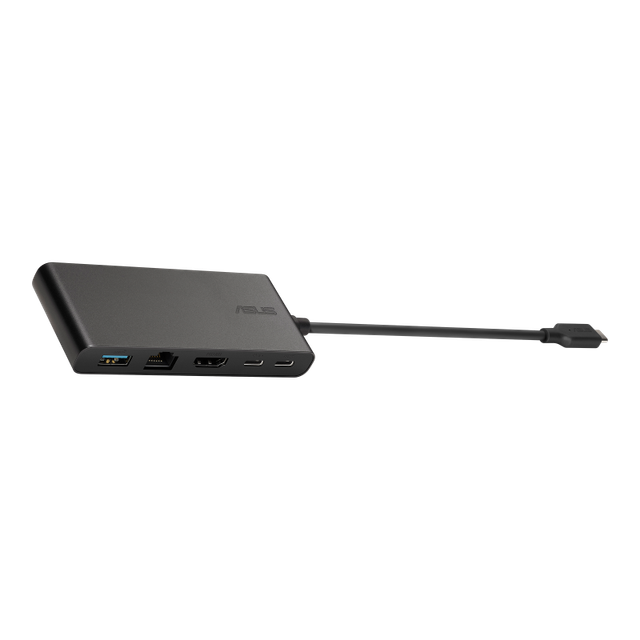
ASUS DC5 Universal Dock
Expert rating6 / 10
- Connection Type:
- USB-C (compact travel)
- Total Ports:
- 5
- Max Display Support:
- Single display
- Power Delivery:
- 100W passthrough
Consumercarts is reader-supported. Learn more
Disclaimer: The price and specification of the given product may differ from the actual product. Please confirm on the retailer's website before buying.
Manufacturer: ASUS Last updated: September 12, 2026
ASUS DC5 Universal Dock Review
The ASUS DC5 Universal Dock is a compact 5-port travel dock with single 4K@60Hz output and 100W pass-through charging, sized for a laptop bag rather than a permanent desk setup.
ASUS ships this as an accessory for its ZenBook and business laptop lines, but it works on any USB-C device. It's deliberately small: five ports, one display output, no Ethernet, built to slide into a laptop sleeve and come out when you need a hotel-room monitor or a single conference-room display. It won't replace a full desk dock, and it isn't trying to.
Comparison to Alternatives
Against the Kensington SD1620P, both are pocket-sized travel docks, but the Kensington adds a second display output where the ASUS DC5 sticks to a single monitor, keeping the DC5 smaller and cheaper. Against the Twelve South StayGo mini, the StayGo's magnetic MacBook-specific design suits Mac travelers, while the DC5's plain USB-C plug makes it the more universal cross-platform travel option.
Our verdict
Reviewed by Burooj Alam. Rated by us, not by users.
Expert rating6 / 10
A no-frills, inexpensive travel dock for single-display needs on the road.
Best for
- Frequent travelers needing a lightweight single-monitor dock
- Hotel or conference room setups with one external display
- Budget-conscious buyers who don't need Ethernet or multi-display support
Not for
- Permanent desk setups needing multiple displays
- Anyone needing wired Ethernet
- Users wanting more than a single external monitor
Specifications
What these specs meanIdentity
| Brand | ASUS |
|---|---|
| Model Number | DC5 Universal Dock |
| Connection Type | USB-C (USB 3.2 Gen2, compact travel dock) |
| Port Configuration | 1x USB-C upstream, 1x HDMI, 1x USB-C data, 2x USB-A |
| Max Display Support | Single display |
Ports & Power
| Max Display Resolution | Single 4K@60Hz |
|---|---|
| Total Ports | 5 |
| Ethernet | No |
Host power
| Host Power Delivery | 100W passthrough charging |
|---|
FAQs
What are the key specifications of the ASUS DC5 Universal Dock (USB-C / 5 Ports / 100W Pass-Through Charging / Single 4K@60Hz / Windows/Mac/Chrome / ~$70)?
Key specs for the ASUS DC5 Universal Dock: Power Delivery 100W passthrough charging, Ethernet No, Connection Type USB-C (USB 3.2 Gen2, compact travel dock), Port Configuration 1x USB-C upstream, 1x HDMI, 1x USB-C data, 2x USB-A, Max Display Support Single display, Max Display Resolution Single 4K@60Hz.
Who is the ASUS DC5 Universal Dock (USB-C / 5 Ports / 100W Pass-Through Charging / Single 4K@60Hz / Windows/Mac/Chrome / ~$70) best suited to?
Best suited to: Frequent travelers needing a lightweight single-monitor dock; Hotel or conference room setups with one external display; Budget-conscious buyers who don't need Ethernet or multi-display support.
What are the drawbacks of the ASUS DC5 Universal Dock (USB-C / 5 Ports / 100W Pass-Through Charging / Single 4K@60Hz / Windows/Mac/Chrome / ~$70)?
Not the best fit for: Permanent desk setups needing multiple displays; Anyone needing wired Ethernet; Users wanting more than a single external monitor.
Compare and read more
- ASUS DC5 Universal Dock (USB-C / 5 Ports / 100W Pass-Through Charging / Single 4K@60Hz / Windows/Mac/Chrome) vs Dell WD19S (USB-C / 8 Ports / 65W Host Charging / Single 4K@60Hz / Windows)
- ASUS DC5 Universal Dock (USB-C / 5 Ports / 100W Pass-Through Charging / Single 4K@60Hz / Windows/Mac/Chrome) vs CalDigit Element Hub (Thunderbolt 4 / 4 Ports / 60W Host Charging / Data-Only / Mac/Windows)
- ASUS DC5 Universal Dock (USB-C / 5 Ports / 100W Pass-Through Charging / Single 4K@60Hz / Windows/Mac/Chrome) vs HP USB-C Dock G5 (USB-C / 8 Ports / 65W Host Charging / Dual 4K@30Hz / Windows)
- ASUS DC5 Universal Dock (USB-C / 5 Ports / 100W Pass-Through Charging / Single 4K@60Hz / Windows/Mac/Chrome) vs Wavlink Universal Docking Station (USB-A / 9 Ports / No Host Charging / Dual 4K@30Hz DisplayLink / Windows Only)
- ASUS DC5 Universal Dock (USB-C / 5 Ports / 100W Pass-Through Charging / Single 4K@60Hz / Windows/Mac/Chrome) vs Dell WD19TB Thunderbolt Dock (Thunderbolt 3 / 12 Ports / 130W Host Charging / Dual 4K@60Hz / Windows)
- Why "Total Ports" on a Docking Station Doesn't Tell You Anything
- EDID Emulation Explained: Why Your Monitor Resets When You Switch