
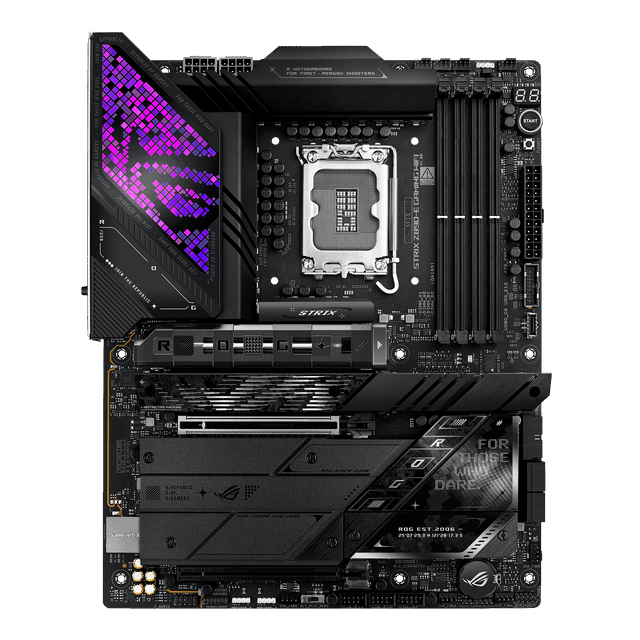
ASUS ROG Strix Z890-E Gaming WiFi
- Socket:
- LGA1851
- Chipset:
- Z890
- Form Factor:
- ATX
- Memory:
- 4x DDR5
- M.2 Slots:
- 7 (3x PCIe 5.0)
- Network:
- Wi-Fi 7 + 5GbE
Consumercarts is reader-supported. Learn more
Disclaimer: The price and specification of the given product may differ from the actual product. Please confirm on the retailer's website before buying.
Manufacturer: ASUS Last updated: September 11, 2026
ASUS ROG Strix Z890-E Gaming WiFi (LGA1851/Intel Z890/ATX/Seven M.2 Slots/Wi-Fi 7) Review
The ROG Strix Z890-E Gaming WiFi is ASUS's high-end gaming board for Core Ultra Series 2 processors, distinguished by an unusually high seven total M.2 slots across CPU and chipset lanes.
ASUS does not publish an exact VRM phase count for this board, but it is built with ASUS's high-end Extreme Engine Digi+ design and rated for sustained Core Ultra 9 operation with memory overclocking. Four DDR5 DIMM slots (non-ECC, unbuffered CUDIMM) support up to 256GB total, with overclocked speeds rated up to 9200+ MT/s. Expansion includes a PCIe 5.0 x16 slot supporting x16/x8/x4/x4 modes and a PCIe 4.0 x16 slot at x4. Storage is unusually generous at seven total M.2 slots across PCIe 5.0, PCIe 4.0, and SATA-hybrid configurations. A Realtek 5Gb Ethernet controller handles wired networking, paired with Wi-Fi 7 (802.11be) rated up to 5.8Gbps. Audio uses ASUS's ROG SupremeFX implementation with a Realtek ALC4080 codec. Against the ASUS ROG Maximus Z890 Hero already in this catalog, the Strix Z890-E Gaming WiFi offers more total M.2 slots (seven versus six) at a lower price, trading some of the Maximus's BIOS tuning refinement for raw storage expansion.
Power Delivery and VRM Design
ASUS does not publish an exact VRM phase count for this board, but it is built with ASUS's high-end Extreme Engine Digi+ design and rated for sustained Core Ultra 9 operation with memory overclocking.
Memory Support
Four DDR5 DIMM slots (non-ECC, unbuffered CUDIMM) support up to 256GB total, with overclocked speeds rated up to 9200+ MT/s.
Expansion and Storage
Expansion includes a PCIe 5.0 x16 slot supporting x16/x8/x4/x4 modes and a PCIe 4.0 x16 slot at x4. Storage is unusually generous at seven total M.2 slots across PCIe 5.0, PCIe 4.0, and SATA-hybrid configurations.
Connectivity
A Realtek 5Gb Ethernet controller handles wired networking, paired with Wi-Fi 7 (802.11be) rated up to 5.8Gbps. Audio uses ASUS's ROG SupremeFX implementation with a Realtek ALC4080 codec.
Comparison to Sibling Products
Against the ASUS ROG Maximus Z890 Hero already in this catalog, the Strix Z890-E Gaming WiFi offers more total M.2 slots (seven versus six) at a lower price, trading some of the Maximus's BIOS tuning refinement for raw storage expansion.
Specifications
Platform and CPU compatibility
| Platform | Intel |
|---|---|
| Socket | LGA1851 |
| Socket | Intel Core Ultra Processors (Series 2) |
| Chipset | Z890 |
| Newest CPU Family Supported | Core Ultra Series 2 |
| Oldest CPU Family Supported | Core Ultra Series 2 |
| CPU Overclocking Supported | Yes |
Platform
| Socket Type | LGA1851 |
|---|---|
| Form Factor | ATX |
Memory
| Memory Type | DDR5 |
|---|---|
| Memory Slots | 4 |
| Max Memory | 256 GB |
| Memory Type | 4x DDR5 DIMM (CUDIMM), up to 256GB, up to 9200+ MT/s (OC) |
| Max Rated Memory Speed | 9200 MT/s |
| CUDIMM Support | Yes |
| ECC Memory Support | None |
Expansion & Connectivity
| M.2 Slots | 7 |
|---|---|
| PCIe 5.0 Support | Yes |
| Wi-Fi Onboard | Yes |
M.2 storage
| M.2 PCIe 5.0 Slots | 3 |
|---|---|
| M.2 PCIe 4.0 Slots | 4 |
| M.2 CPU Attached Slots | 4 |
Other storage
| SATA Ports | 4 |
|---|
PCIe expansion
| PCIe x16 Slots | 2 |
|---|---|
| Primary Graphics Slot Gen | PCIe 5.0 |
| Graphics Slot Bifurcation | x8/x4/x4 |
Rear USB
| Rear USB4 or TB Ports | 2 |
|---|---|
| Rear USB 10Gbps Ports | 9 |
| Rear USB 5Gbps Ports | 3 |
Internal headers
| Front USB-C Header Speed | 20Gbps |
|---|---|
| Fan and Pump Headers | 8 |
| ARGB Headers | 3 |
Power delivery
| EPS 12V Configuration | Two 8-pin |
|---|
Builder features
| POST Code Display | Yes |
|---|---|
| BIOS Flashback | Yes |
| Tool Free M.2 Retention | Yes |
Network and audio
| Max Ethernet Speed | 5 Gbps |
|---|---|
| Ethernet Port Count | 1 |
| Wi-Fi Standard | Wi-Fi 7 |
| Bluetooth Version | 5.4 |
| Audio Codec | ROG SupremeFX ALC4080 |
| Model | ROG Strix Z890-E Gaming WiFi |
|---|---|
| VRM | ASUS Extreme Engine Digi+ (phase count not officially disclosed) |
| Expansion | PCIe 5.0 x16 (x16/x8/x4/x4) + PCIe 4.0 x16 (x4) |
| Connectivity | 2x Thunderbolt 4, Aura Sync |
| Networking | Realtek 5Gb LAN, Wi-Fi 7, Bluetooth 5.4 |
| Special Features | 7x M.2 (4x CPU incl. 3x PCIe 5.0, 3x chipset) |
| Source URL | https://rog.asus.com/motherboards/rog-strix/rog-strix-z890-e-gaming-wifi/spec/ |
Expert Review
Reviewed by Burooj Alam. Rated by us, not by users.
Best for
- Builders who want more M.2 slots than almost any other Z890 board
- Gamers who want ROG styling with strong storage expansion
Not for
- Buyers who don't need seven M.2 slots and would rather save money
- Enthusiasts who want the Maximus line's extra BIOS tuning tools
FAQs
What are the key specifications of the ASUS ROG Strix Z890-E Gaming WiFi (LGA1851/Intel Z890/ATX/Seven M.2 Slots/Wi-Fi 7)?
The ASUS ROG Strix Z890-E Gaming WiFi (LGA1851/Intel Z890/ATX/Seven M.2 Slots/Wi-Fi 7) is a motherboard from ASUS. Key specs: Socket LGA1851, Chipset Z890, VRM ASUS Extreme Engine Digi+ (phase count not officially disclosed), Memory 4x DDR5 DIMM (CUDIMM), up to 256GB, up to 9200+ MT/s (OC), Expansion PCIe 5.0 x16 (x16/x8/x4/x4) + PCIe 4.0 x16 (x4).
Will the ASUS ROG Strix Z890-E Gaming WiFi (LGA1851/Intel Z890/ATX/Seven M.2 Slots/Wi-Fi 7) work with my current setup?
The ASUS ROG Strix Z890-E Gaming WiFi (LGA1851/Intel Z890/ATX/Seven M.2 Slots/Wi-Fi 7) lists Socket is LGA1851. Check that against the hardware you already own before buying, since this is the field that most often decides whether a part fits.
Who is the ASUS ROG Strix Z890-E Gaming WiFi (LGA1851/Intel Z890/ATX/Seven M.2 Slots/Wi-Fi 7) best suited to?
It suits builders who want more m.2 slots than almost any other z890 board, gamers who want rog styling with strong storage expansion.
What are the drawbacks of the ASUS ROG Strix Z890-E Gaming WiFi (LGA1851/Intel Z890/ATX/Seven M.2 Slots/Wi-Fi 7)?
It is a poor fit for buyers who don't need seven m.2 slots and would rather save money, enthusiasts who want the maximus line's extra bios tuning tools.
Compare and read more
- ASRock X570 Steel Legend (AM4/AMD X570/ATX/PCIe 4.0/Dual M.2) vs ASUS ROG Strix Z890-E Gaming WiFi (LGA1851/Intel Z890/ATX/Seven M.2 Slots/Wi-Fi 7)
- ASRock B650 PG Lightning (AM5/AMD B650/ATX/Two M.2 Slots/PCIe 5.0/2.5G LAN) vs ASUS ROG Strix Z890-E Gaming WiFi (LGA1851/Intel Z890/ATX/Seven M.2 Slots/Wi-Fi 7)
- ASRock B650E PG Riptide WiFi (AM5/AMD B650E/ATX/14+2+1 Power Phase VRM/Wi-Fi 6E) vs ASUS ROG Strix Z890-E Gaming WiFi (LGA1851/Intel Z890/ATX/Seven M.2 Slots/Wi-Fi 7)
- ASRock B650E Steel Legend WiFi (AM5/AMD B650/ATX/16+2+1 Phase 60A SPS VRM/Three M.2 Slots/Wi-Fi 6E) vs ASUS ROG Strix Z890-E Gaming WiFi (LGA1851/Intel Z890/ATX/Seven M.2 Slots/Wi-Fi 7)
- ASRock B850 Steel Legend WiFi (AM5/AMD B850/ATX/14+2+1 Phase 80A Dr.MOS VRM/Four M.2 Slots/Wi-Fi 7) vs ASUS ROG Strix Z890-E Gaming WiFi (LGA1851/Intel Z890/ATX/Seven M.2 Slots/Wi-Fi 7)