
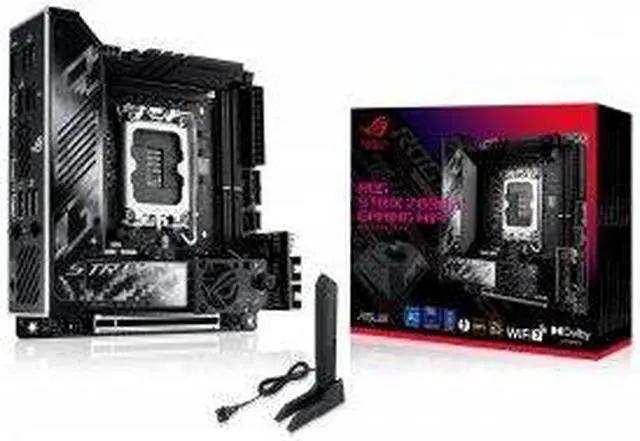
ASUS ROG Strix Z890-I Gaming WiFi
- Socket:
- LGA1851
- Chipset:
- Z890
- Form Factor:
- Mini-ITX
- Memory:
- 2x DDR5
- M.2 Slots:
- 2 (both PCIe 5.0)
- Network:
- Wi-Fi 7 + 2.5GbE
Consumercarts is reader-supported. Learn more
Disclaimer: The price and specification of the given product may differ from the actual product. Please confirm on the retailer's website before buying.
Manufacturer: ASUS Last updated: September 11, 2026
ASUS ROG Strix Z890-I Gaming WiFi (LGA1851/Intel Z890/Mini-ITX/10+1+2+1 110A Power Stages/Dual Thunderbolt 4) Review
The ROG Strix Z890-I Gaming WiFi brings Intel's Core Ultra 200S platform to Mini-ITX, pairing Z890's PCIe 5.0 and CUDIMM memory support with dual Thunderbolt 4 ports in a board built for compact high-performance Intel builds.
Power delivery uses a 10+1+2+1 power stage design rated at 110A per stage, giving this board robust headroom for Core Ultra 9 285K-class chips even in a thermally constrained ITX case, backed by a substantial VRM heatsink for a board this size. Two DDR5 DIMM slots support up to 128GB total capacity, with overclocked speeds of 9200+ MT/s achievable using CUDIMM modules and Intel's latest memory controllers. A single PCIe 5.0 x16 slot handles the primary GPU, and two PCIe 5.0 x4 M.2 slots (both in the 2280 form factor) give this board an unusually high-bandwidth all-Gen5 storage configuration for its size. Dual Thunderbolt 4 ports are a headline feature, alongside 2.5GbE wired networking, Wi-Fi 7, and Bluetooth 5.4. Audio comes from an ESS SABRE9260Q DAC, and M.2 Q-Release Duo lets both M.2 drives be removed without tools. Against the ASUS ROG Strix Z790-I Gaming WiFi also in this catalog, the Z890-I moves to CUDIMM-capable DDR5, all-Gen5 M.2 storage, and Thunderbolt 4 in place of Thunderbolt 4's predecessor implementation, reflecting the generational jump to Arrow Lake.
Power Delivery and VRM Design
Power delivery uses a 10+1+2+1 power stage design rated at 110A per stage, giving this board robust headroom for Core Ultra 9 285K-class chips even in a thermally constrained ITX case, backed by a substantial VRM heatsink for a board this size.
Memory Support
Two DDR5 DIMM slots support up to 128GB total capacity, with overclocked speeds of 9200+ MT/s achievable using CUDIMM modules and Intel's latest memory controllers.
Expansion and Storage
A single PCIe 5.0 x16 slot handles the primary GPU, and two PCIe 5.0 x4 M.2 slots (both in the 2280 form factor) give this board an unusually high-bandwidth all-Gen5 storage configuration for its size.
Connectivity
Dual Thunderbolt 4 ports are a headline feature, alongside 2.5GbE wired networking, Wi-Fi 7, and Bluetooth 5.4. Audio comes from an ESS SABRE9260Q DAC, and M.2 Q-Release Duo lets both M.2 drives be removed without tools.
Comparison to Sibling Products
Against the ASUS ROG Strix Z790-I Gaming WiFi also in this catalog, the Z890-I moves to CUDIMM-capable DDR5, all-Gen5 M.2 storage, and Thunderbolt 4 in place of Thunderbolt 4's predecessor implementation, reflecting the generational jump to Arrow Lake.
Specifications
Platform and CPU compatibility
| Platform | Intel |
|---|---|
| Socket | LGA1851 |
| Socket | Intel Core Ultra 200S series |
| Chipset | Z890 |
| Newest CPU Family Supported | Core Ultra Series 2 |
| Oldest CPU Family Supported | Core Ultra Series 2 |
| CPU Overclocking Supported | Yes |
Platform
| Socket Type | LGA1851 |
|---|---|
| Form Factor | Mini-ITX |
Memory
| Memory Type | DDR5 |
|---|---|
| Memory Slots | 2 |
| Max Memory | 128 GB |
| Memory Type | 2x DDR5 (CUDIMM), up to 128GB, up to 9200+ MT/s (OC) |
| Max Rated Memory Speed | 9200 MT/s |
| CUDIMM Support | Yes |
| ECC Memory Support | None |
Expansion & Connectivity
| M.2 Slots | 2 |
|---|---|
| PCIe 5.0 Support | Yes |
| Wi-Fi Onboard | Yes |
M.2 storage
| M.2 PCIe 5.0 Slots | 2 |
|---|---|
| M.2 PCIe 4.0 Slots | 0 |
| M.2 CPU Attached Slots | 2 |
Other storage
| SATA Ports | 2 |
|---|
PCIe expansion
| PCIe x16 Slots | 1 |
|---|---|
| Primary Graphics Slot Gen | PCIe 5.0 |
Rear USB
| Rear USB4 or TB Ports | 2 |
|---|---|
| Rear USB 20Gbps Ports | 1 |
| Rear USB 10Gbps Ports | 3 |
| Rear USB 5Gbps Ports | 1 |
| Rear USB 2.0 Ports | 2 |
Internal headers
| Front USB-C Header Speed | 20Gbps |
|---|---|
| Front USB-C Power Delivery | 15 W |
| Fan and Pump Headers | 4 |
| ARGB Headers | 2 |
Power delivery
| EPS 12V Configuration | One 8-pin |
|---|
Builder features
| BIOS Flashback | Yes |
|---|---|
| Tool Free M.2 Retention | Yes |
Network and audio
| Max Ethernet Speed | 2.5 Gbps |
|---|---|
| Ethernet Port Count | 1 |
| Wi-Fi Standard | Wi-Fi 7 |
| Bluetooth Version | 5.4 |
| Audio Codec | ESS SABRE9260Q DAC |
| Model | ROG Strix Z890-I Gaming WiFi |
|---|---|
| VRM | 10+1+2+1 phase, 110A per stage |
| Expansion | 1x PCIe 5.0 x16 |
| Connectivity | 2x Thunderbolt 4, M.2 Q-Release Duo |
| Networking | 2.5GbE (Intel), Wi-Fi 7, Bluetooth 5.4 |
| Special Features | 2x PCIe 5.0 M.2 (all-Gen5 storage) |
| Source URL | https://rog.asus.com/motherboards/rog-strix/rog-strix-z890-i-gaming-wifi/spec/ |
Expert Review
Reviewed by Burooj Alam. Rated by us, not by users.
Best for
- Core Ultra 200S SFF builds that want dual Thunderbolt 4 and all-Gen5 M.2 storage
- Builders using CUDIMM memory who want maximum memory OC headroom on ITX
Not for
- Anyone on a budget who doesn't need Thunderbolt 4 or CUDIMM support
- Builds needing more than two M.2 slots or a second PCIe slot
FAQs
What are the key specifications of the ASUS ROG Strix Z890-I Gaming WiFi (LGA1851/Intel Z890/Mini-ITX/10+1+2+1 110A Power Stages/Dual Thunderbolt 4)?
The ASUS ROG Strix Z890-I Gaming WiFi (LGA1851/Intel Z890/Mini-ITX/10+1+2+1 110A Power Stages/Dual Thunderbolt 4) is a motherboard from ASUS. Key specs: Socket LGA1851, Chipset Z890, VRM 10+1+2+1 phase, 110A per stage, Memory 2x DDR5, up to 128GB, up to 9200+ MT/s (OC), Expansion 1x PCIe 5.0 x16.
Will the ASUS ROG Strix Z890-I Gaming WiFi (LGA1851/Intel Z890/Mini-ITX/10+1+2+1 110A Power Stages/Dual Thunderbolt 4) work with my current setup?
The ASUS ROG Strix Z890-I Gaming WiFi (LGA1851/Intel Z890/Mini-ITX/10+1+2+1 110A Power Stages/Dual Thunderbolt 4) lists Socket is LGA1851. Check that against the hardware you already own before buying, since this is the field that most often decides whether a part fits.
Who is the ASUS ROG Strix Z890-I Gaming WiFi (LGA1851/Intel Z890/Mini-ITX/10+1+2+1 110A Power Stages/Dual Thunderbolt 4) best suited to?
It suits core ultra 200s sff builds that want dual thunderbolt 4 and all-gen5 m.2 storage, builders using cudimm memory who want maximum memory oc headroom on itx.
What are the drawbacks of the ASUS ROG Strix Z890-I Gaming WiFi (LGA1851/Intel Z890/Mini-ITX/10+1+2+1 110A Power Stages/Dual Thunderbolt 4)?
It is a poor fit for anyone on a budget who doesn't need thunderbolt 4 or cudimm support, builds needing more than two m.2 slots or a second pcie slot.
Compare and read more
- ASRock B850I Lightning WiFi (AM5/AMD B850/Mini-ITX/10+1+1 110A SPS/8-Layer PCB) vs ASUS ROG Strix Z890-I Gaming WiFi (LGA1851/Intel Z890/Mini-ITX/10+1+2+1 110A Power Stages/Dual Thunderbolt 4)
- ASRock B650E PG-ITX WiFi (AM5/AMD B650E/Mini-ITX/10+2+1 105A SPS/Server-Grade 10-Layer PCB) vs ASUS ROG Strix Z890-I Gaming WiFi (LGA1851/Intel Z890/Mini-ITX/10+1+2+1 110A Power Stages/Dual Thunderbolt 4)
- ASRock X570 Phantom Gaming-ITX/TB3 (AM4/AMD X570/Mini-ITX/10-Phase VRM/Built-In Thunderbolt 3) vs ASUS ROG Strix Z890-I Gaming WiFi (LGA1851/Intel Z890/Mini-ITX/10+1+2+1 110A Power Stages/Dual Thunderbolt 4)